Drift
Bedtime calculator, weekly sleep schedule, sleep sounds, sleep diary and trends
Google Play pageDownload APK v1.3 · 3.9 MB
Early access on Google Play closed testing. You need to be on the tester list first: see how to join.
A closer look.
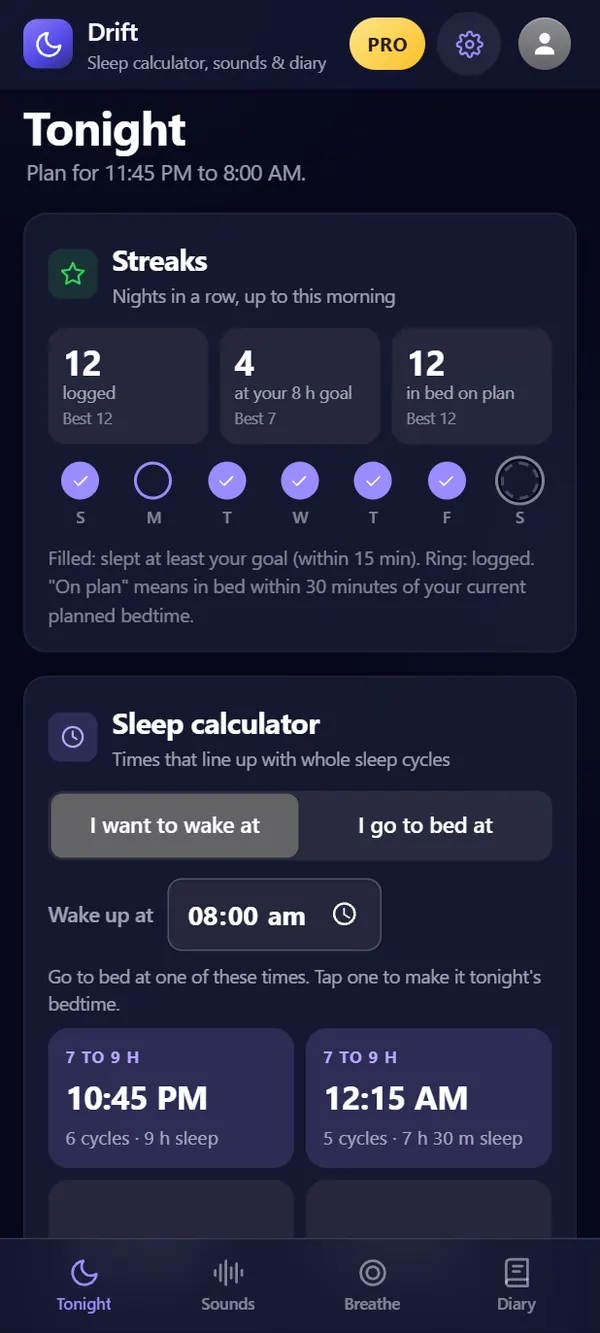
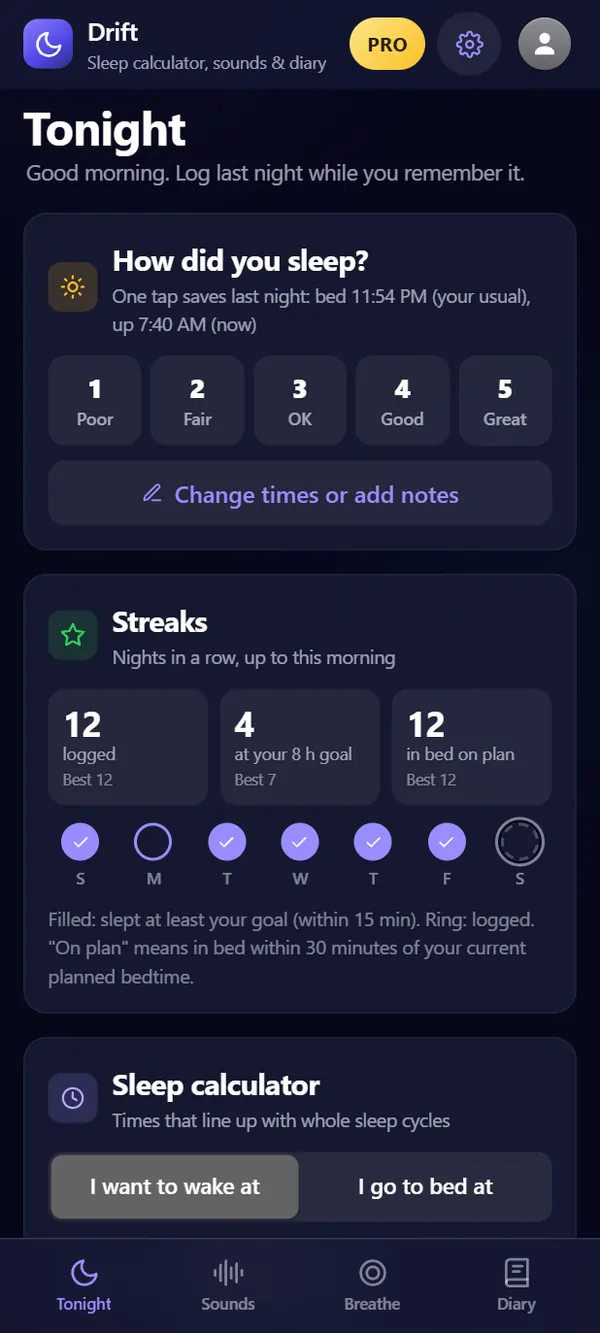
Drift helps you build a calmer evening and keep track of how you sleep: plan tonight's bedtime, keep a weekly sleep schedule, wind down with a simple routine, play gentle sleep sounds and note each morning how the night went.
What's new in version 1.3
New in version 1.3, along with a refreshed design and the optional Bright Loop Account. Early-access testers get it through Google Play.
Sleep streaks
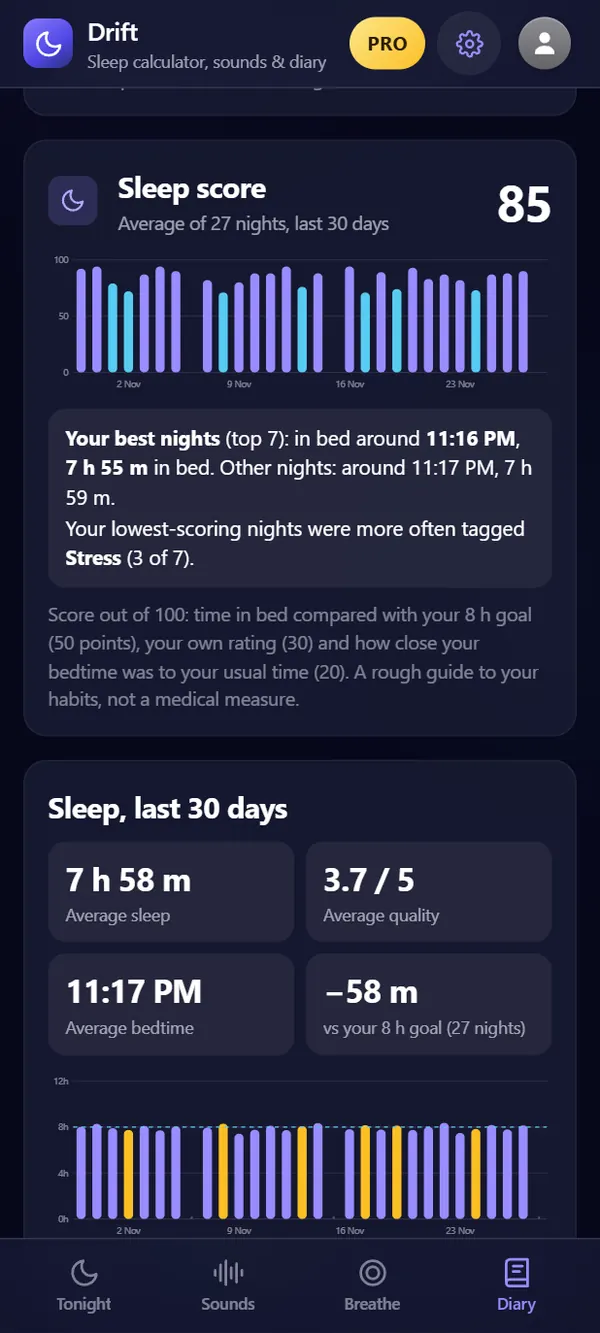
Nightly sleep score (0–100)
Your best nights insight
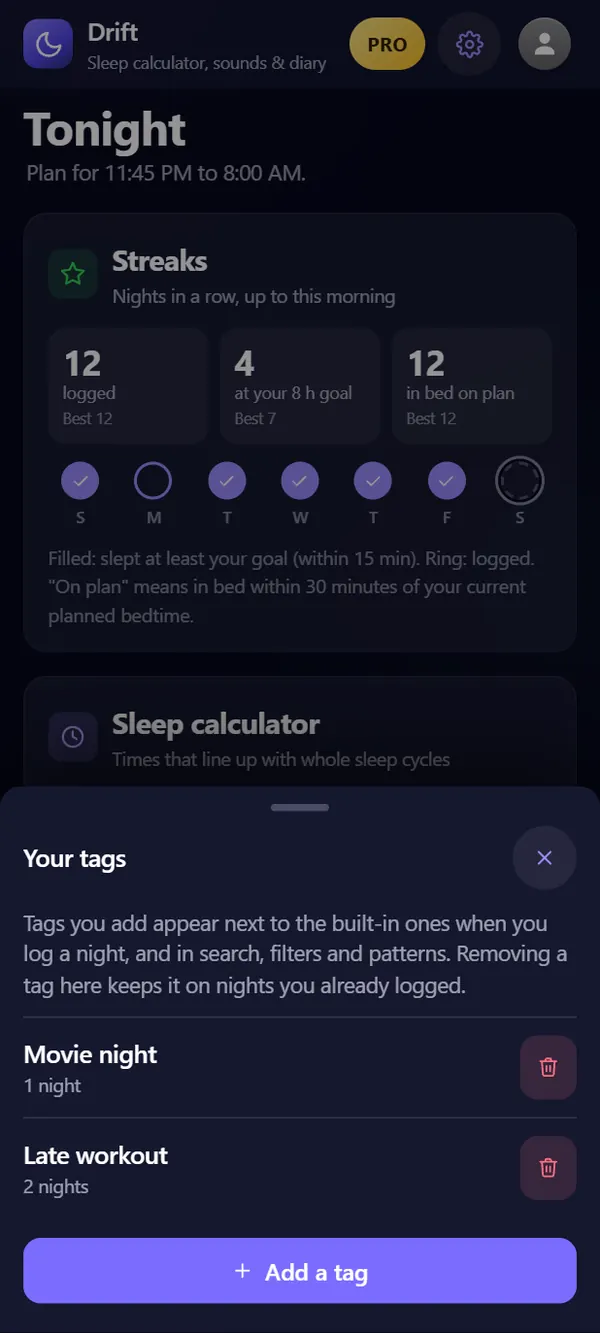
Custom diary tags
Feature tour.
Every feature in Drift, and what it does for you. Items marked Pro are part of the optional subscription.
Plan your night
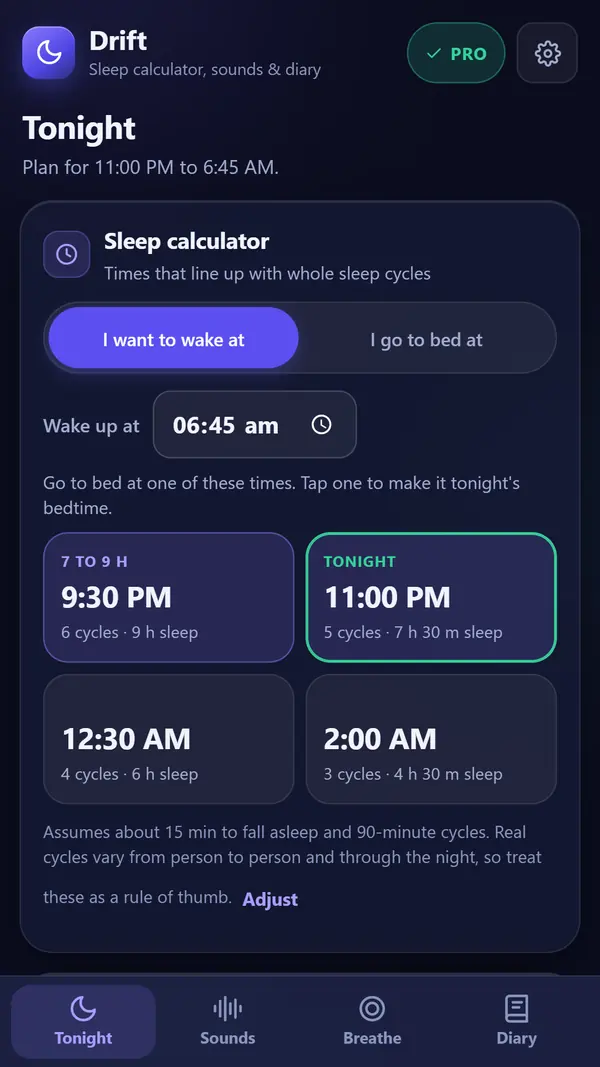
- Sleep cycle calculator
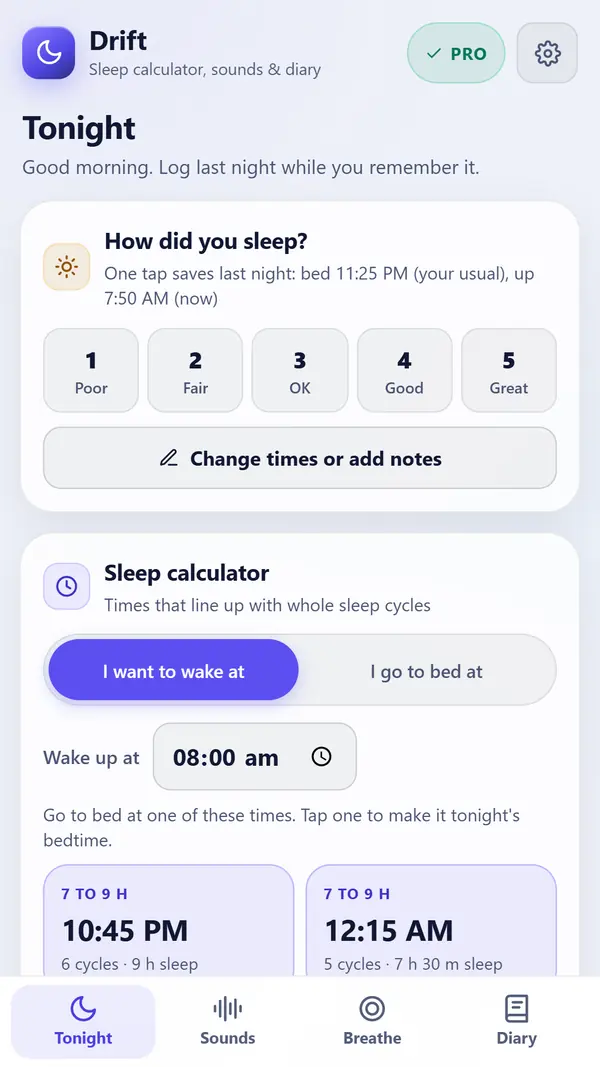
- Enter when you want to wake up to see bedtimes that fit whole sleep cycles, or enter your bedtime to see wake-up times. It assumes about 90-minute cycles and 15 minutes to fall asleep; both can be changed in Settings.
- Tonight's plan
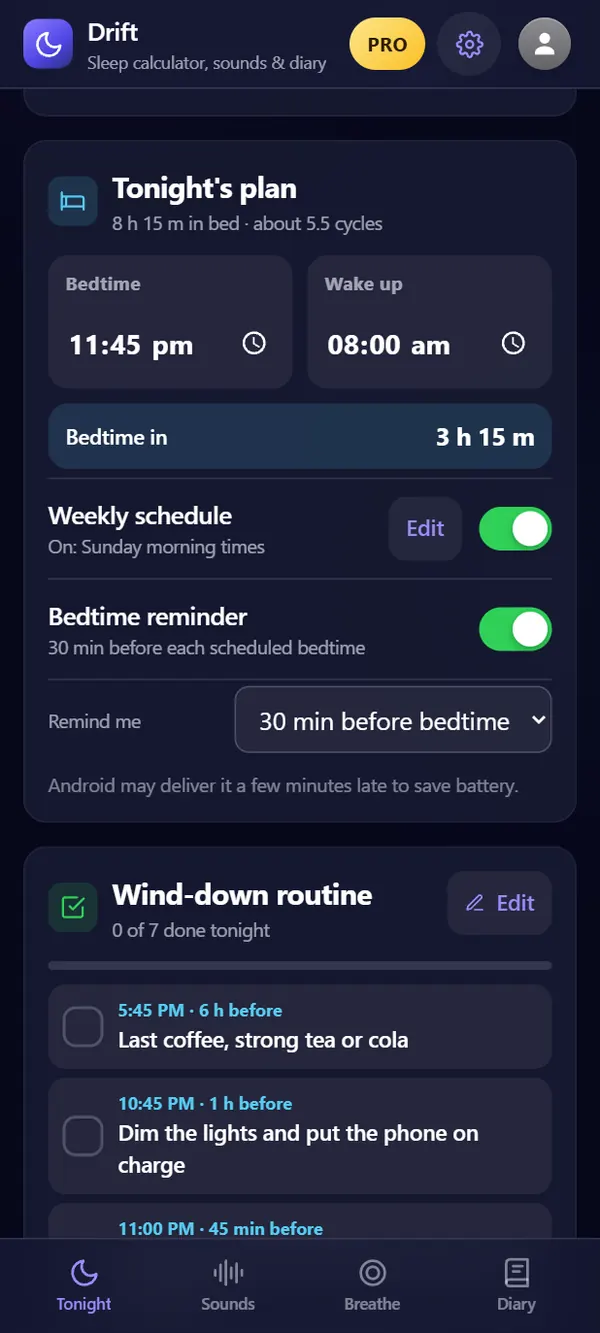
- Your bedtime and wake-up time for tonight, how long you will be in bed and a countdown to bedtime.
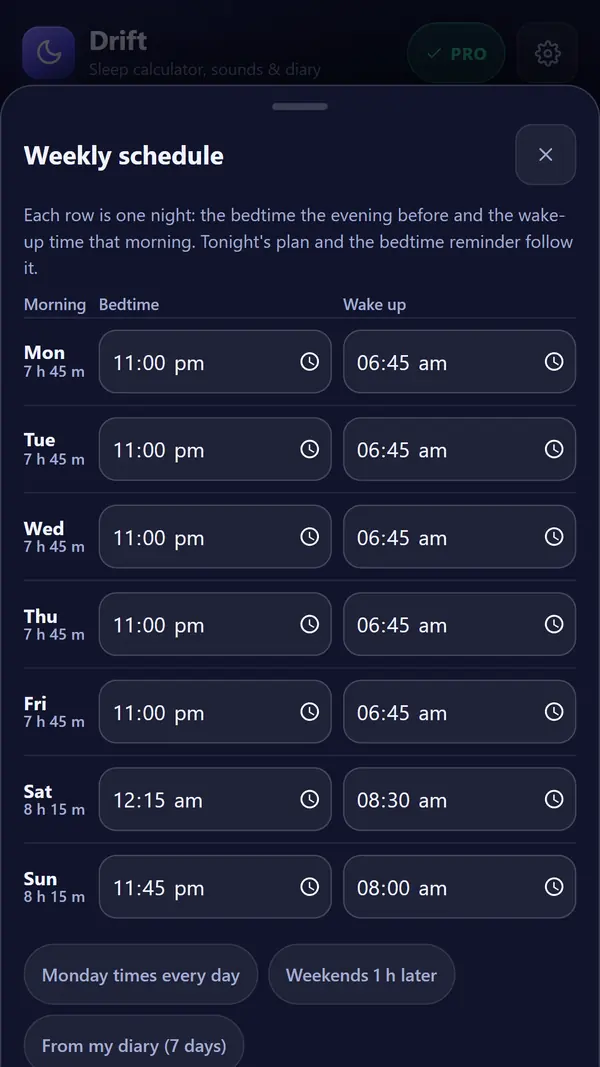
- Weekly sleep schedule
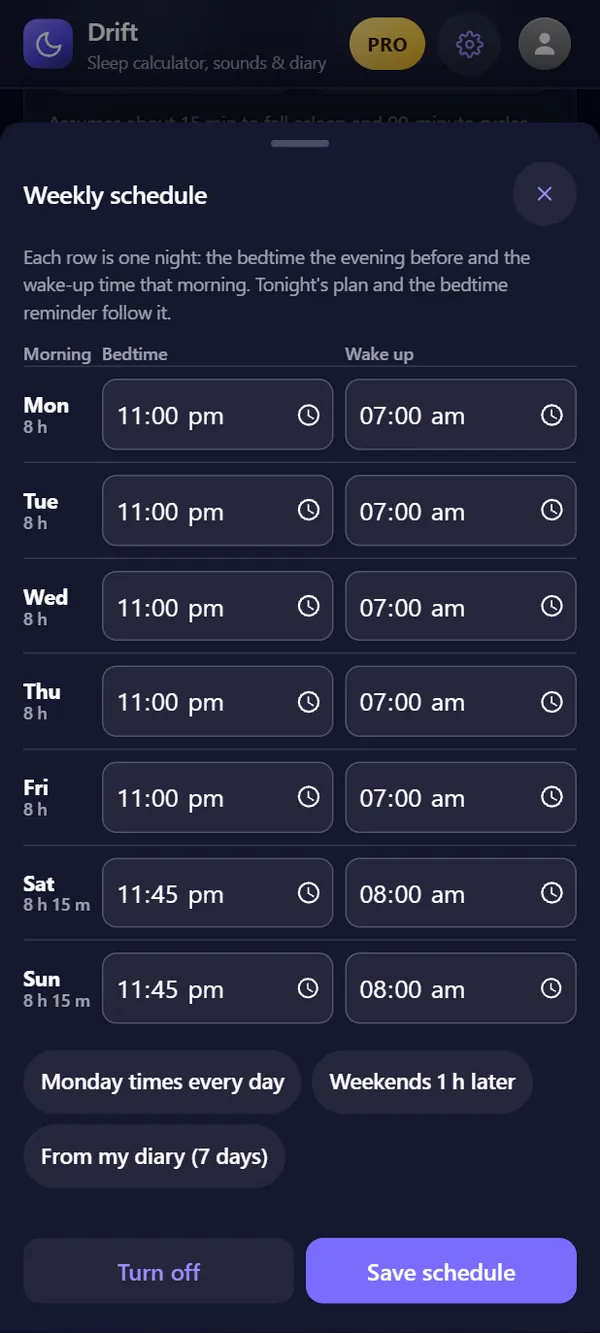
- Set different bed and wake-up times for each night. Tonight's plan and the reminder follow it, and changing tonight only leaves the rest of the week alone. From my diary fills it with the times you actually log.
- Bedtime reminder
- An optional phone notification before your planned bedtime, at a lead time you choose. It needs the Android app and notification permission.
Wind down
- Wind-down routine
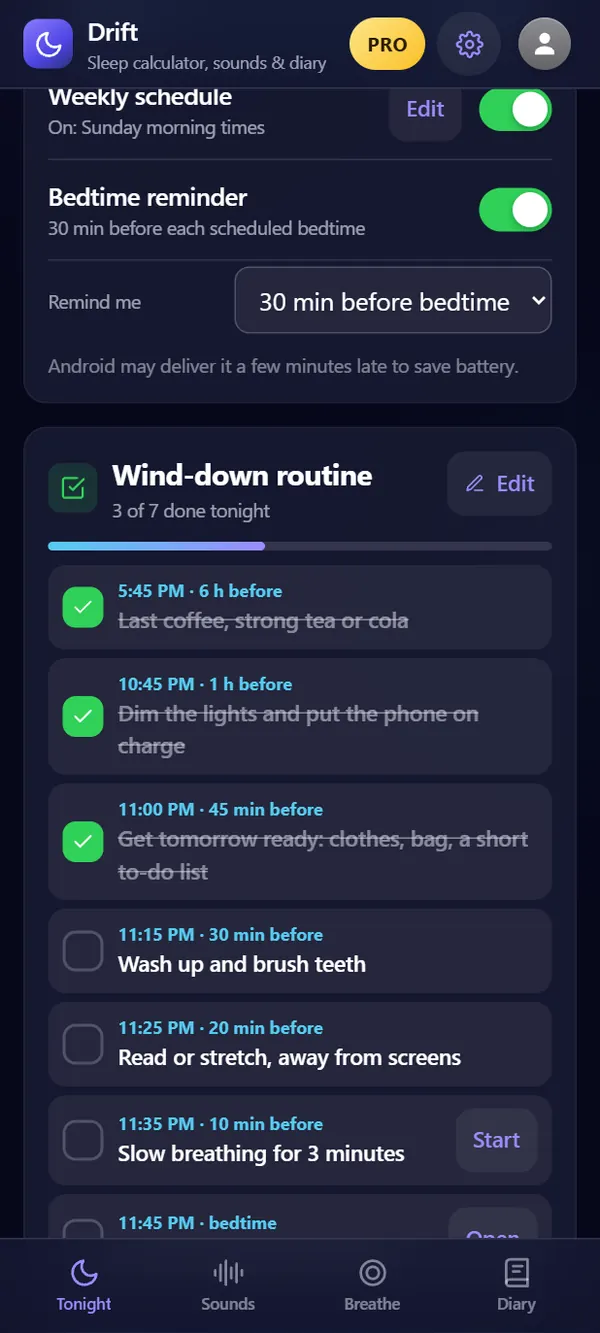
- A checklist of evening steps, each timed relative to your bedtime. Edit, add or remove steps to suit you.
- Breathing exercise
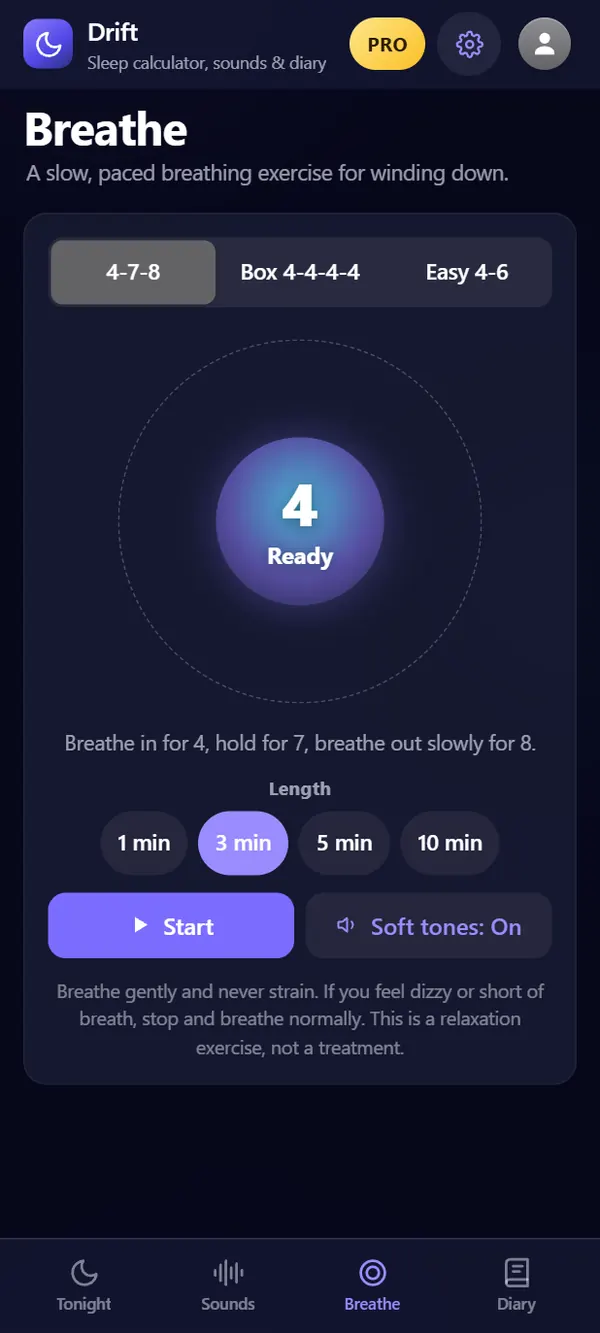
- Paced breathing with an animated circle: 4-7-8, box breathing or an easy 4-6 rhythm, for 1 to 10 minutes, with optional soft tones.
Sleep sounds
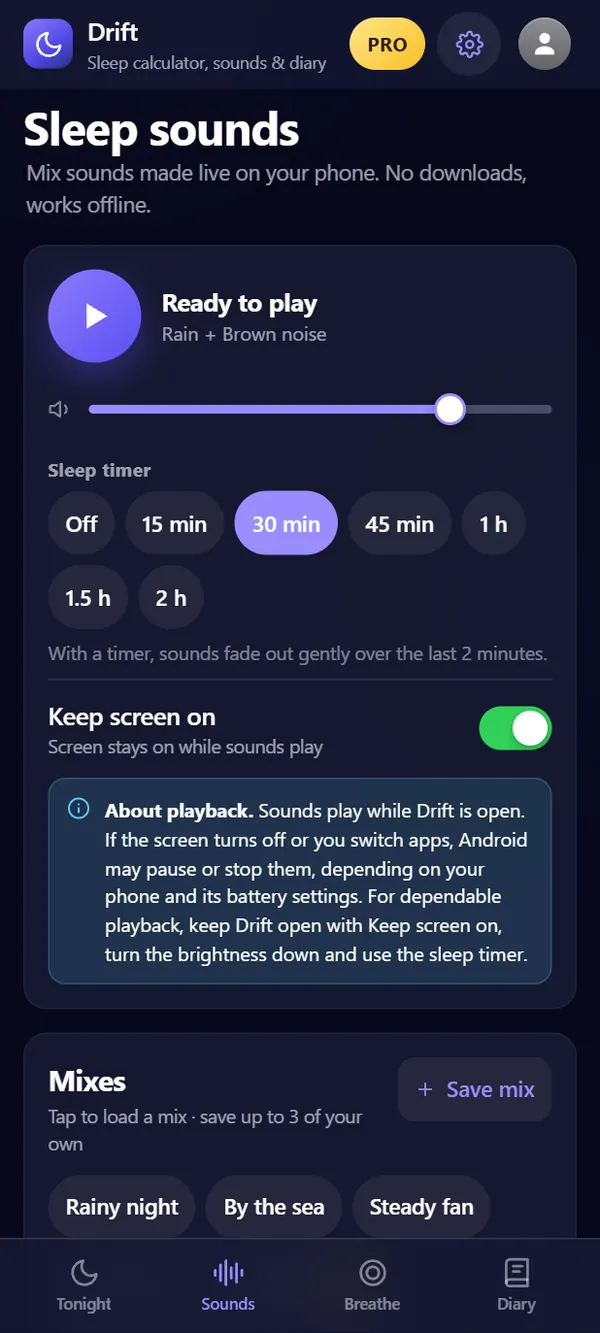
- Six free sounds
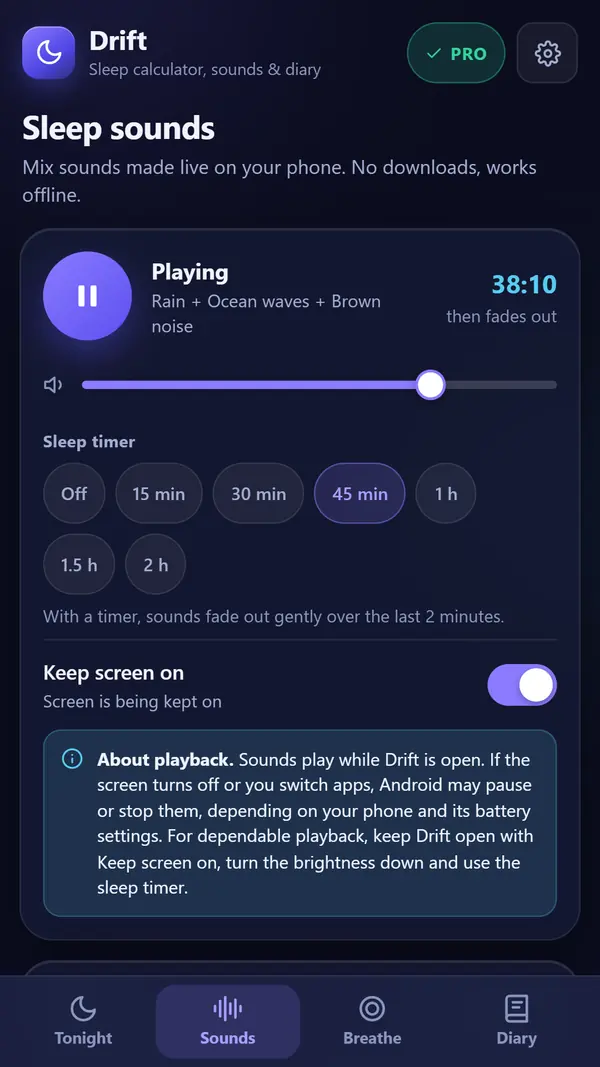
- Rain, ocean waves, brown, pink and white noise and a fan, generated live on your phone so they work offline. Mix several and set each level.
- Sleep timer and mixes
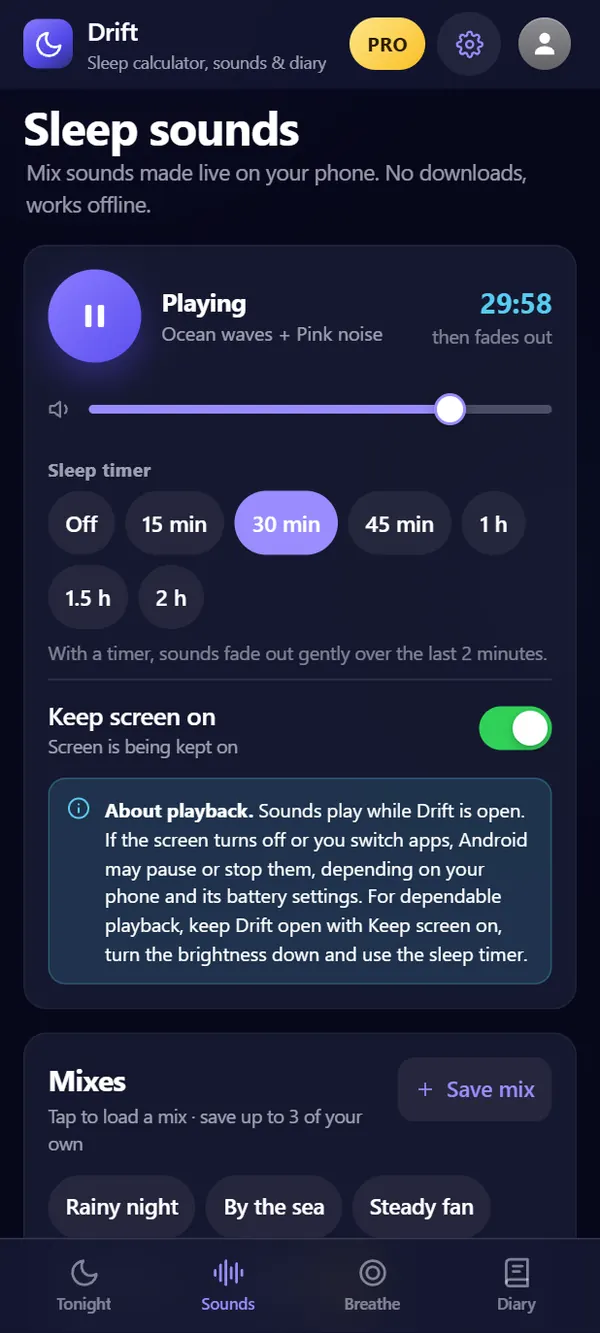
- A timer from 15 minutes to 2 hours that fades sounds out gently. Load ready-made mixes and save up to 3 of your own.
- More sounds and mixes Pro
- Wind, stream, crickets, fireplace and distant thunder, 3 extra ready-made mixes and unlimited saved mixes.
- Binaural tone Pro
- A steady tone layer for headphones that you hear as a slow pulse. It is offered as a calm background, not a treatment.
Sleep diary
- One-tap morning log
- Rate last night from 1 to 5 on the Tonight screen in the morning; Drift fills in your usual bedtime and the time you woke.
- Tags, notes, dreams and naps
- Mark things like late caffeine or stress, write notes, keep a dream journal and log naps.
- Custom diary tags
- Add up to 30 tags of your own. They appear next to the built-in tags and in search, filters and patterns.
- Search, filters and calendar
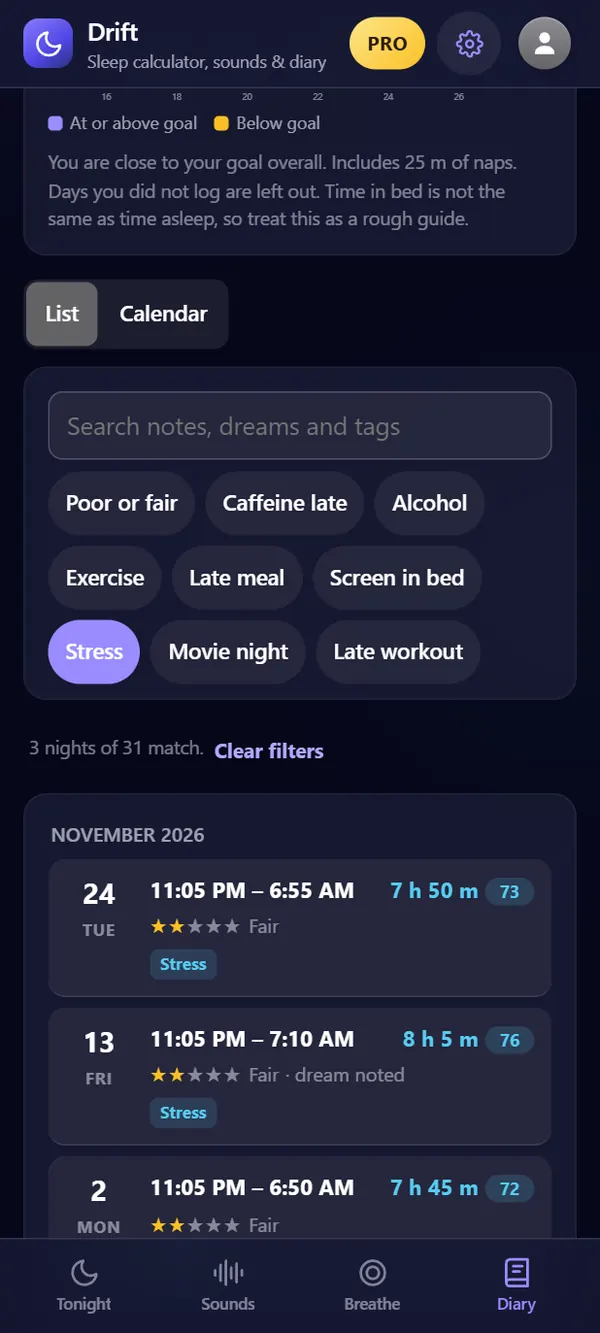
- Search notes, dreams and tags, filter by a tag or by poor nights, or browse a month calendar coloured by quality.
- CSV import
- Bring in an existing sleep log from a spreadsheet file in Settings.
Insights
- Sleep streaks
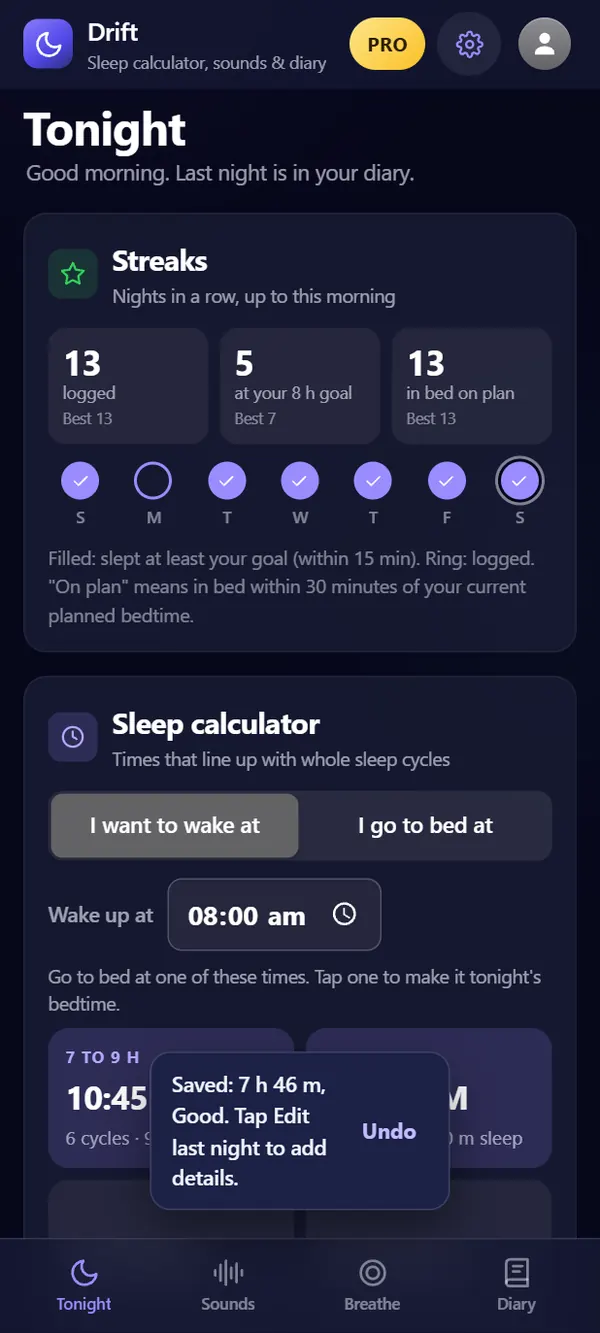
- Nights in a row logged, at your sleep goal and in bed on plan, with your best runs and the last 7 mornings.
- Nightly sleep score (0-100)
- Each night gets a score from time in bed against your goal, your own rating and how close your bedtime was to your usual time. A rough guide, not a medical measure.
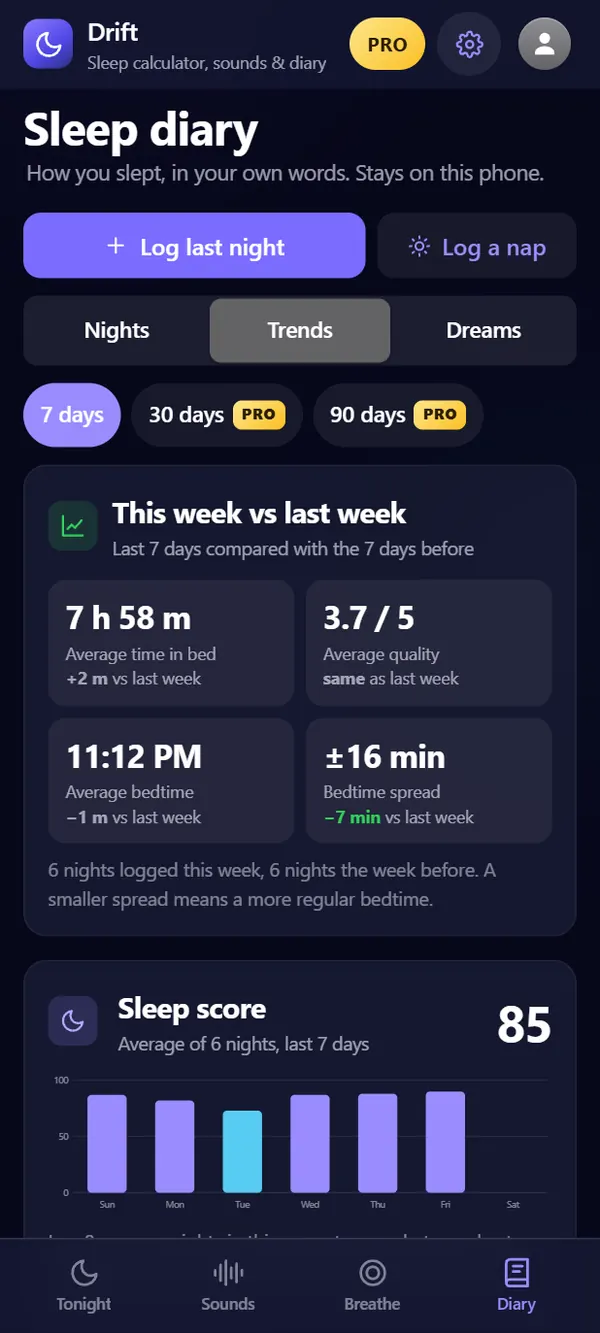
- Week vs week and sleep balance
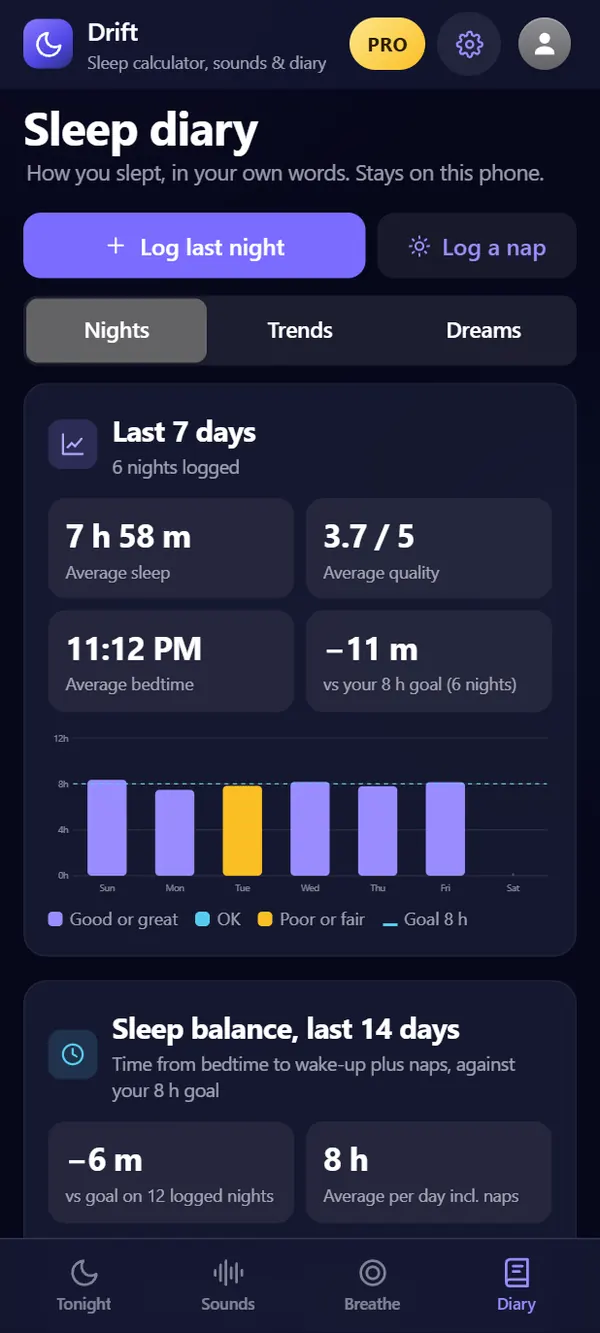
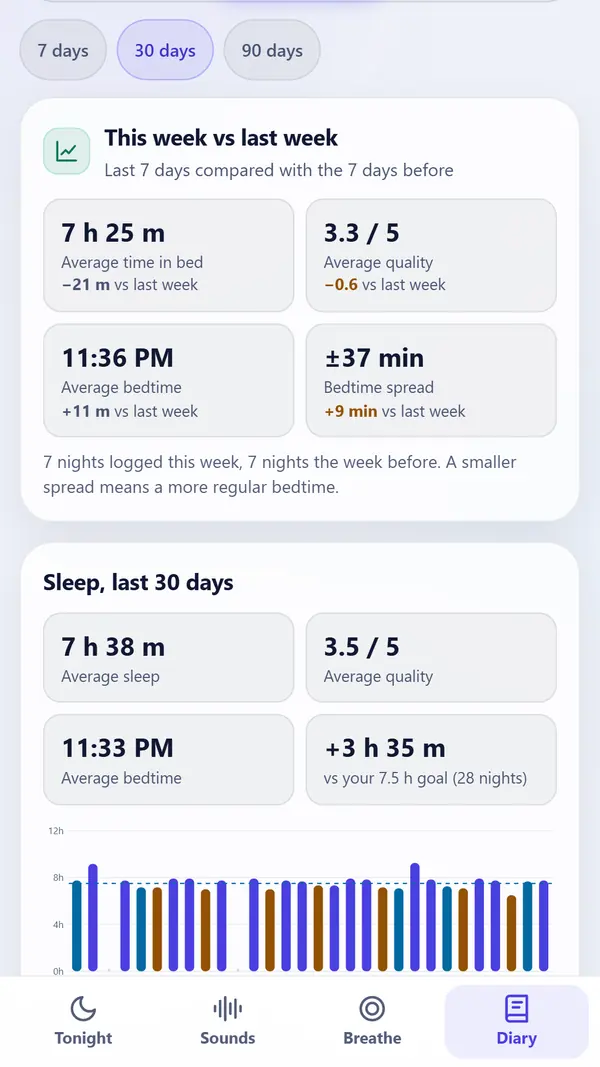
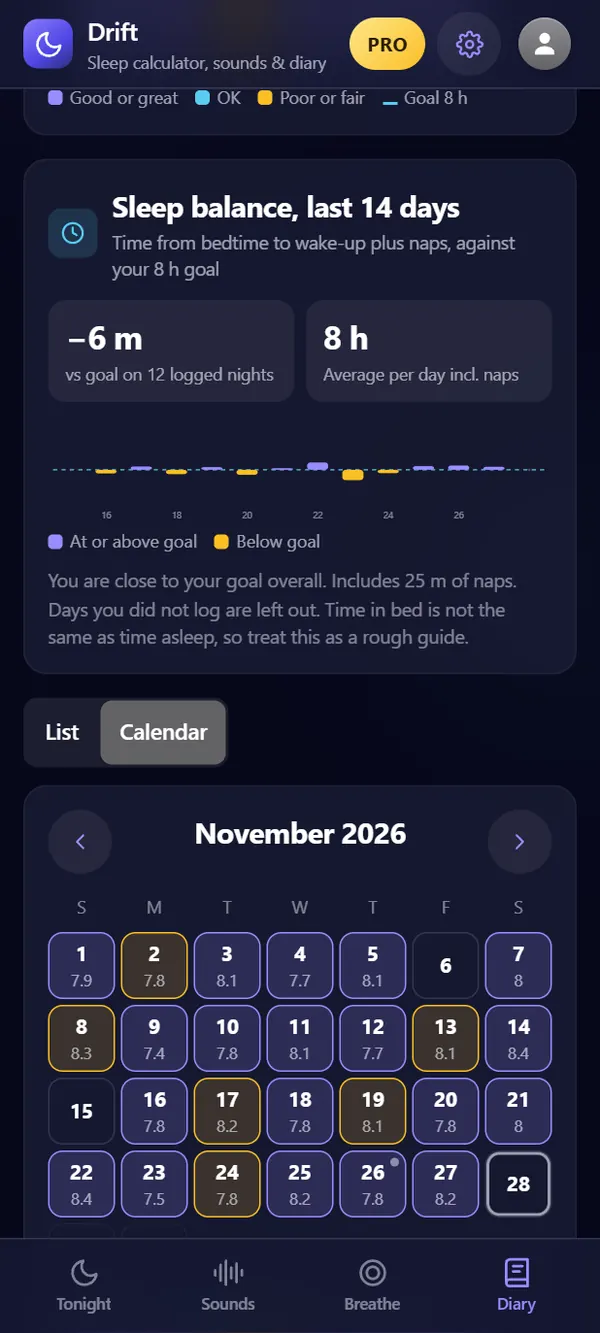
- Compare this week with last week, see the 7-day chart against your goal and your sleep balance over 14 days including naps.
- Your best nights Pro
- In the 30- and 90-day trends, see the usual bedtime and time in bed on your top-scoring nights and which tag turns up most on your lowest-scoring ones.
- Longer trends and tag patterns Pro
- 30- and 90-day charts and how nights with each tag compare with nights without it.
- Rhythm and year view Pro
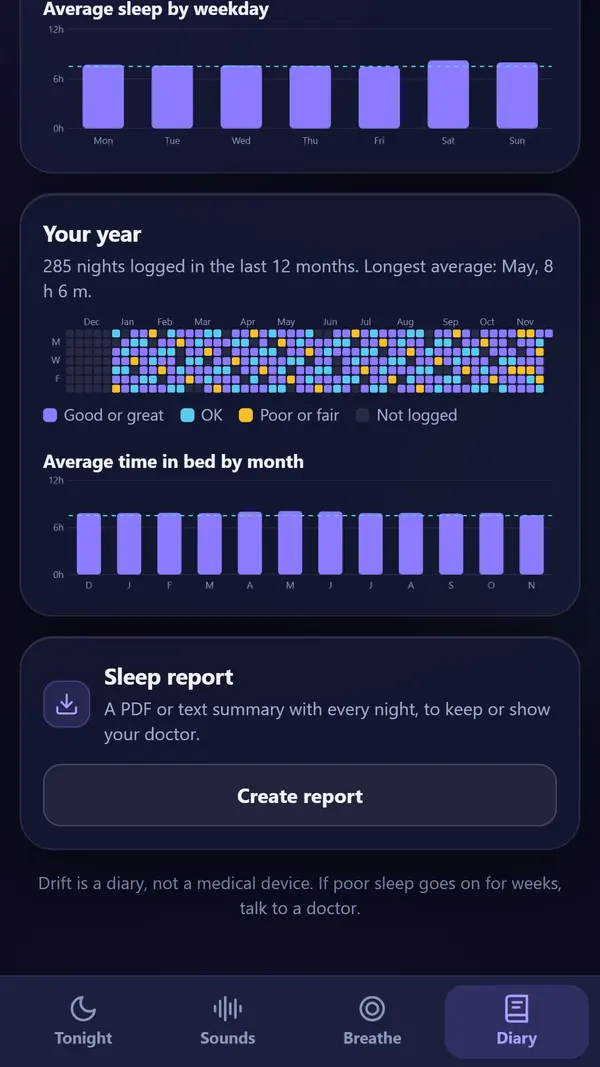
- Weekday vs weekend times, bedtime regularity, sleep by weekday, and a 12-month calendar with your average time in bed per month.
- Sleep report and CSV export Pro
- A PDF or text summary of 14, 30 or 90 days, and your diary as a CSV spreadsheet.
Your data
- Private by design
- No ads and no analytics. Your diary stays on your phone unless you export it or sign in.
- Bright Loop Account (optional)
- Sign in to back up and sync your diary, naps, routine, mixes, tags and settings between phones. Pro and the bedtime reminder stay set per phone.
- Backup, restore and themes
- Export a backup file and restore it later, and choose a Dark, Light or Match phone theme.
Full store description
Sleep cycle calculator
Tell Drift when you want to wake up and it suggests bedtimes that fit whole sleep cycles, or enter your bedtime to see wake-up times. It uses the common rule of thumb of about 90-minute cycles plus around 15 minutes to fall asleep. Real cycles vary, so you can change both in Settings.
Weekly sleep schedule
Set different bed and wake-up times for each day, for example later at weekends. Tonight's plan and the bedtime reminder follow the schedule automatically; change tonight only without touching the rest of the week. "From my diary" fills the schedule with the times you actually log.
Tonight's plan and wind-down routine
See how long is left until bed, follow a wind-down checklist you can edit, and get an optional bedtime reminder.
Sleep sounds with timer
Rain, ocean waves, brown, pink and white noise and a fan sound, made live on your phone, so they work offline. Mix several, save mixes and use the sleep timer with a gentle fade-out. Sounds play while Drift is open.
Breathing exercise
Paced breathing: 4-7-8, box breathing or an easy 4-6 rhythm.
Sleep diary
In the morning, rate last night with one tap: Drift fills in your usual bedtime and the time you woke. Add tags such as late caffeine or stress, notes, dreams and naps. See your week against your sleep goal, this week compared with last week, your sleep balance, a monthly calendar, search and tag filters. Import an existing sleep log from a CSV file.
How to use Drift.
Step-by-step walkthroughs of the main tasks, with screens from the current version.
1Log last night in one tapSave how you slept each morning in a second, then add details if you want.
- Step 1
Open Drift in the morning (before noon). If last night is not logged yet, the How did you sleep? card is at the top of Tonight, with your usual bedtime and the time you woke already filled in.
- Step 2
Tap a rating from 1 Poor to 5 Great. The night is saved straight away and your streaks update; tap Undo on the message if you picked the wrong one.
- Step 3
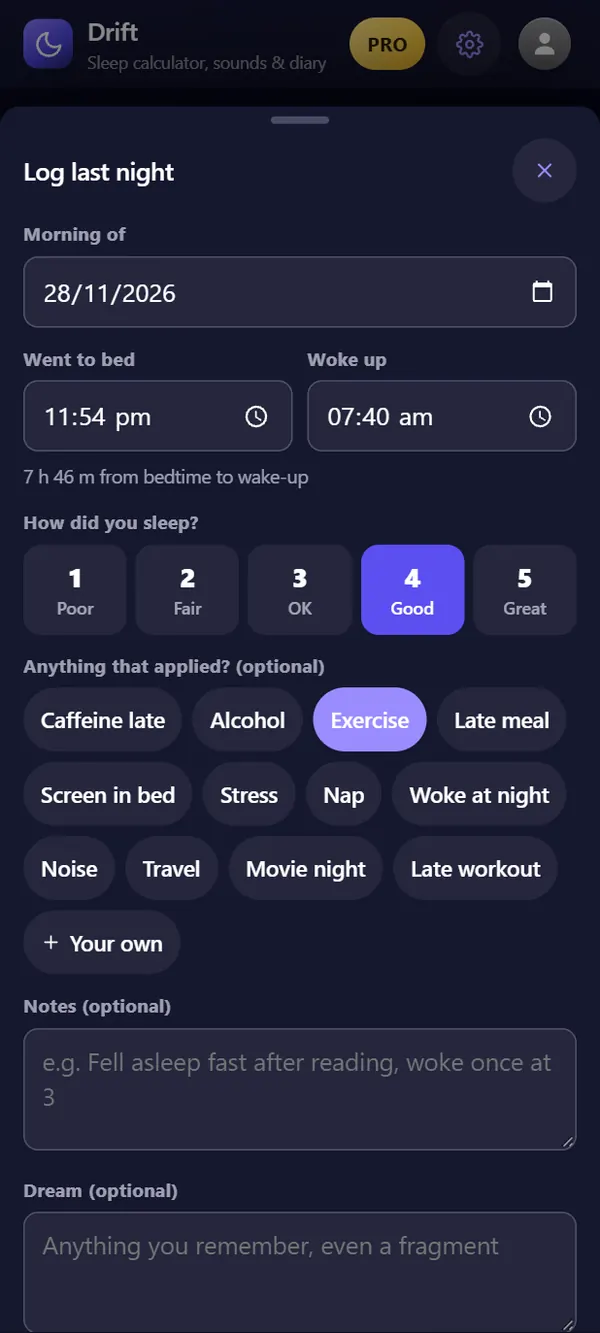
To change the times or add tags, notes or a dream, tap Change times or add notes, or go to Diary and tap Log last night (it becomes Edit last night once saved).
- Step 4
Pick any tags that applied, such as Exercise or Stress, add a note or dream if you like, and tap Save.
2Plan tonight's bedtimeUse the sleep calculator and a weekly schedule so you know when to go to bed.
- Step 1
Open the Tonight tab. The line under the title shows tonight's plan, from bedtime to wake-up.
- Step 2
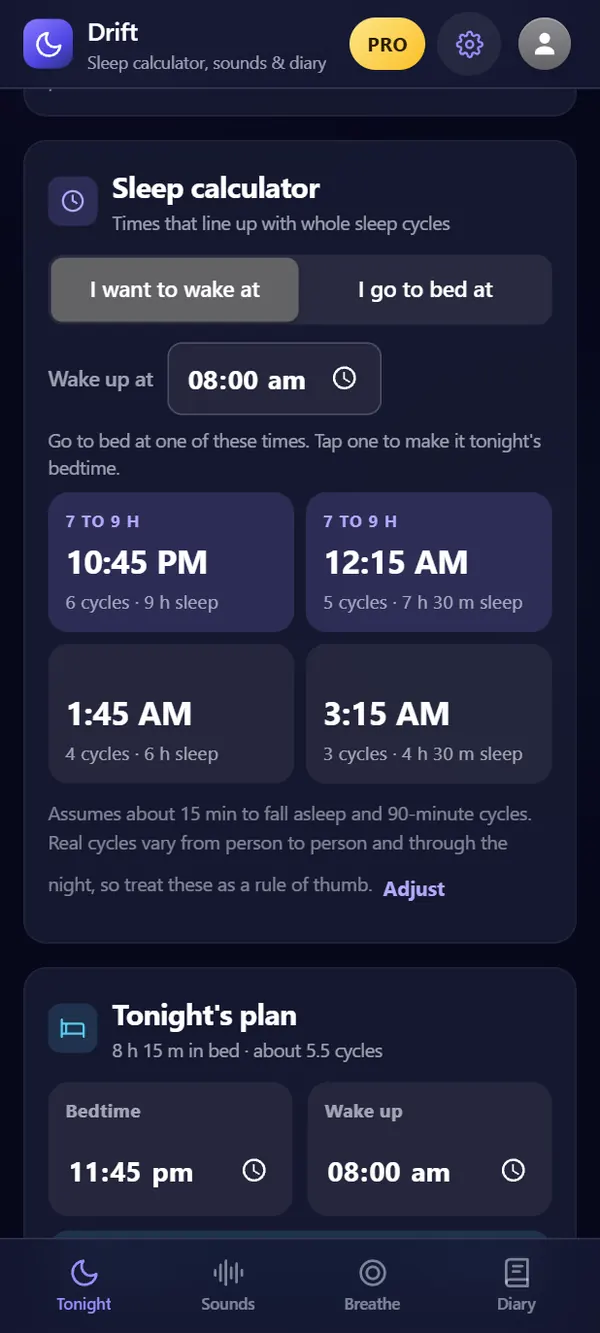
In Sleep calculator, choose I want to wake at and set your wake-up time. Drift lists bedtimes that fit whole sleep cycles; the ones marked 7 to 9 h are in the usual range. Tap one to make it tonight's bedtime.
- Step 3
Tonight's plan shows your bedtime, wake-up time and how long is left until bed. Turn on Bedtime reminder and choose how early you want it under Remind me.
- Step 4
For different times on different days, tap Edit next to Weekly schedule. Set each night, or use Weekends 1 h later or From my diary, then tap Save schedule.
3Wind down before bedFollow your routine, do a short breathing exercise and start a sleep sound.
- Step 1
On Tonight, scroll to Wind-down routine. Each step shows when to do it before bedtime; tap a step to tick it off. Tap Edit to change the steps.
- Step 2
Tap Start next to the breathing step, or open the Breathe tab. Pick 4-7-8, Box 4-4-4-4 or Easy 4-6, choose a length and tap Start.
- Step 3
Open the Sounds tab, tap a mix such as By the sea (or tap sounds on and set their levels), choose a Sleep timer and tap play. With a timer, sounds fade out over the last 2 minutes.
4Check your sleep score and streaksSee how regular your nights are and what your best nights have in common.
- Step 1
The Streaks card on Tonight counts nights in a row that you logged, met your sleep goal and went to bed on plan, with your best runs.
- Step 2
Go to Diary and tap Trends. This week vs last week compares time in bed, quality, bedtime and bedtime spread; below it, Sleep score shows a score from 0 to 100 for each night.
- Step 3
Every night in your diary list also shows its score, so you can spot good and bad nights quickly.
- Step 4
With Drift Pro, switch to 30 days or 90 days. Once 8 or more nights are logged in the range, Your best nights shows your usual bedtime and time in bed on your top-scoring nights and which tag turns up most on your lowest ones.
5Search your diary and use your own tagsFind past nights by words or tags, browse by month, and add tags that fit your life.
- Step 1
Go to Diary > Nights. The Last 7 days card and Sleep balance sit at the top.
- Step 2
Scroll to the search box and type a word from your notes, dreams or tags, or tap a chip such as Stress or Poor or fair. Tap Clear filters to see everything again.
- Step 3
Tap Calendar for a month view coloured by quality. Tap any day to log or edit it.
- Step 4
To add your own tags, open Settings and tap Edit next to Your tags, then Add a tag. You can also tap + Your own while logging a night.
6Log naps and dreamsKeep naps and dreams in the same diary as your nights.
- Step 1
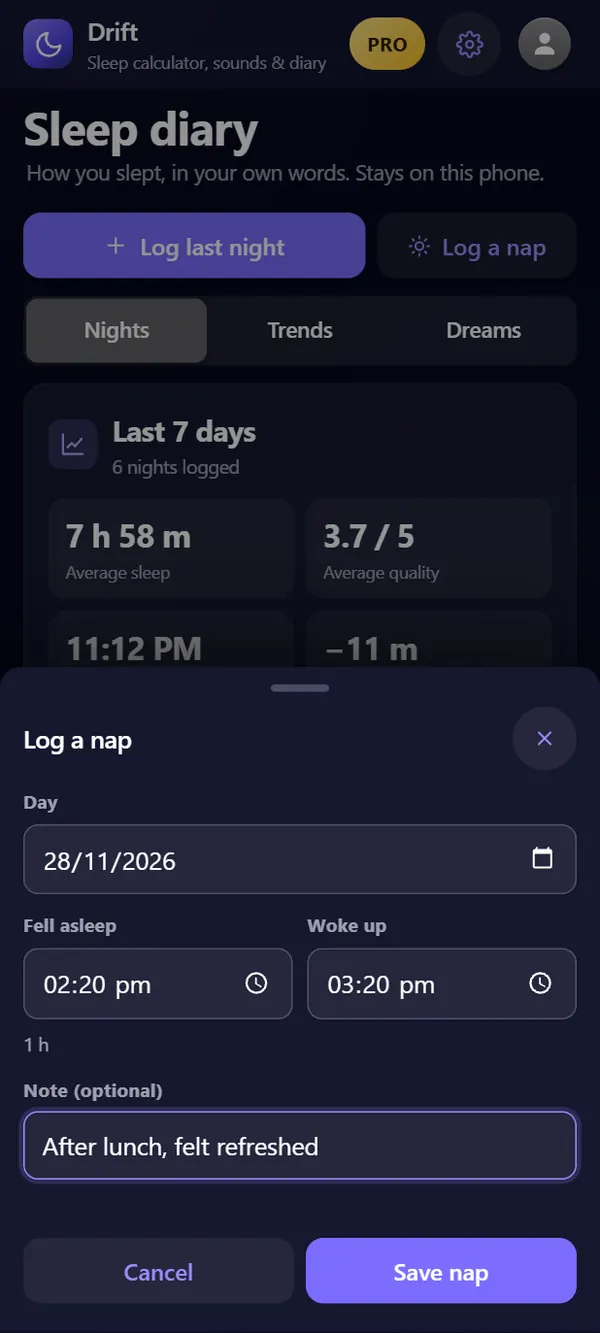
In Diary, tap Log a nap.
- Step 2
Set the day, when you fell asleep and woke up, add a short note if you like, and tap Save nap. Naps count towards your sleep balance.
- Step 3
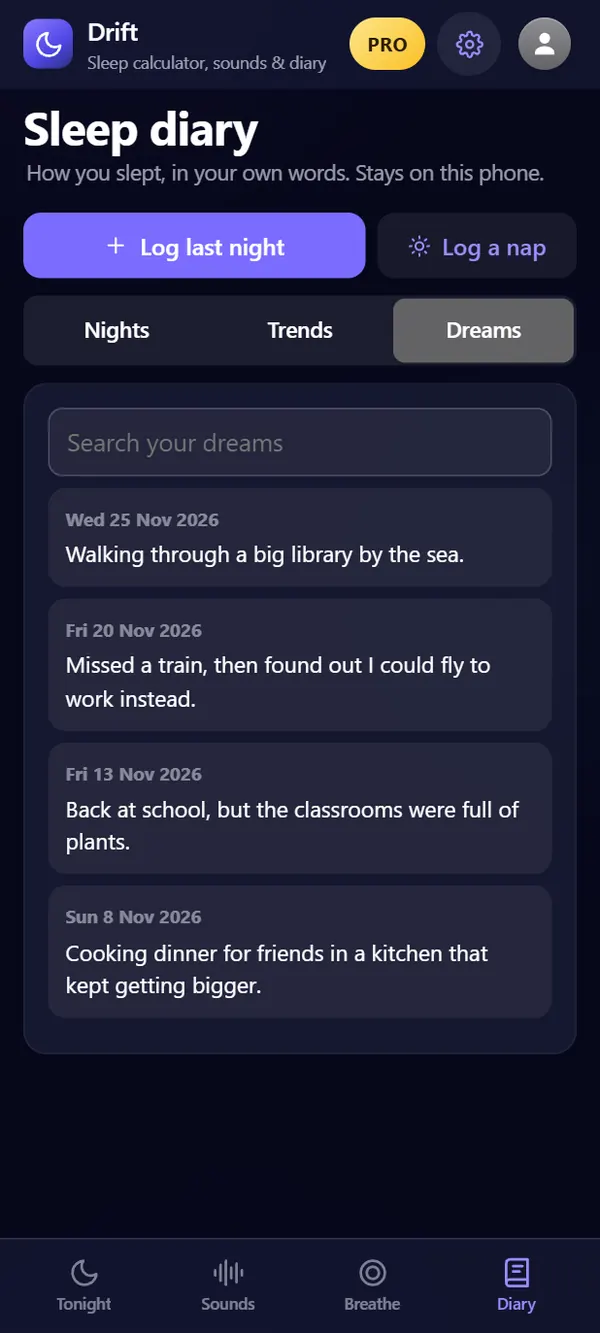
When you log a night, write anything you remember in Dream (optional). Read them all back under Diary > Dreams.
Free, with optional Pro.
Download Drift free. Pro is optional and billed by Google Play, which shows the price before you confirm.
Free
Calculator, weekly schedule, tonight's plan, routine, bedtime reminder, 6 sounds with timer and 3 saved mixes, breathing, full diary with one-tap morning log and naps, week-over-week comparison, sleep balance, calendar, search, CSV import, 7-day chart, dream journal, backup and restore, dark and light themes.
Drift Pro (optional subscription)
- 5 more sounds, a binaural tone layer (for headphones) and 3 extra mixes
- Unlimited saved mixes
- 30- and 90-day trends and how your tagged nights compare
- Rhythm and regularity: weekday vs weekend times, bedtime regularity, sleep by weekday
- Year view: a 12-month calendar of every night and your average time in bed per month
- Sleep report: a PDF or text summary of 14, 30 or 90 days
- Export your diary as a CSV spreadsheet
Pro is a monthly or yearly subscription through Google Play. The price and any trial are shown before you buy. It renews until you cancel in Google Play.
Manage or cancel subscriptions in Google Play > Payments & subscriptions. Purchases and Restore purchases
Try it now.
Open Drift right here in your browser, or download the Android app file directly.
Open in browser
The full Drift app, running in a new tab. Nothing to install.
Some phone-only features, such as purchases, notifications, sharing and camera scanning, work only in the Android app. Anything you do in the browser is saved in that browser only, unless you sign in to the Bright Loop Account.
Download the APK
Install Drift on an Android phone without Google Play.
- Version
- 1.3
- Size
- 3.9 MB
- SHA-256
09c9977a74a52e08046aa431a94ec8b8326f2f23bec9a914003d68bf121fdcd0
An APK installed from this website can't be updated from Google Play later. To switch to Google Play, uninstall it and install from Play. Your data only comes with you if you back it up with the Bright Loop Account first. How to install an APK
Requirements & details.
- Requires
- Android 7.0 or later
- Size
- 3.9 MB
- Version
- 1.3
- Price
- Free, optional Pro subscription
- Internet
- Not required
- Account
- Optional Bright Loop Account
- Ads
- None
- Category
- Health & Fitness
- Developer
- Bright Loop (Google Play: Bright Loop Games)
- Availability
- Early access (Google Play closed testing)
- Web version
- Open in browser
How to get Drift.
Drift is in early access through Google Play closed testing. It takes about two minutes.
- Ask to join the tester listEarly access runs as a Google Play closed test, so your Google account must be on the tester list before the opt-in link works. Send us the Gmail address you use on Google Play and we'll add you.
- Open the opt-in linkOn your Android phone, signed in to the same Google account, open the Drift early access link.
- Tap "Become a tester"Google Play confirms that you've joined the test.
- Install from Google PlayTap the "download it on Google Play" link on that page, or open the Google Play page, then tap Install. Updates arrive through Google Play like any other app.
- Tell us what you thinkEarly access means your feedback shapes the next update. Email rehman@mindum.dev any time.
Link not working? See Troubleshooting or the full early access guide.
Account & sync.
Optional. Drift works fully without an account. Sign in to the free Bright Loop Account to back up your Drift data and keep it in sync across your phones.
What syncs
- Sleep diary, tags and schedule
- Settings
What stays on this phone
- Your bedtime reminder
- Your Pro status (Google Play restores it)
- Sleep sounds, which are generated on the phone
Account & Sync is part of Drift 1.3. Look for it at the top of Settings.
Privacy.
Drift keeps your data on your phone. No ads and no analytics.
Private by design
No account needed, no ads, no analytics. Your diary stays on your phone unless you export it.
If you sign in
The Bright Loop Account is optional. If you sign in, Drift backs up the records listed under Account & sync to your account so you can restore them on another phone. Photos and files are never uploaded, and you can export or delete your cloud data at any time.
Read the full Privacy Policy.
Tips.
- Rate last night soon after you wake: the one-tap card shows on Tonight only until noon, and it fills in the current time as your wake-up time.
- Turn on the weekly schedule, then use From my diary after a couple of weeks so your plan matches how you really sleep.
- Tap a calculator result to make it tonight's bedtime; when the weekly schedule is on, that change applies to tonight only.
- For sounds that keep playing, leave Drift open with Keep screen on, turn the brightness down and use the sleep timer.
- Tag nights for a few weeks; the sleep score and tag insights become much more useful with 8 or more nights logged.
- Export a backup from Settings now and then if you do not use a Bright Loop Account.
Troubleshooting.
The "How did you sleep?" card is missing.
It shows only between 4 AM and noon, and only if last night is not logged yet. Otherwise use Diary > Log last night or Edit last night.
Sounds stop after the screen turns off.
Turn on Keep screen on in Sounds, lower the brightness and keep Drift open. Also check that battery optimisation is not restricting Drift.
The bedtime reminder does not arrive or arrives late.
Allow notifications for Drift in Android settings. Android may deliver reminders a few minutes late to save battery.
Tonight's bedtime changed by itself.
With the weekly schedule on, tonight's plan follows the schedule for the next morning. Tap Edit next to Weekly schedule to change it, or switch the schedule off.
"From my diary" does not fill the schedule.
It needs each weekday logged at least twice in the last 8 weeks. Keep logging and try again.
Questions.
How is the sleep score worked out?
It is out of 100: up to 50 points for time in bed compared with your sleep goal, 30 for your own 1-5 rating and 20 for how close your bedtime was to your usual time. It describes your habits and is not a medical measure.
Why does the calculator use 90-minute cycles?
About 90 minutes is a common rule of thumb, plus around 15 minutes to fall asleep. Real cycles vary, so you can change Cycle length and Time to fall asleep in Settings.
What counts towards a streak?
Streaks count mornings in a row up to today: nights you logged, nights at your sleep goal (within 15 minutes) and nights you were in bed within 30 minutes of your planned bedtime.
Why don't I see "Your best nights"?
It needs 8 or more logged nights in the chosen range. The free 7-day range holds at most 7, so the insight appears in the 30- and 90-day ranges, which are part of Drift Pro.
Do sounds keep playing when the screen is off?
Sounds play while Drift is open. If the screen turns off or you switch apps, Android may pause them depending on your phone and battery settings, so Drift offers Keep screen on while sounds play.
Can I bring in my old sleep log?
Yes. In Settings, use Import a sleep log (CSV) to read a spreadsheet file with your nights. You can review the nights before they are added.
What happens when I remove one of my own tags?
It is removed from the tags you can pick, but nights you already logged keep it.
Does the weekly schedule change my diary?
No. It only sets tonight's plan and the bedtime reminder. Your diary always holds the times you logged.
Is Drift free?
Yes. Drift is free to download and use. Drift Pro is an optional monthly or yearly subscription through Google Play that adds the extras listed under Free and Pro. Google Play shows the price, and any trial, before you confirm.
Why can't I find Drift on Google Play?
Drift is in early access (a Google Play closed test), so it only appears for people on the tester list. Follow the steps under How to get it. Once it becomes public, anyone can install it from Google Play.
Does Drift work offline?
Yes. Drift works without an internet connection. You only need a connection for optional things like Bright Loop Account sync and Google Play purchases.
Do I need an account?
No. Drift works fully without one. The Bright Loop Account is optional and adds cloud backup and sync across your phones.
How do I move to a new phone?
Sign in to your Bright Loop Account on the new phone and choose "Use Cloud Data", or export a backup file on the old phone and restore it on the new one. Photos and files only move with a backup file. Pro comes back with Restore purchases. See Move to a new phone.
How do I restore a purchase?
Make sure your phone uses the same Google account you bought with, open Drift and tap Restore purchases. Google Play checks your purchases and Drift unlocks what you own. More about purchases.
Can I use Drift in a browser?
Yes. Tap Open in browser to run it in a new tab. Some phone-only features, such as purchases, notifications, sharing and camera scanning, work only in the Android app, and anything you do there is saved in that browser.
Can I install it without Google Play?
Yes, with the APK on this page (version 1.3, 3.9 MB). An APK install can't be updated from Google Play later; see Install an APK on Android.
What do I need to run it?
Android 7.0 or later, or any modern browser for the web version.
Is it available on iPhone?
There's no iPhone app at the moment. Drift is made for Android, but you can open the web version in Safari.
Get help with Drift
Email rehman@mindum.dev. Include your phone model, Android version and what happened, and we'll take it from there.
Help Centre
Step-by-step guides for early access, sync, backups, purchases and moving phones. Visit the Help Centre
More apps you might like.
SnapMacro
Calorie and macro counter with 600+ world foods, exercise log and fasting timer.
IronOS
Log sets fast, supersets, progression hints, rest timer, 1RM and body stats
RitualOS
Track habits and streaks, and run timed morning, evening and workout routines.
GlowOS
AM/PM skincare checklist, product shelf & wishlist, skin cycling, photo diary