SnapMacro
Calorie and macro counter with 600+ world foods, exercise log and fasting timer.
Google Play pageDownload APK v1.5 · 4.0 MB
Early access on Google Play closed testing. You need to be on the tester list first: see how to join.
A closer look.
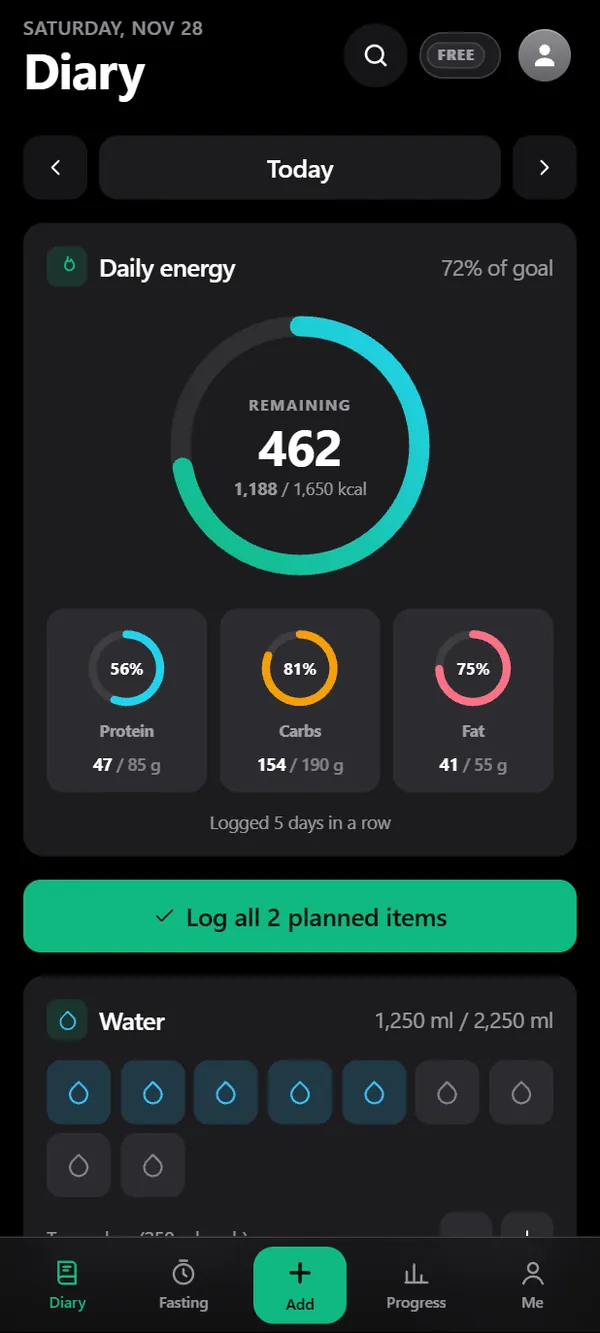
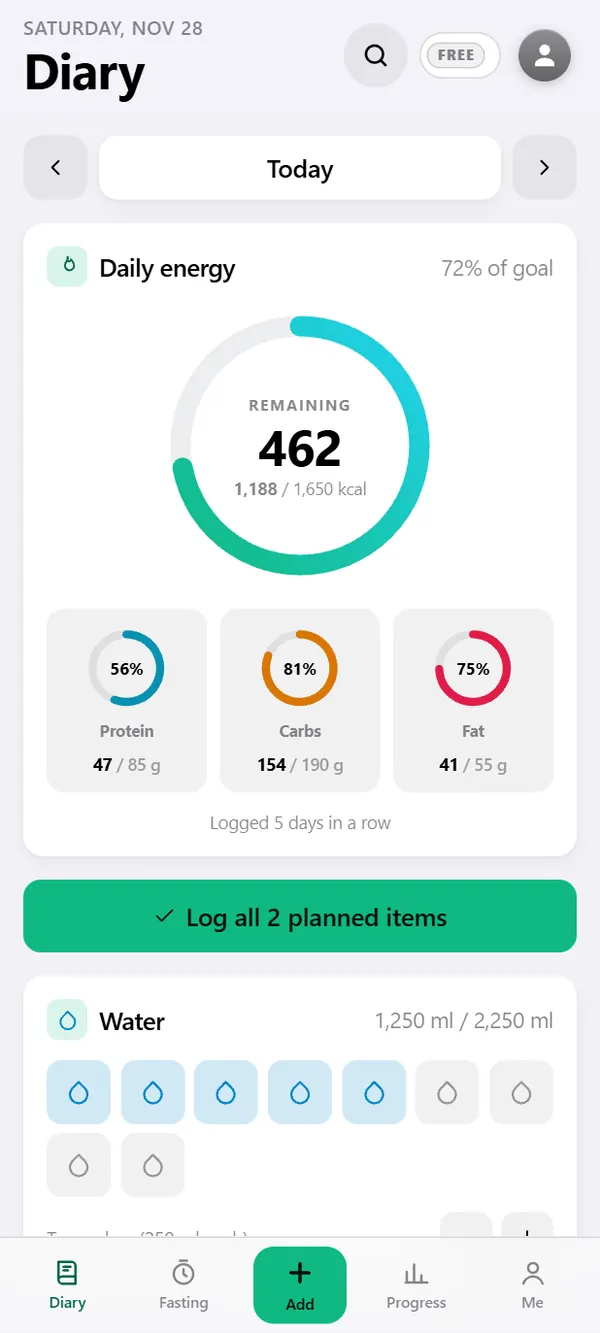
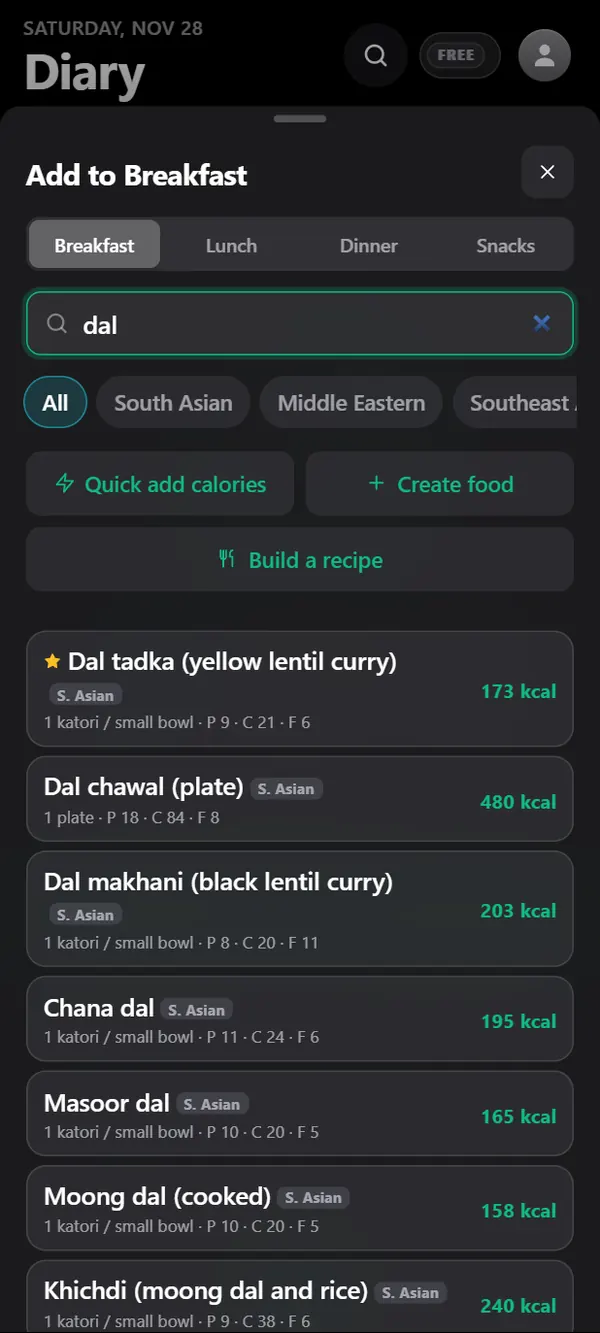
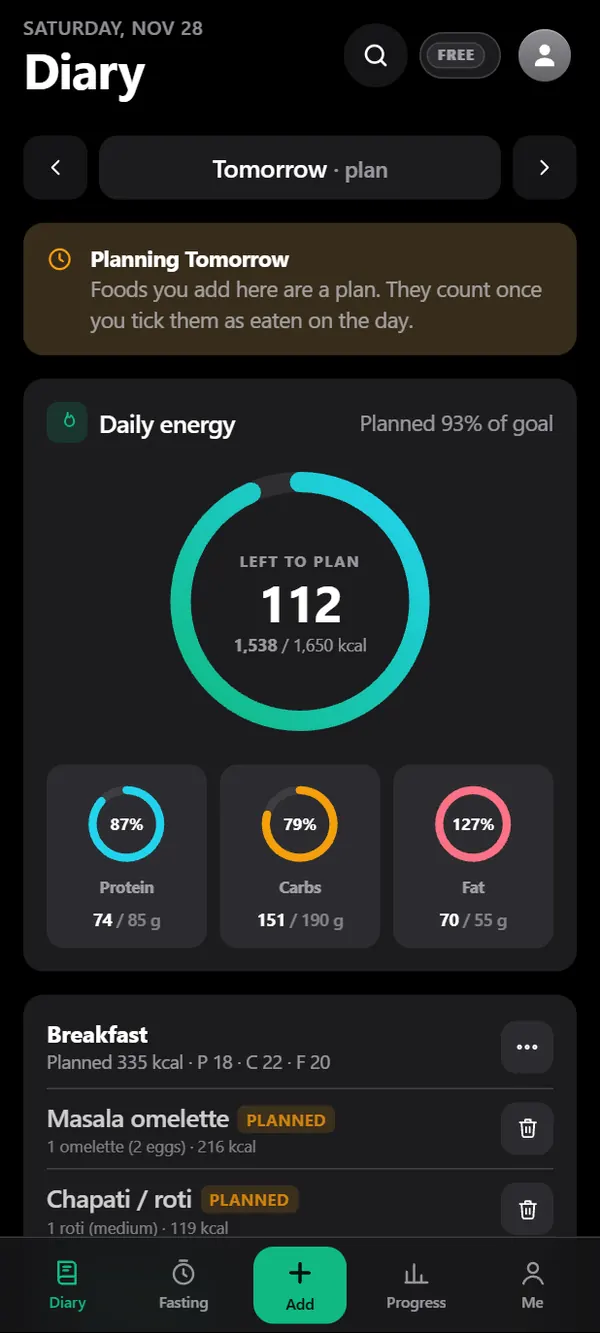
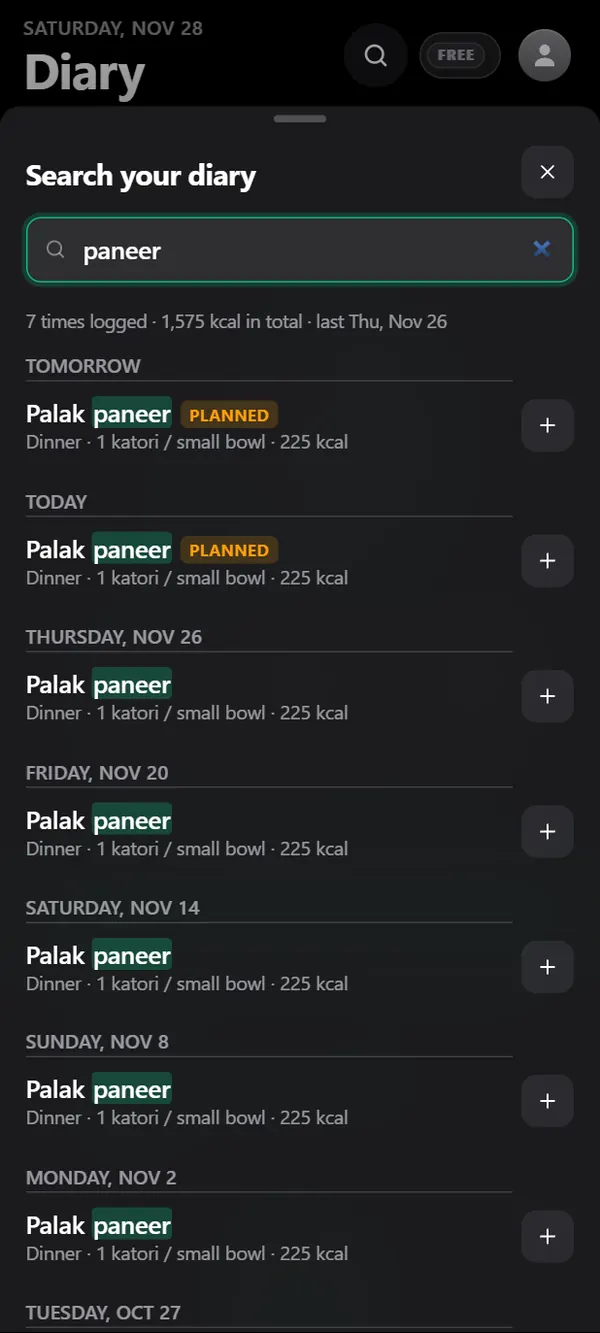
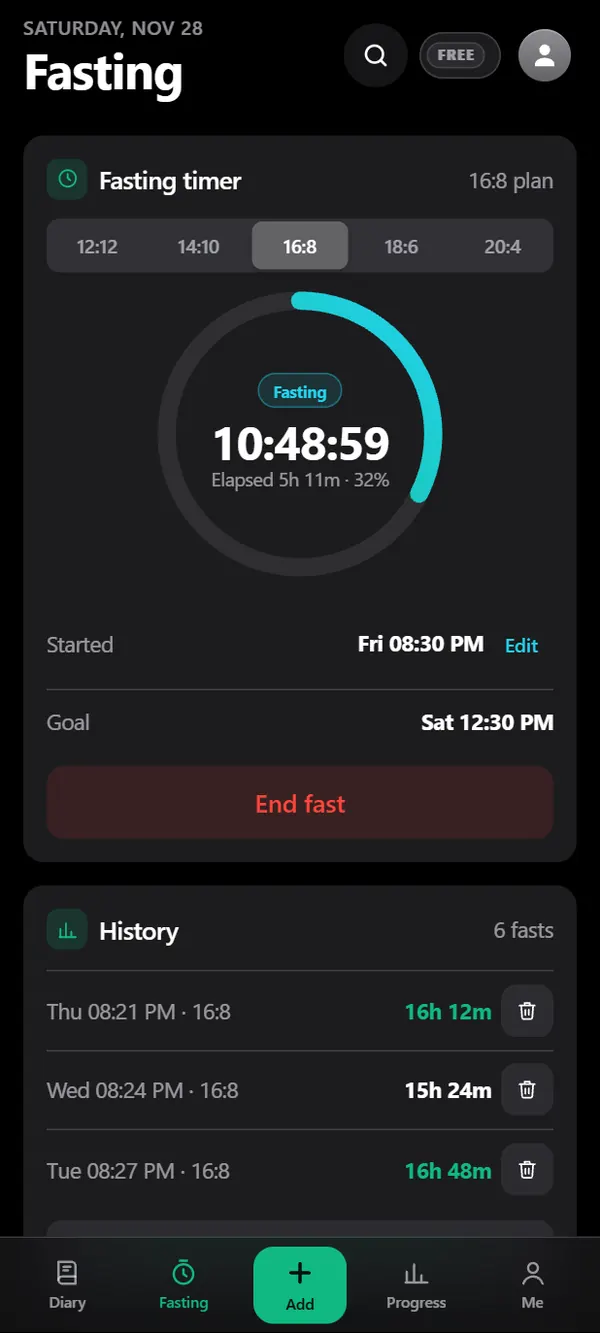
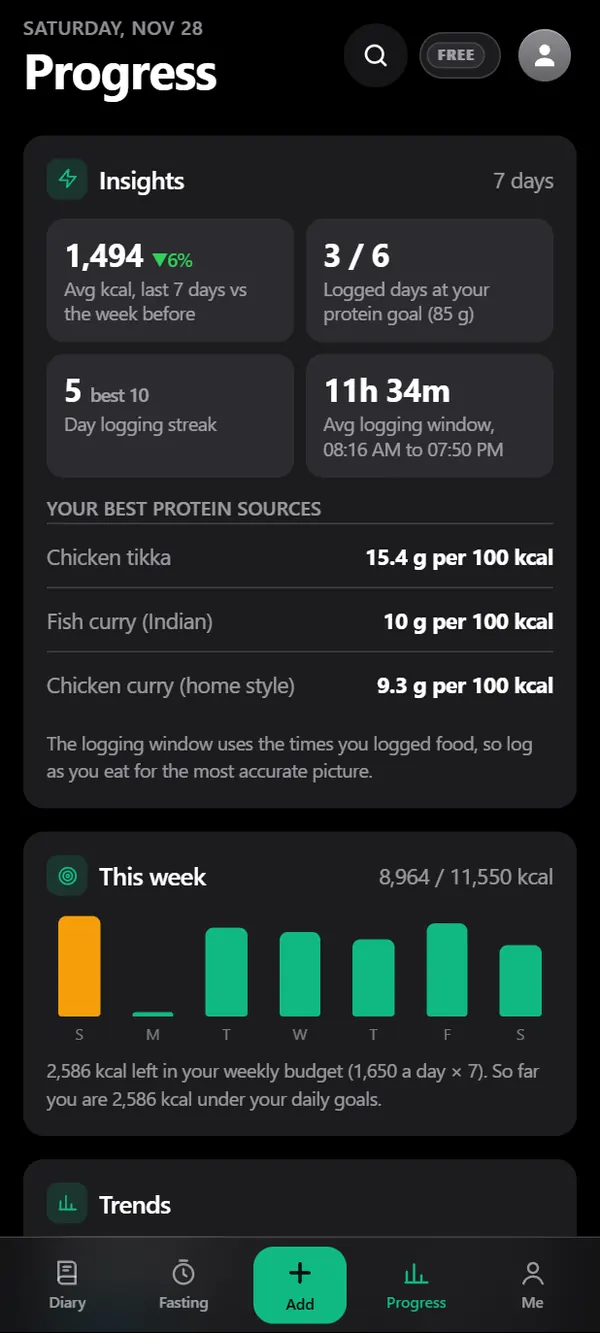
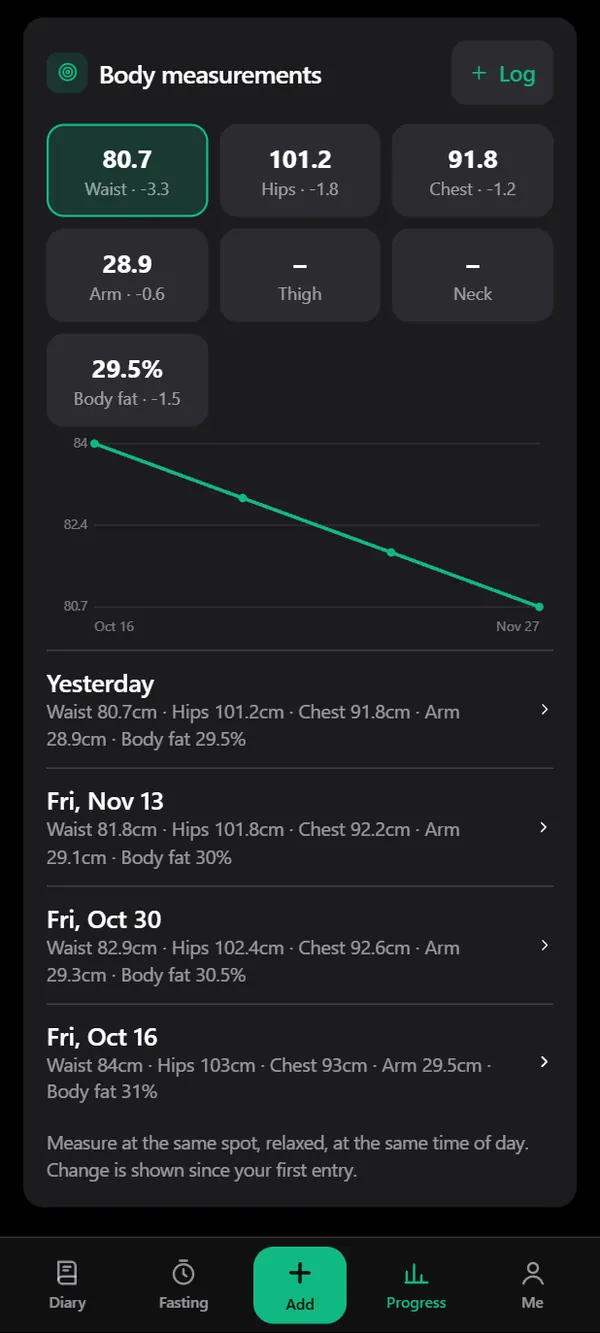
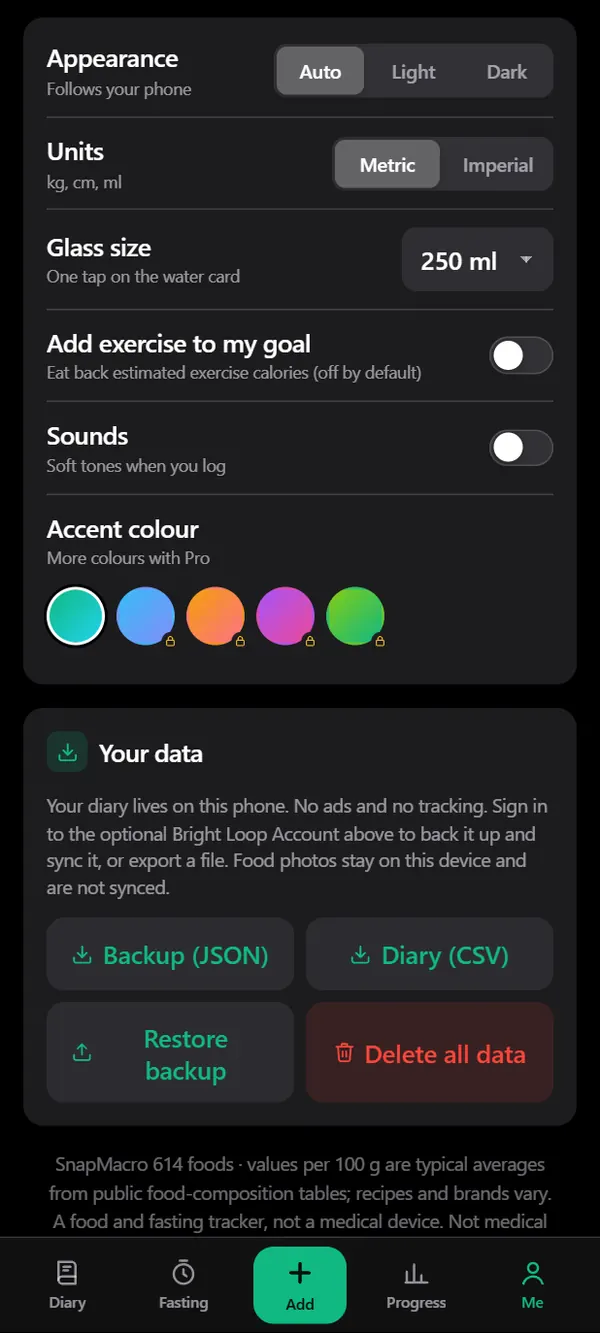
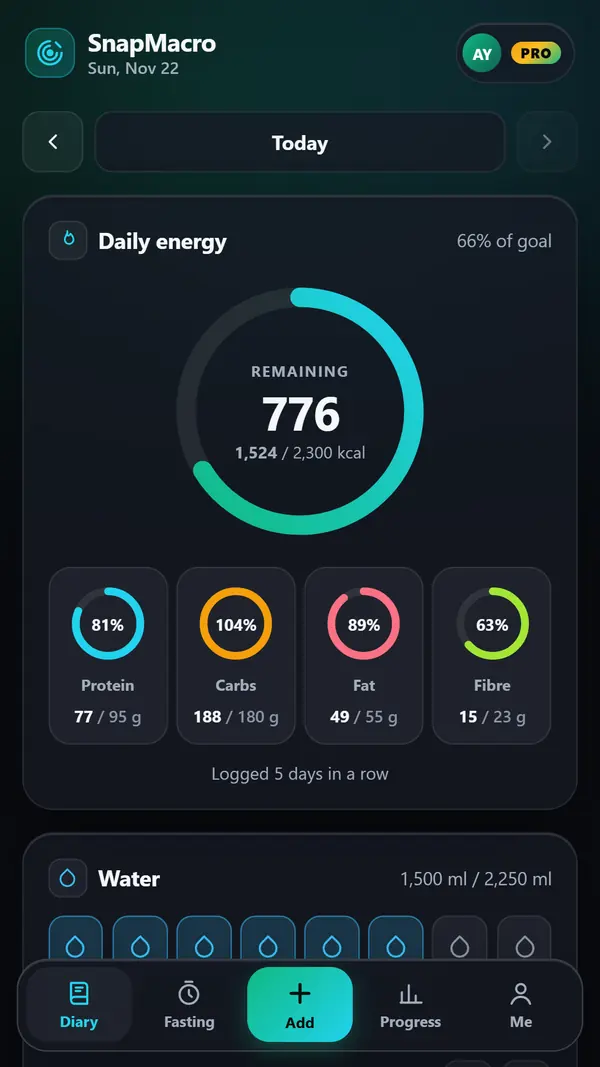
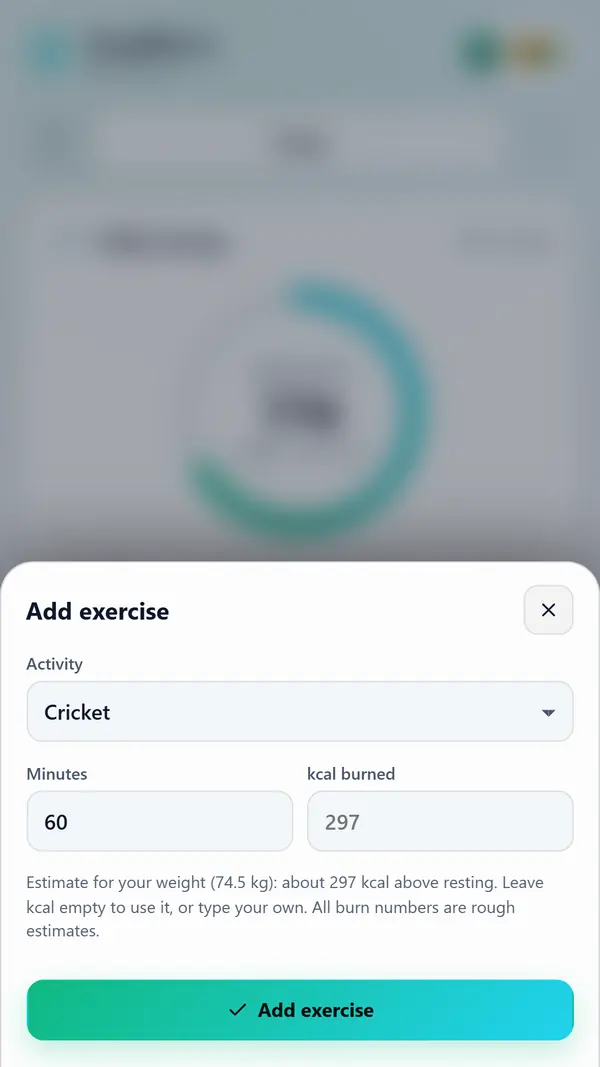
SnapMacro is a calorie counter, macro tracker and fasting timer that works fully offline. Log meals in a few taps from a built-in database of 600+ foods and dishes from around the world.
What's new in version 1.5
New in version 1.5, along with a refreshed design and the optional Bright Loop Account. Early-access testers get it through Google Play.
Meal planner up to 14 days ahead
Search your whole food diary and log again in one tap
Insights: week vs week, protein-goal days, streaks, top protein sources
Body measurements with trend charts
Auto / Light / Dark appearance
Feature tour.
Every feature in SnapMacro, and what it does for you. Items marked Pro are part of the optional subscription.
Food logging
- 600+ foods with real portions
- Typical values per 100 g plus portions like 1 roti, 1 plate of biryani or 1 katori of dal. Strong South Asian coverage, plus Middle Eastern, Asian, Western, Latin American and African dishes.
- Search any way you spell it
- Search by name, alias or spelling, or browse by cuisine. Press Enter to open the top match.
- Your usual foods
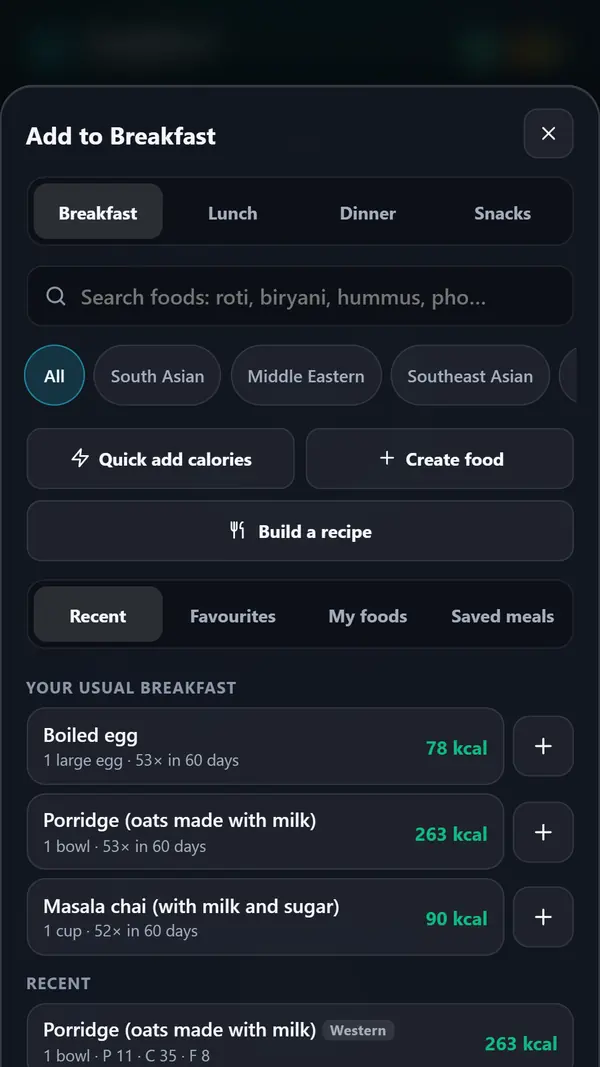
- For each meal, SnapMacro learns what you usually eat from your own diary, so you can log last time's portion in one tap.
- Recent, favourites, own foods and recipes
- Star favourites, create your own foods, build recipes from ingredients and save meals you eat often (up to 3 saved meals free).
- Multi-select with undo
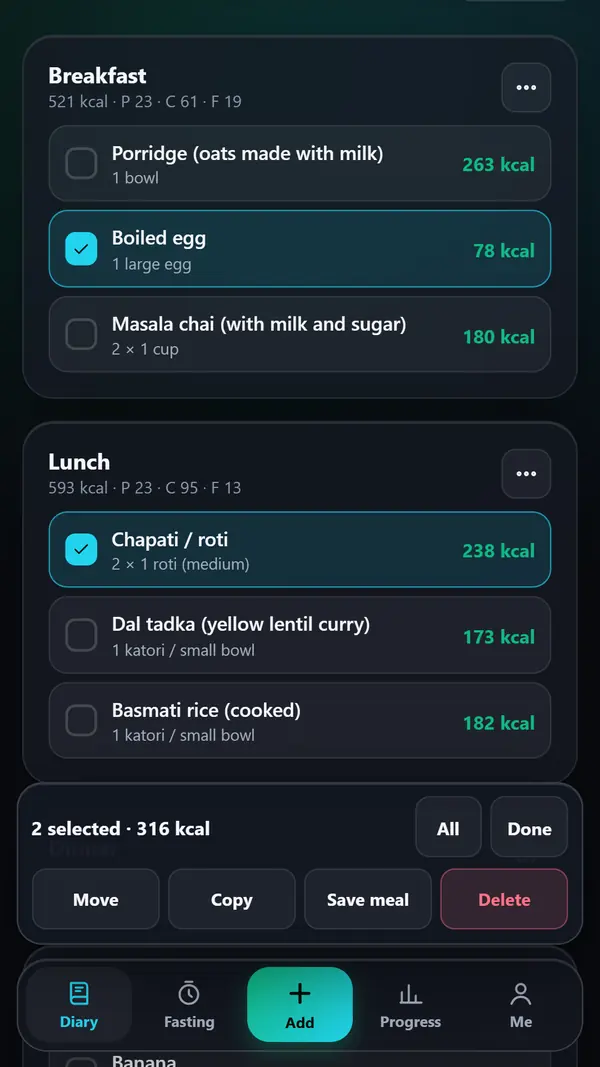
- Tap Select to pick several foods, then move them to another meal, copy them to any day, save them as a meal or delete them.
- Copy meals and days
- Copy a meal from yesterday from the meal's menu, or copy a whole past day to today. Quick add calories, day notes and optional meal photos (kept on the phone) are there too.
- Unlimited saved meals Pro
- Free keeps up to 3 saved meals; Pro removes the limit.
Planning and searching
- Meal planner
- Move up to 14 days ahead and add food as a plan. Planned food counts once you tick it as eaten, or log the whole plan in one tap.
- Search your whole diary
- The search icon finds every time you logged a food, with a count and total calories, and logs it again today in one tap.
Exercise and water
- Exercise log
- Log walking, running, cycling, cricket, yoga, strength training and more. The burn is estimated from your weight and the minutes, or type the number from your watch.
- Eat back exercise (optional)
- Exercise calories can be added to your daily goal. This is off by default.
- Water glasses
- Tap a glass to log water against your goal. Choose the glass size in settings.
Goals
- Goals that fit you
- Calorie, protein, carb, fat and water goals estimated from your age, height, weight, activity and goal (a steady 0.25 or 0.5 kg a week), or your dietitian's numbers.
- Goal weight
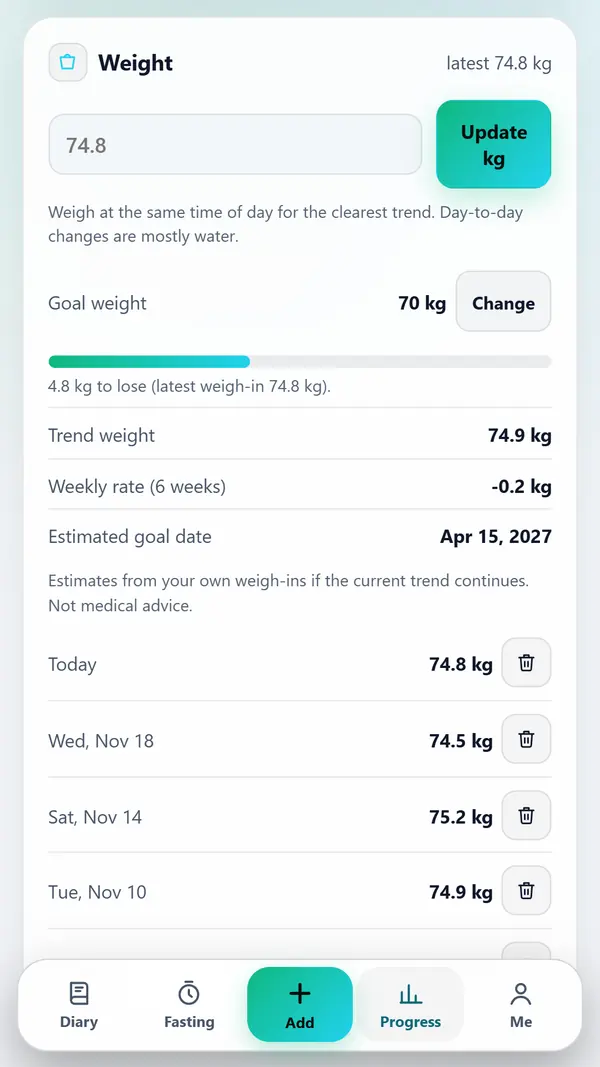
- Set a goal weight to see a progress bar and how much is left.
- Metric or imperial
- Switch between kg, cm and ml or lb, ft/in and fl oz at any time.
- Fibre tracking Pro
- Adds a fibre goal and a fibre ring, using fibre values from the food database.
Fasting and progress
- Fasting timer
- 12:12 to 20:4 plans with a live countdown, an editable start time and the history of your last 3 fasts.
- Full fasting history Pro
- Keeps every fast with averages instead of only the last 3.
- Insights
- Average calories this week vs last week, logged days at your protein goal, your current and best logging streak, your usual eating window and your top protein sources.
- 7-day trends and weekly budget
- Charts for calories, protein, water and weight, your macro split and a weekly calorie budget.
- Month calendar
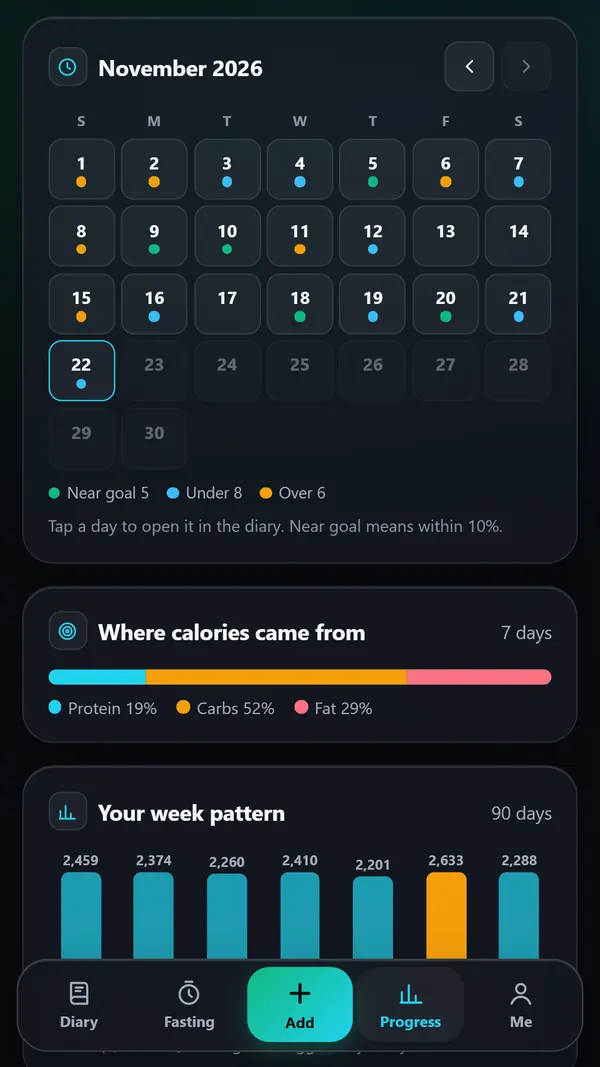
- See which days were near, under or over your goal and tap a day to open it.
- Body measurements
- Log waist, hips, chest, arm, thigh, neck and body fat, with a trend chart and the change since your first entry.
- 30 and 90-day trends and week pattern Pro
- Longer trends with weekly averages and your average calories by weekday.
- Trend weight and goal date Pro
- A smoothed trend weight with your weekly rate and an estimated goal date.
- Top foods and printable report Pro
- Your top foods by calories, calories by meal and a nutrition report you can print or save as PDF.
Look, privacy and backup
- Auto, Light or Dark
- Auto follows your phone's setting, or pick Light or Dark yourself.
- Extra accent colours Pro
- Emerald is free; Ocean, Sunset, Violet and Lime come with Pro.
- Private by design
- No ads and no analytics. Your diary stays on your phone unless you choose to sign in to the optional Bright Loop Account for backup and sync.
- Backup and CSV export
- Export a JSON backup, restore it on another phone, or export your diary with exercise as CSV.
Full store description
Foods you actually eat
- 600+ foods with typical values per 100 g and real portions: 1 roti, 1 plate of biryani, 1 katori of dal
- Strong South Asian coverage, plus Middle Eastern, Asian, Western, Latin American and African dishes
- Search by any name or spelling, or browse by cuisine; press Enter to open the top match
Fast daily logging
- "Your usual" foods for each meal, learned from your own diary: log last time's portion in one tap
- Recent foods, favourites, your own foods, saved meals and recipes built from ingredients
- Select several foods to move them to another meal, copy them to any day, save them as a meal or delete them, with undo
- Copy a meal from yesterday or a whole past day, quick add calories, day notes, optional meal photos
Exercise
- Log walking, running, cycling, cricket, yoga, strength training and more; burn is estimated from your weight and the minutes, or type the number from your watch
- Optionally add exercise calories to your daily goal (off by default)
Goals that fit you
- Calorie, protein, carb, fat and water goals estimated from your age, height, weight, activity and goal (a steady 0.25 to 0.5 kg a week), or your dietitian's numbers
- Goal weight with a progress bar
- Metric or imperial units
Fasting and progress
- 12:12 to 20:4 fasting plans with a live countdown and history
- 7-day charts for calories, protein, water and weight, macro split and a weekly calorie budget
- Month calendar showing which days were near, under or over your goal; tap a day to open it
How to use SnapMacro.
Step-by-step walkthroughs of the main tasks, with screens from the current version.
1Log a mealFind a food, pick a real portion and add it to breakfast, lunch, dinner or snacks.
- Step 1
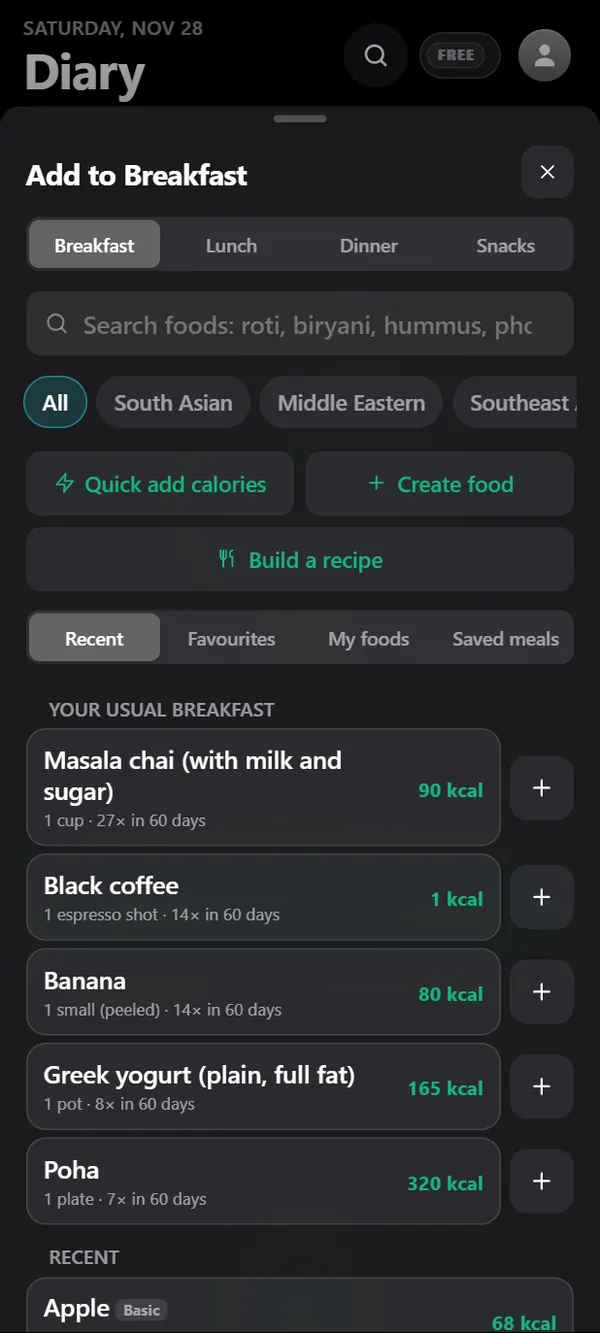
Tap Add in the bottom bar. The sheet opens on the meal that fits the time of day, and Your usual lists what you normally eat for it: tap + to log last time's portion in one tap.
- Step 2
Type any name or spelling in the search box (for example "dal"), or tap a cuisine chip such as South Asian to browse. Press Enter to open the top match.
- Step 3
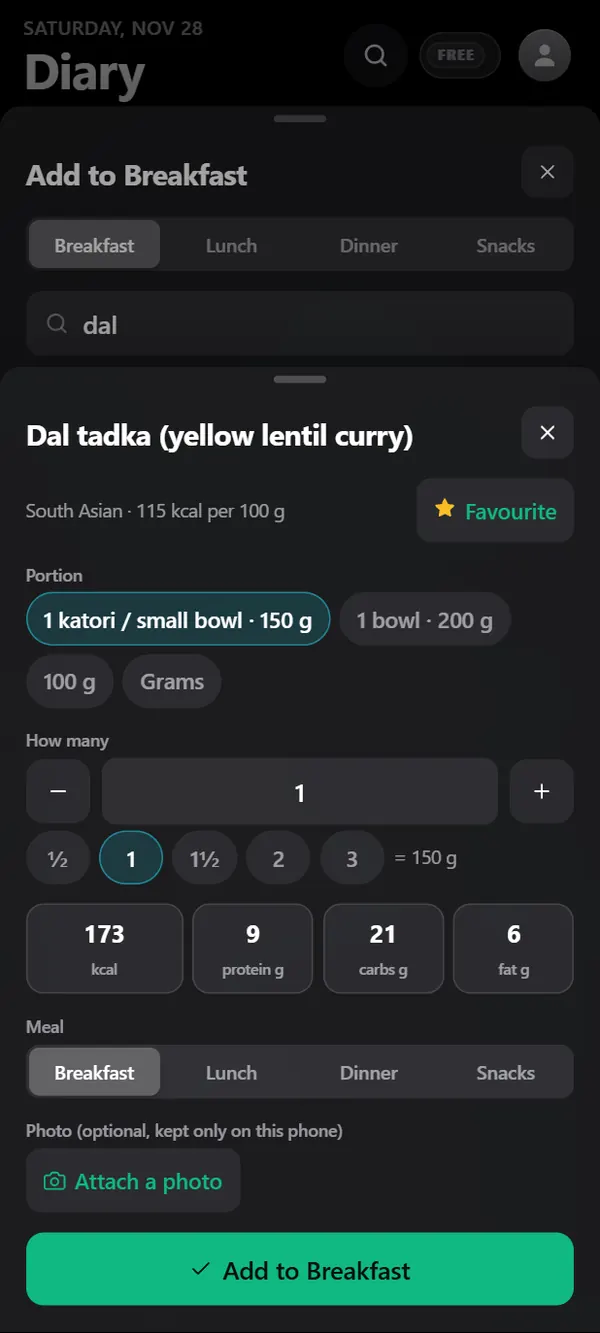
Tap a food, choose a portion such as 1 katori / small bowl and how many, and check the calories and macros.
- Step 4
Tap Add to Breakfast (or whichever meal is picked). The Diary updates your calories left, protein, carbs and fat straight away.
2Plan meals ahead with the plannerPlan food for any of the next 14 days, then tick it off when you actually eat it.
- Step 1
On the Diary, tap the > arrow next to the date to move to tomorrow (you can go up to 14 days ahead). The day is marked plan and the ring shows what is left to plan.
- Step 2
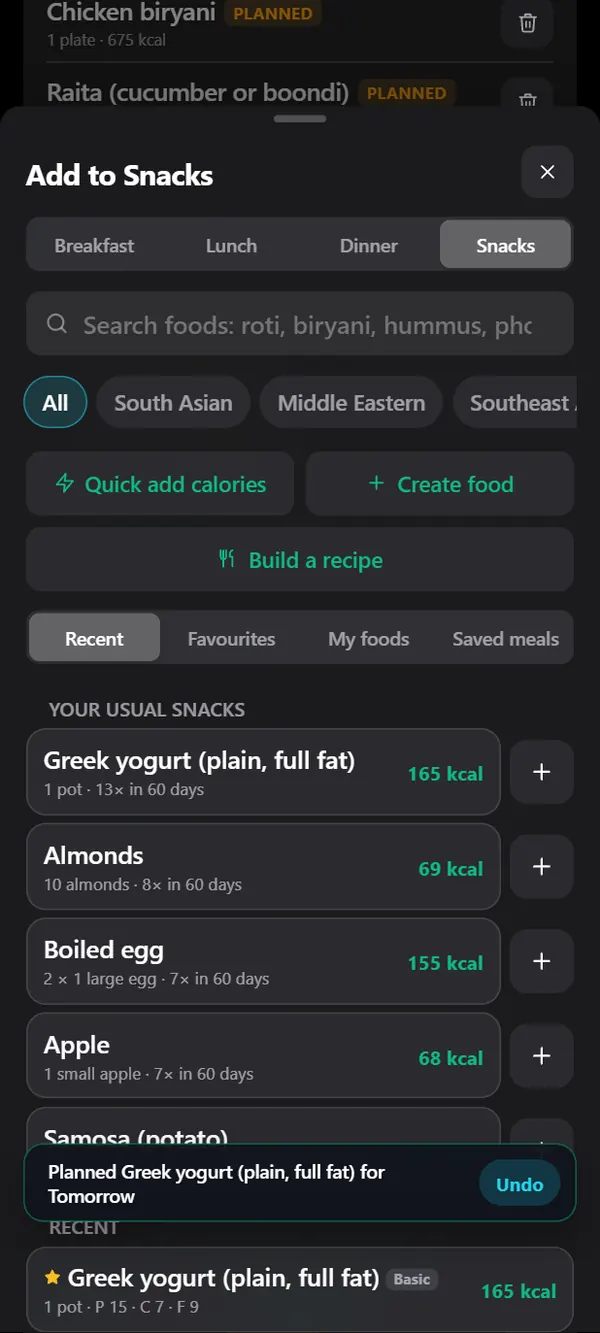
Tap Add food under a meal and add foods the usual way. On a future day they are saved as a plan, and a message confirms it, for example "Planned Greek yogurt for Tomorrow".
- Step 3
On the day itself, planned foods show a Planned tag. Tap the tick to log one as eaten, or the bin to drop it.
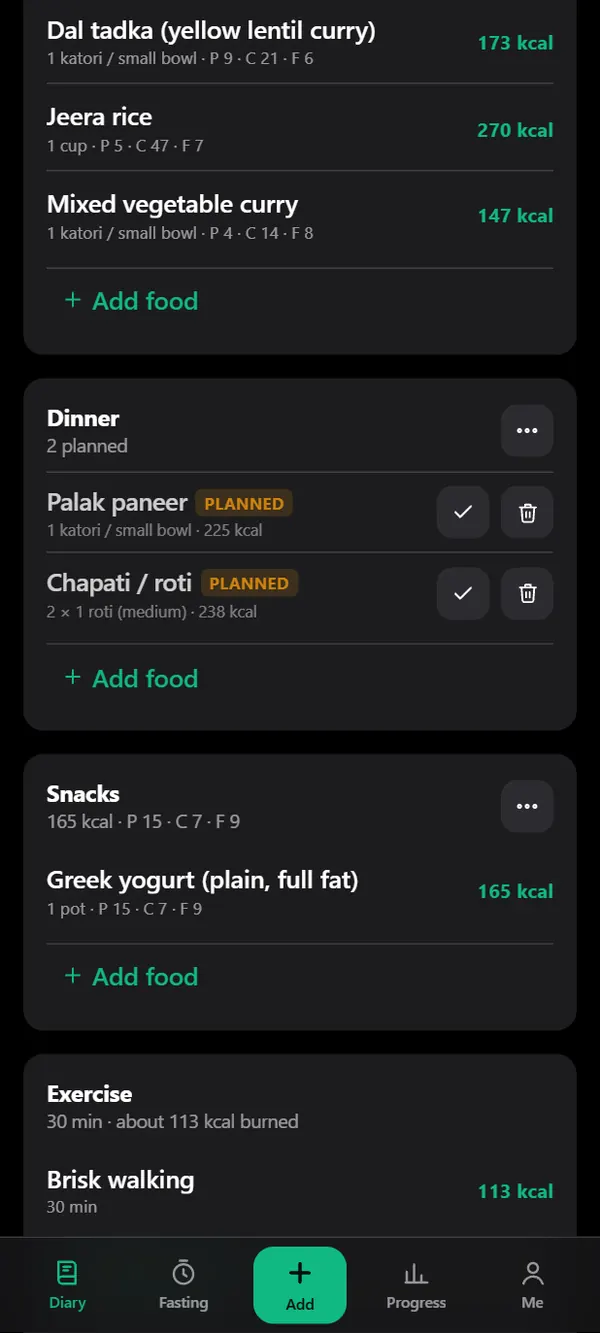
- Step 4
To log the whole plan at once, tap Log all planned items under the calorie ring.
3Search your diary and log a food againFind anything you have logged before and add it to today in one tap.
- Step 1
Tap the search icon at the top of the screen.
- Step 2
Type part of a food name, for example "paneer". You see how many times you logged it, the total calories and every day it appears, including planned days.
- Step 3
Tap + next to an entry to log the same portion again today, or tap the entry to open that day in the Diary.
4Read your Insights and progressSee how this week compares with last week and how your days and weight are going.
- Step 1
Open the Progress tab. Insights compares your average calories with the week before and shows days at your protein goal, your logging streak, your usual eating window and your best protein sources.
- Step 2
Scroll to the month calendar. Dots show days near, under or over your calorie goal; tap a day to open it in the Diary.
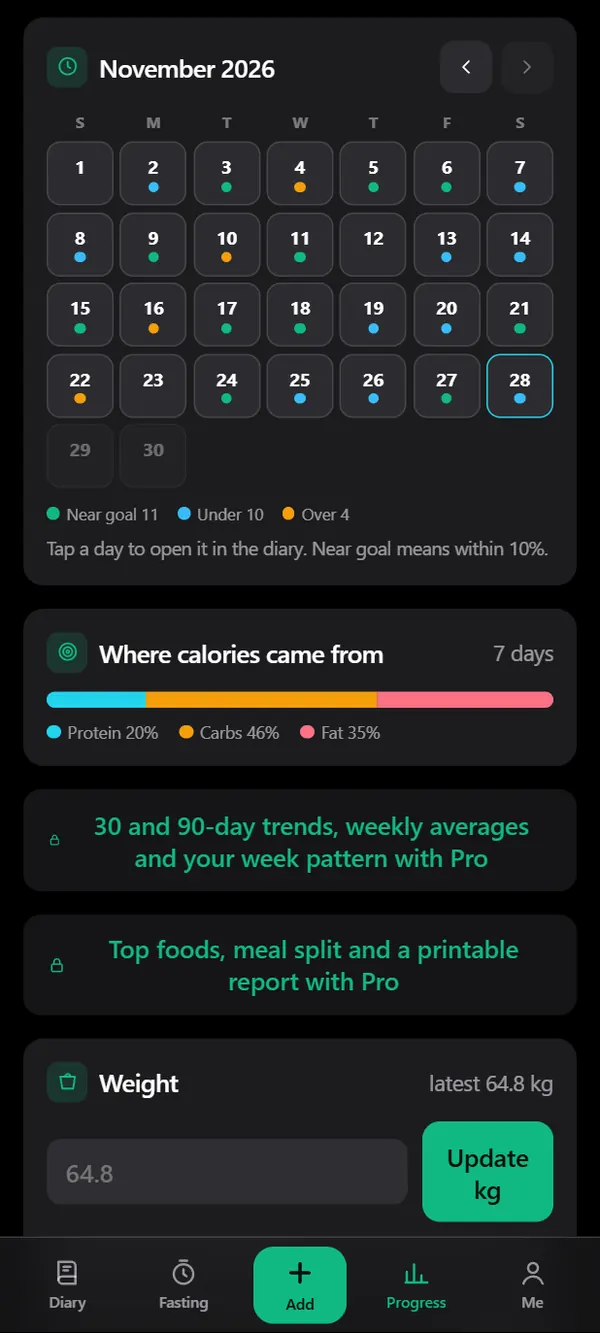
- Step 3
In Weight, type today's weight and tap Update. Set a Goal weight to see a progress bar and how much is left.
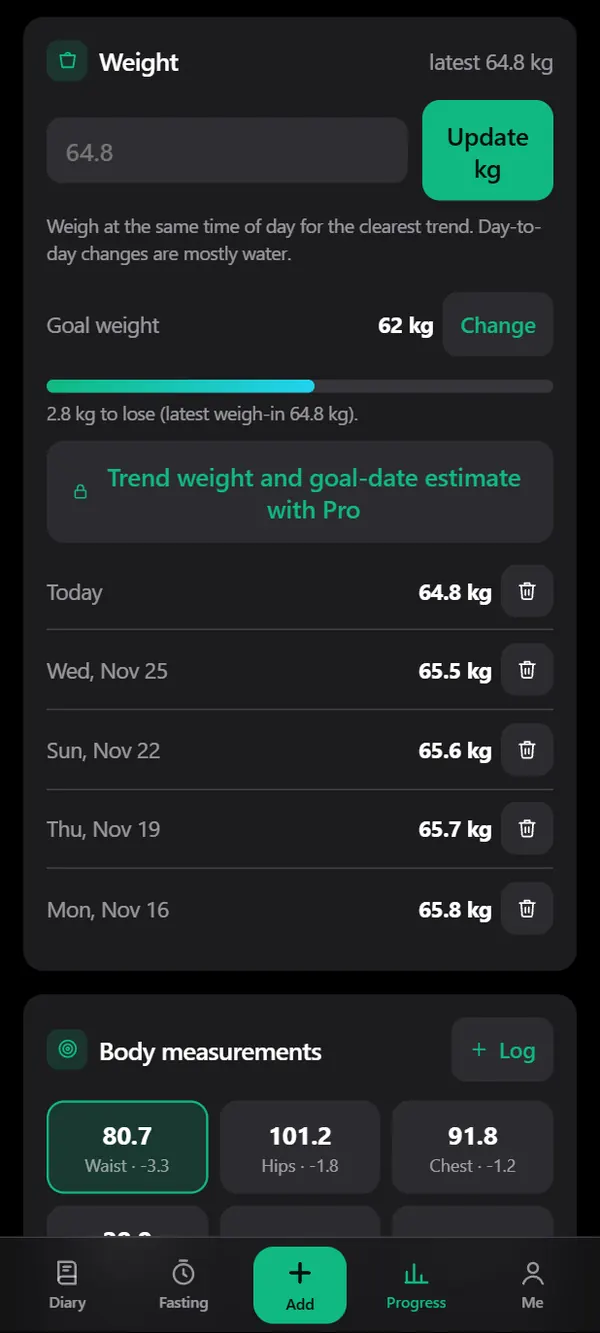
5Log body measurementsTrack waist, hips, chest and more, because they often change when the scale does not.
- Step 1
On Progress, scroll to Body measurements and tap Log.
- Step 2
Enter the measurements you took (leave the rest empty) and tap Save.
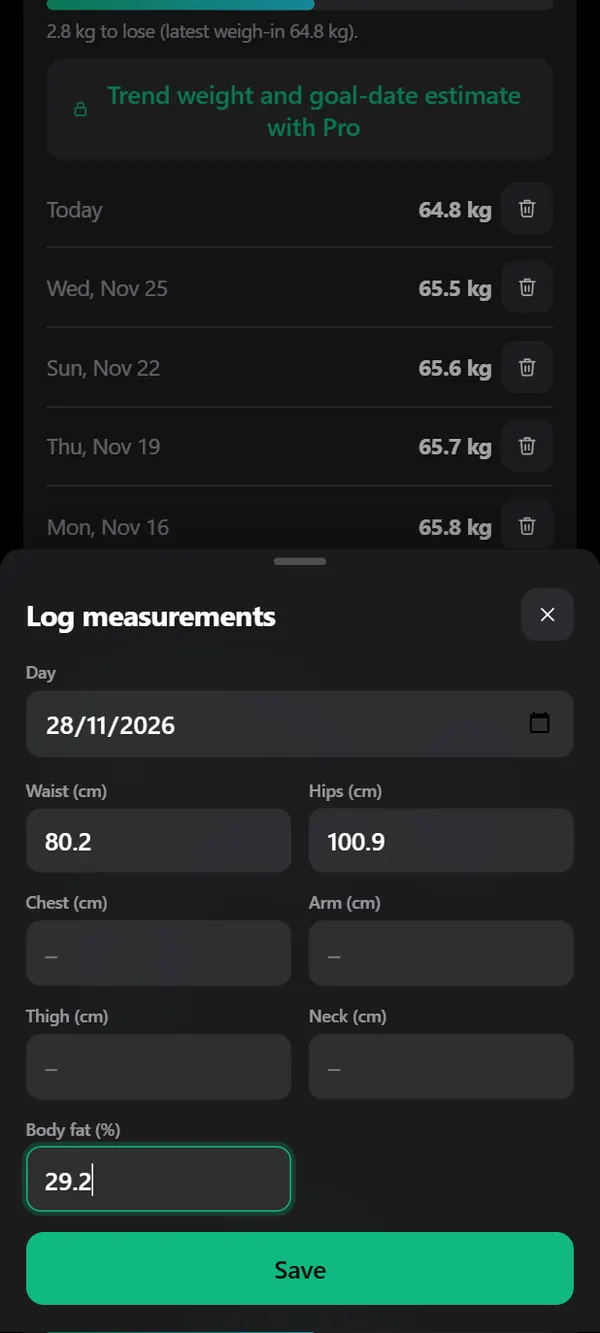
- Step 3
Tap a measurement tile such as Waist to see its trend chart. Each tile shows the change since your first entry.
6Set your goals and appearanceGet calorie and macro targets from your details and choose how the app looks.
- Step 1
Open Me and tap Edit on Daily goals. Enter your details, activity and goal and SnapMacro estimates calories, protein, carbs, fat and water. Turn on Set my own numbers to use your dietitian's targets instead.
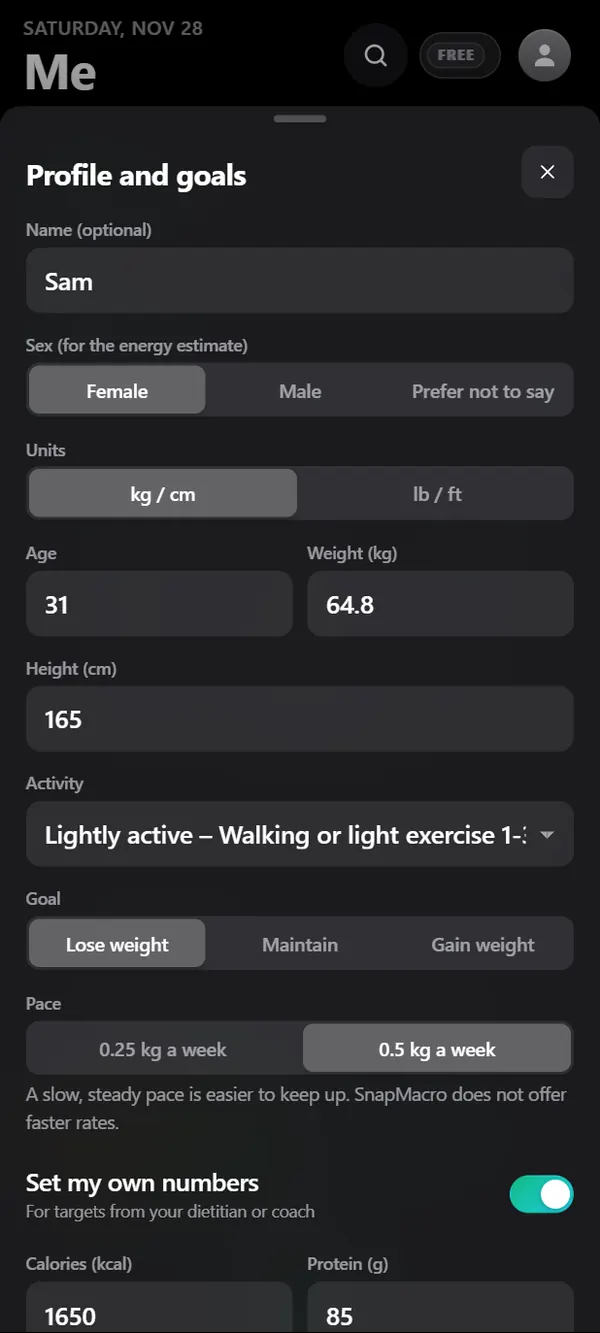
- Step 2
Scroll to the settings. Under Appearance choose Auto (follows your phone), Light or Dark, and set units, glass size and whether exercise calories are added to your goal.
- Step 3
The whole app switches straight away, like this Diary in Light.
Free, with optional Pro.
Download SnapMacro free. Pro is optional and billed by Google Play, which shows the price before you confirm.
Free
- The full food database
- Unlimited diary
- Usual foods
- Multi-select
- Exercise log
- Calendar
- Goal weight
- Own foods and recipes
- Up to 3 saved meals
- Fasting timer with your last 3 fasts
- 7-day trends
- Weight log
- Backup and CSV
- Both themes
SnapMacro Pro (optional subscription, monthly or yearly)
- 30 and 90-day trends with weekly averages
- Your week pattern (average calories by weekday)
- Smoothed trend weight with weekly rate and an estimated goal date
- Top foods and calories by meal
- A printable report
- Fibre tracking
- Unlimited saved meals
- Full fasting history and four extra colours
Prices and any trial are shown by Google Play. Renews until you cancel in Google Play.
Manage or cancel subscriptions in Google Play > Payments & subscriptions. Purchases and Restore purchases
Try it now.
Open SnapMacro right here in your browser, or download the Android app file directly.
Open in browser
The full SnapMacro app, running in a new tab. Nothing to install.
Some phone-only features, such as purchases, notifications, sharing and camera scanning, work only in the Android app. Anything you do in the browser is saved in that browser only, unless you sign in to the Bright Loop Account.
Download the APK
Install SnapMacro on an Android phone without Google Play.
- Version
- 1.5
- Size
- 4.0 MB
- SHA-256
f5a9e103352c8cd2001b07c54cf5384dff21eb638b8f2d3ae54b7e60a70fb951
An APK installed from this website can't be updated from Google Play later. To switch to Google Play, uninstall it and install from Play. Your data only comes with you if you back it up with the Bright Loop Account first. How to install an APK
Requirements & details.
- Requires
- Android 7.0 or later
- Size
- 4.0 MB
- Version
- 1.5
- Price
- Free, optional Pro subscription
- Internet
- Not required
- Account
- Optional Bright Loop Account
- Ads
- None
- Category
- Health & Fitness
- Developer
- Bright Loop (Google Play: Bright Loop Games)
- Availability
- Early access (Google Play closed testing)
- Web version
- Open in browser
How to get SnapMacro.
SnapMacro is in early access through Google Play closed testing. It takes about two minutes.
- Ask to join the tester listEarly access runs as a Google Play closed test, so your Google account must be on the tester list before the opt-in link works. Send us the Gmail address you use on Google Play and we'll add you.
- Open the opt-in linkOn your Android phone, signed in to the same Google account, open the SnapMacro early access link.
- Tap "Become a tester"Google Play confirms that you've joined the test.
- Install from Google PlayTap the "download it on Google Play" link on that page, or open the Google Play page, then tap Install. Updates arrive through Google Play like any other app.
- Tell us what you thinkEarly access means your feedback shapes the next update. Email rehman@mindum.dev any time.
Link not working? See Troubleshooting or the full early access guide.
Account & sync.
Optional. SnapMacro works fully without an account. Sign in to the free Bright Loop Account to back up your SnapMacro data and keep it in sync across your phones.
What syncs
- Food diary, your own foods, saved meals and recipes
- Weight, body measurements and fasting history
- Goals and settings
What stays on this phone
- Meal photos
- Your Pro status (Google Play restores it)
Account & Sync is part of SnapMacro 1.5. Look for it at the top of Settings.
Privacy.
SnapMacro keeps your data on your phone. No ads and no analytics.
Private by design
No account needed, no ads, no analytics. Everything stays on your phone. Export a backup (JSON) or your diary with exercise (CSV) any time.
If you sign in
The Bright Loop Account is optional. If you sign in, SnapMacro backs up the records listed under Account & sync to your account so you can restore them on another phone. Photos and files are never uploaded, and you can export or delete your cloud data at any time.
Read the full Privacy Policy.
Tips.
- Log from Your usual at the top of the Add sheet: the + logs last time's portion without opening the food.
- Plan tomorrow in one tap: on today's Diary, Plan this day again tomorrow copies today's foods into tomorrow's plan.
- Press Enter in food search to open the best match straight away.
- Measure at the same spot and time of day every week or two; the tiles show the change since your first entry.
- Log food as you eat it: Insights works out your usual eating window from the times you logged.
- Use the diary search to see how often you really eat something, like biryani or paratha, and its total calories.
Troubleshooting.
I can't find a food in search.
Try another spelling or a shorter word (for example "chole" or "chana"), tap All to clear the cuisine filter, or use Create food or Quick add calories.
Today's calories look too high or too low.
Tap each entry to check its portion and how many. Make sure planned foods you didn't eat aren't ticked, and that Add exercise to my goal is set the way you want.
The next-day arrow is greyed out.
You have reached the end of the planner, which goes up to 14 days ahead.
Insights shows a dash for the eating window.
It appears once a day has at least two foods logged at different times. Log foods as you eat them.
My diary is not on my new phone.
Export a backup (JSON) on the old phone and use Restore backup on the new one, or sign in to the same Bright Loop Account on both.
Questions.
Do planned foods count toward my calories?
No. Planned foods count only once you tick them as eaten (or tap Log all planned items) on the day. Until then a future day's ring shows how much is left to plan.
How far ahead can I plan meals?
Up to 14 days. Use the arrow next to the date on the Diary to move forward.
How are my calorie and macro goals worked out?
From your age, height, weight, activity and goal, aiming for a steady 0.25 or 0.5 kg a week. They are estimates, not medical advice. Switch on Set my own numbers to use targets from a dietitian or coach.
Are exercise calories added to my goal?
Only if you turn on Add exercise to my goal in settings. It is off by default, and burns are rough estimates.
What does the Insights card compare?
Your average daily calories over the last 7 days against the week before, how many logged days hit your protein goal, your logging streak, your usual eating window and the foods that give you the most protein per 100 kcal.
Can I add my own food or a home recipe?
Yes. In the Add sheet tap Create food to enter your own values, or Build a recipe to combine ingredients from the database and set how many servings it makes.
Where do my food photos go?
Meal photos are optional and stay on your phone. They are not synced.
Which body measurements can I track?
Waist, hips, chest, arm, thigh, neck and body fat. Fill in only the ones you take; each has its own trend chart.
Is SnapMacro free?
Yes. SnapMacro is free to download and use. SnapMacro Pro is an optional monthly or yearly subscription through Google Play that adds the extras listed under Free and Pro. Google Play shows the price, and any trial, before you confirm.
Why can't I find SnapMacro on Google Play?
SnapMacro is in early access (a Google Play closed test), so it only appears for people on the tester list. Follow the steps under How to get it. Once it becomes public, anyone can install it from Google Play.
Does SnapMacro work offline?
Yes. SnapMacro works without an internet connection. You only need a connection for optional things like Bright Loop Account sync and Google Play purchases.
Do I need an account?
No. SnapMacro works fully without one. The Bright Loop Account is optional and adds cloud backup and sync across your phones.
How do I move to a new phone?
Sign in to your Bright Loop Account on the new phone and choose "Use Cloud Data", or export a backup file on the old phone and restore it on the new one. Photos and files only move with a backup file. Pro comes back with Restore purchases. See Move to a new phone.
How do I restore a purchase?
Make sure your phone uses the same Google account you bought with, open SnapMacro and tap Restore purchases. Google Play checks your purchases and SnapMacro unlocks what you own. More about purchases.
Can I use SnapMacro in a browser?
Yes. Tap Open in browser to run it in a new tab. Some phone-only features, such as purchases, notifications, sharing and camera scanning, work only in the Android app, and anything you do there is saved in that browser.
Can I install it without Google Play?
Yes, with the APK on this page (version 1.5, 4.0 MB). An APK install can't be updated from Google Play later; see Install an APK on Android.
What do I need to run it?
Android 7.0 or later, or any modern browser for the web version.
Is it available on iPhone?
There's no iPhone app at the moment. SnapMacro is made for Android, but you can open the web version in Safari.
Get help with SnapMacro
Email rehman@mindum.dev. Include your phone model, Android version and what happened, and we'll take it from there.
Help Centre
Step-by-step guides for early access, sync, backups, purchases and moving phones. Visit the Help Centre
More apps you might like.
IronOS
Log sets fast, supersets, progression hints, rest timer, 1RM and body stats
Drift
Bedtime calculator, weekly sleep schedule, sleep sounds, sleep diary and trends
RitualOS
Track habits and streaks, and run timed morning, evening and workout routines.
GlowOS
AM/PM skincare checklist, product shelf & wishlist, skin cycling, photo diary