RitualOS
Track habits and streaks, and run timed morning, evening and workout routines.
Google Play pageDownload APK v1.3 · 4.0 MB
Early access on Google Play closed testing. You need to be on the tester list first: see how to join.
A closer look.
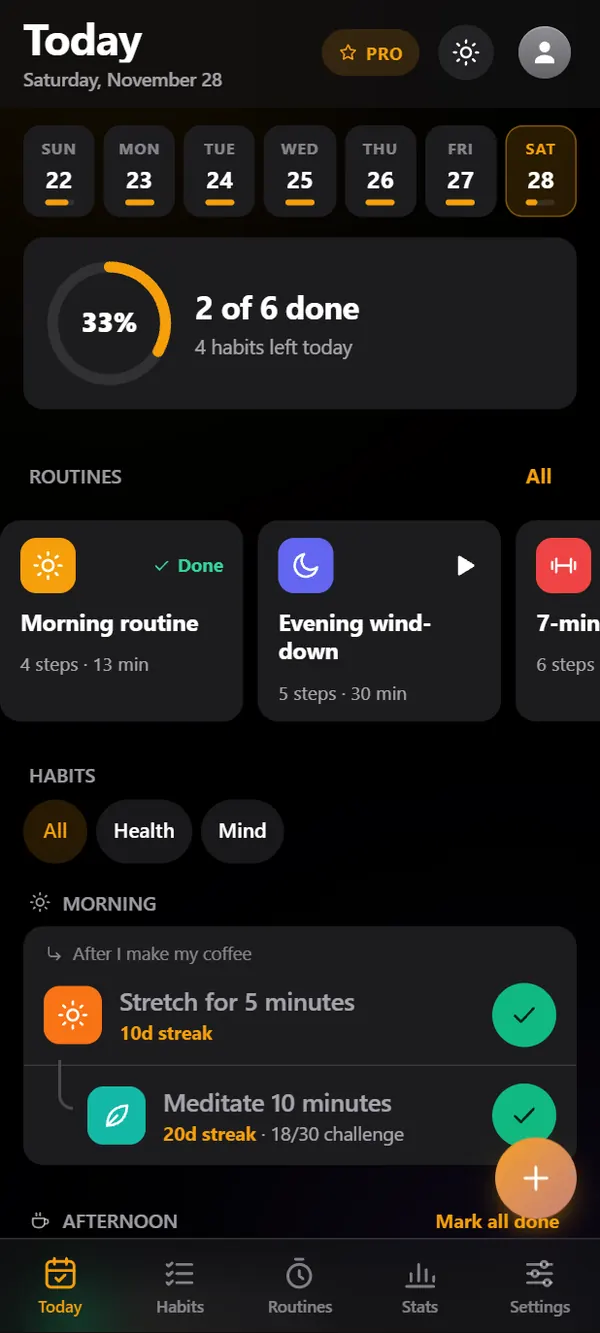
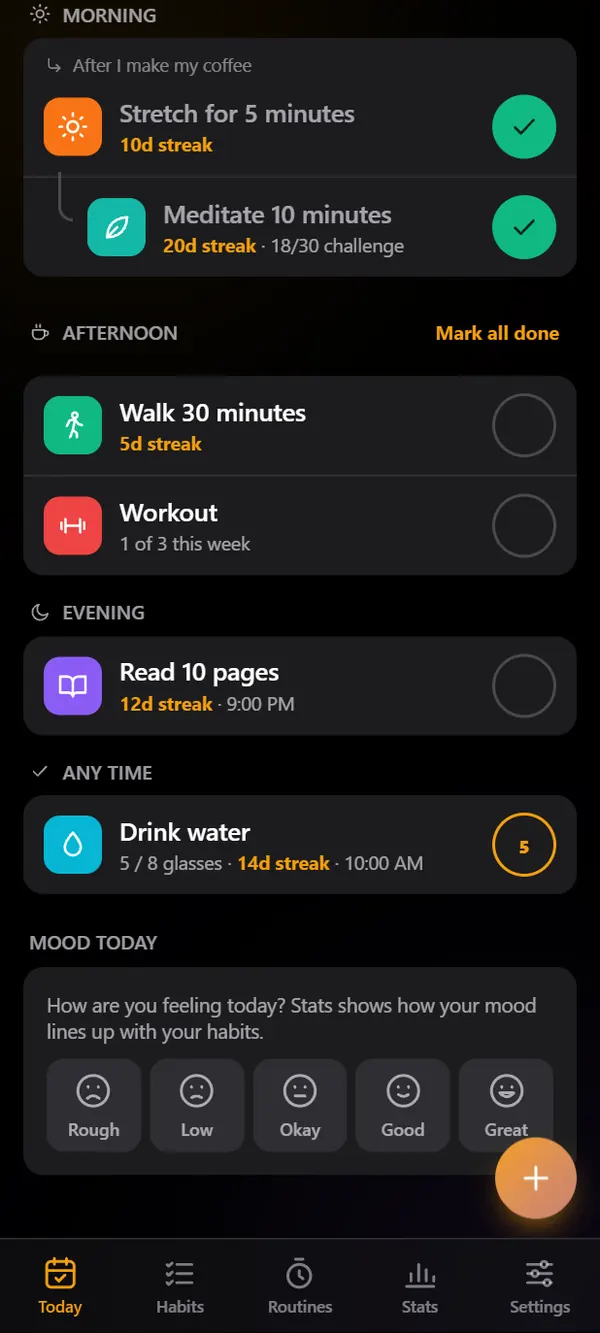
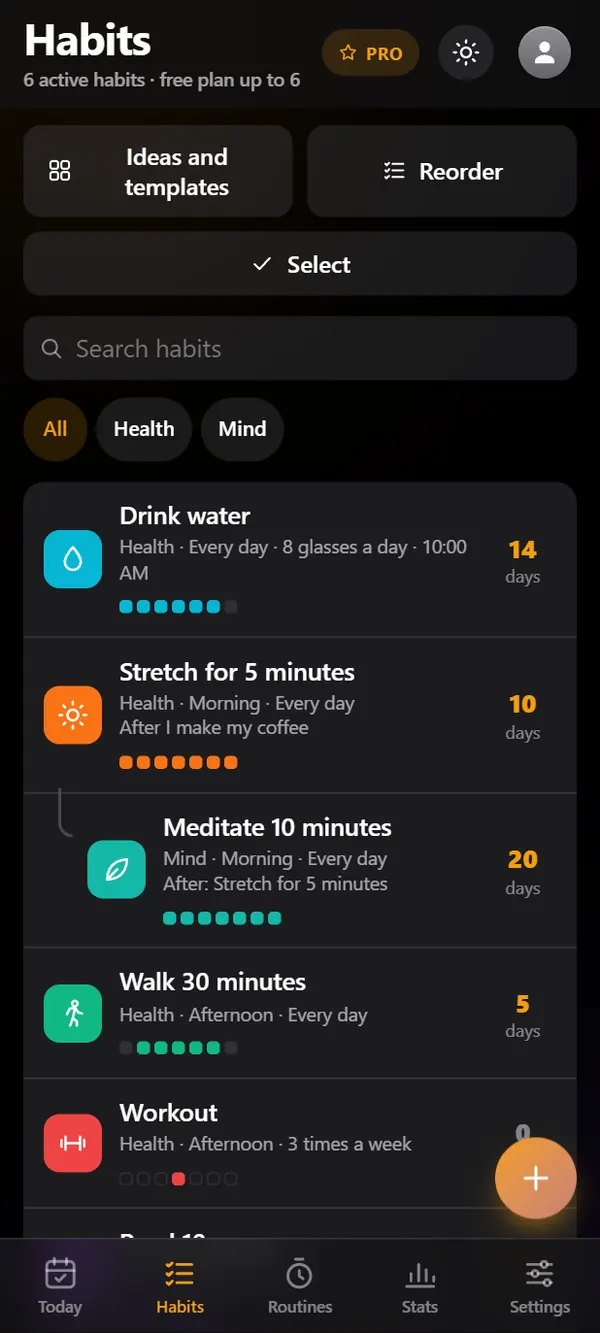
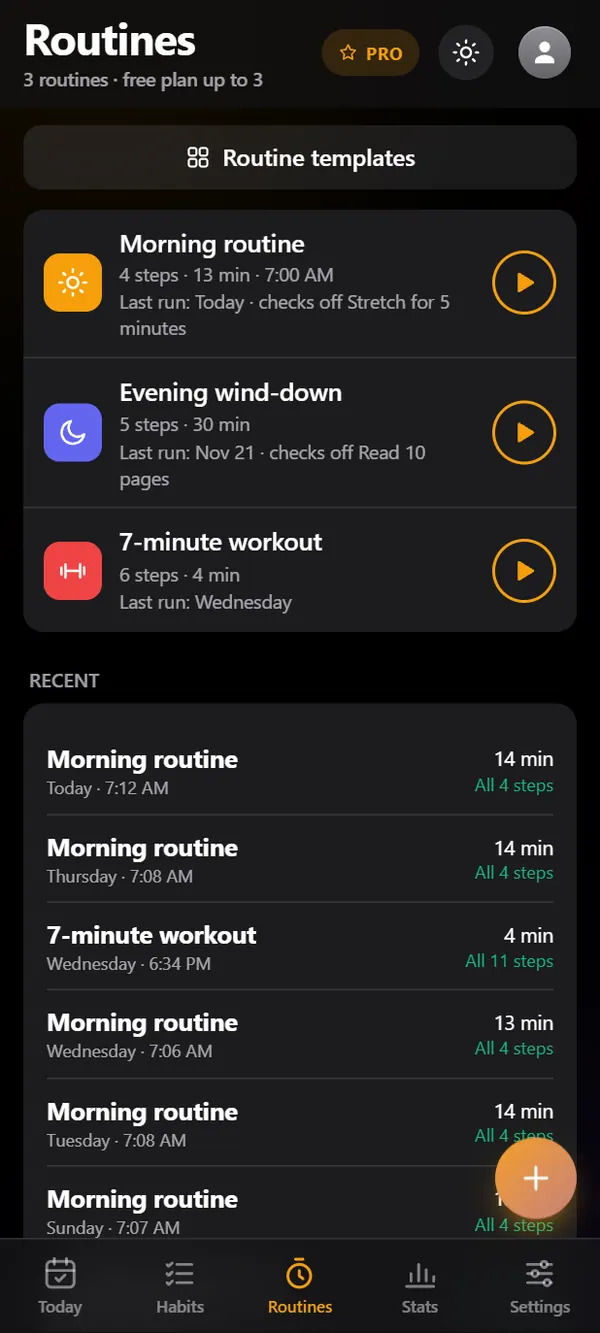
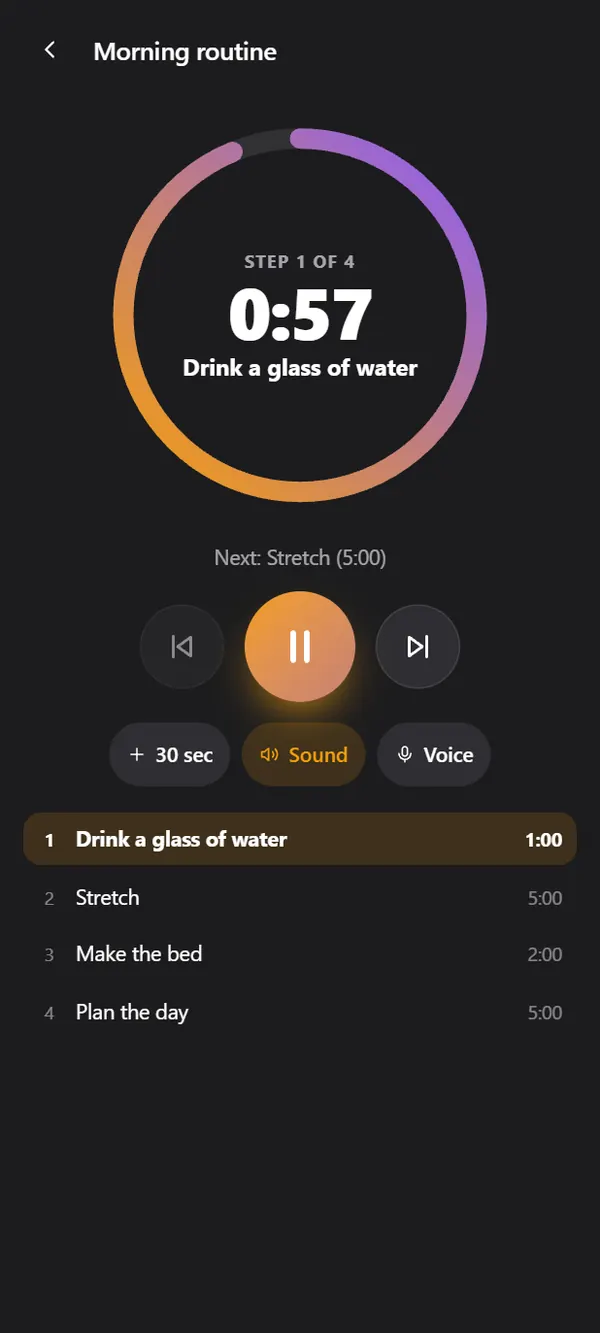
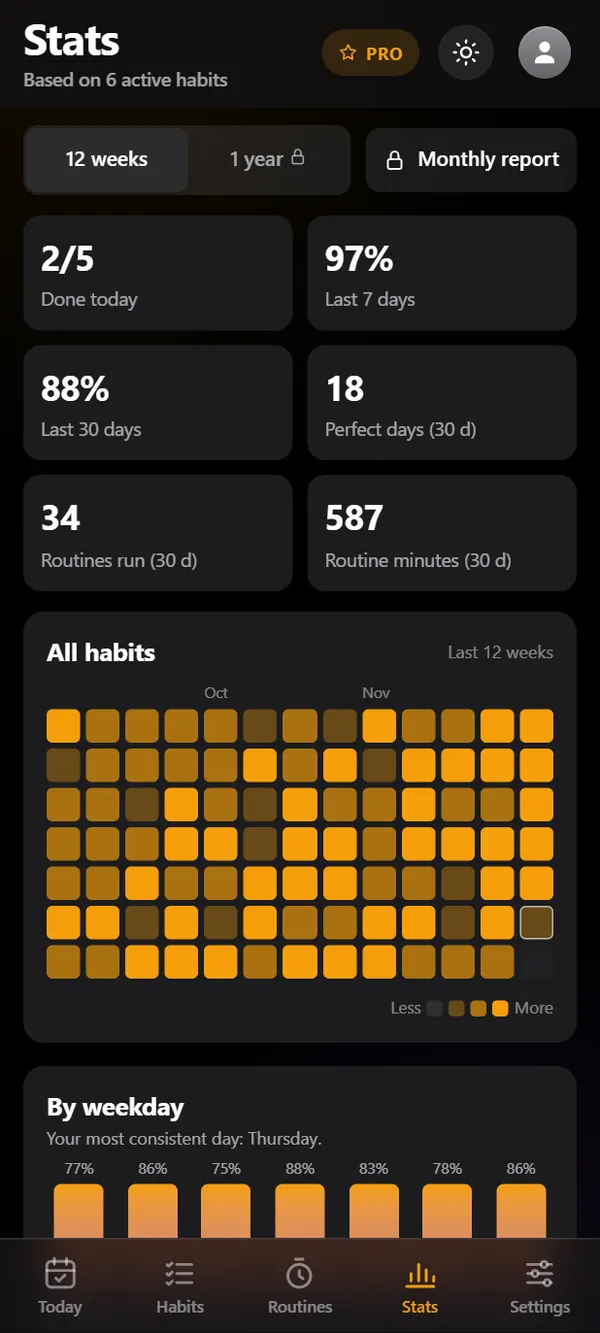
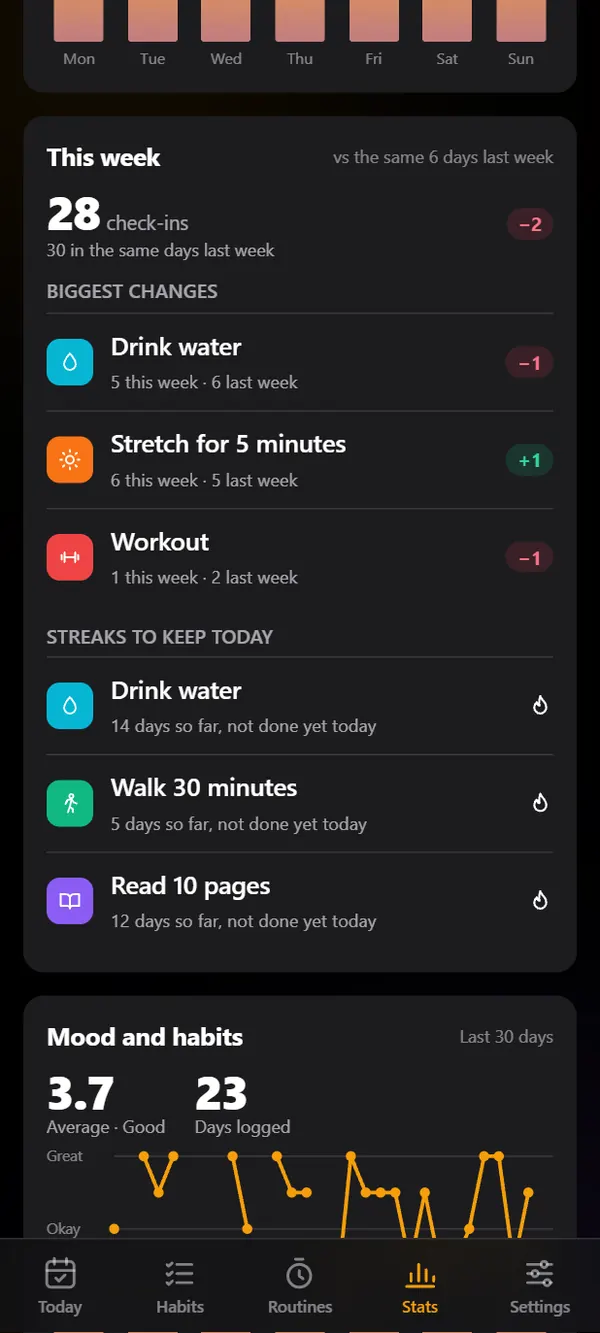
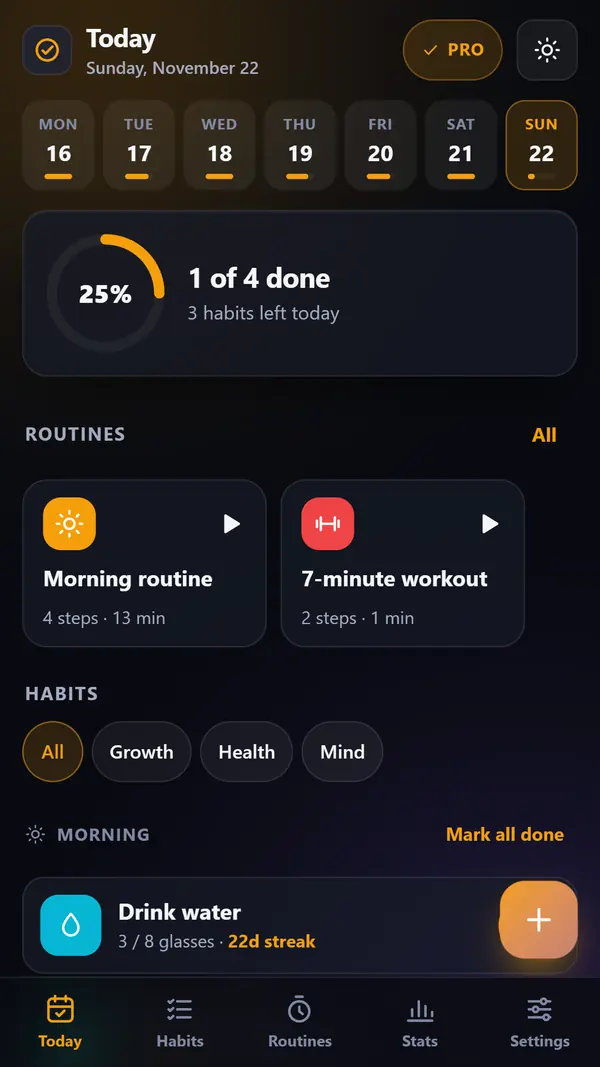
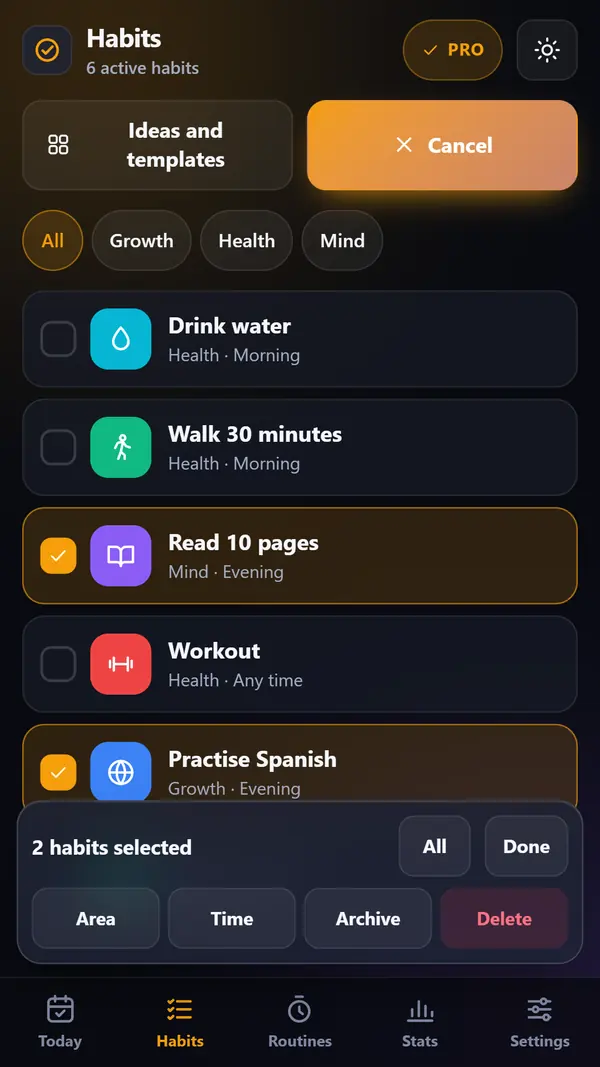
RitualOS is a habit tracker and routine timer in one app. Check off daily habits, keep your streaks, see progress on a calendar heatmap, and run your morning routine, evening wind-down or a quick workout with a timer for each step.
What's new in version 1.3
New in version 1.3, along with a refreshed design and the optional Bright Loop Account. Early-access testers get it through Google Play.
Daily mood check-in
Mood and habits insights
This week review vs last week
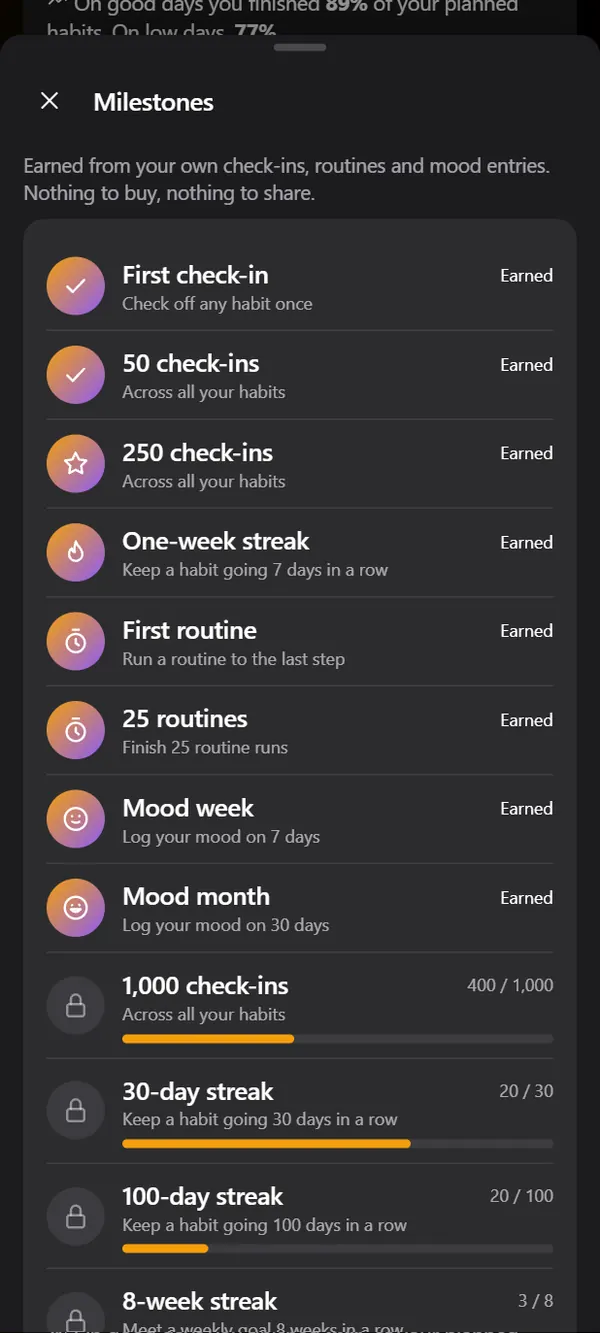
Milestone badges
Habit search
Feature tour.
Every feature in RitualOS, and what it does for you. Items marked Pro are part of the optional subscription.
Habits that fit your week
- Flexible schedules
- Every day, chosen weekdays, a number of times a week, or every few days.
- Counted goals
- Track things like 8 glasses of water or 5 daily prayers, one tap at a time.
- Time-of-day groups and areas
- Today groups habits into morning, afternoon and evening, and areas such as Health or Mind let you filter.
- Skips, catch-up and notes
- Skip a day without losing your streak, fill in missed days from the day strip, and add a note to any day.
- Habit ideas
- Ready-made ideas such as drink water, walk, read, meditate, journal and daily prayers.
- Habit search
- Search the Habits list by name, area, unit or schedule.
Fast check-ins and mood
- Mark all done
- Check off a whole morning, afternoon or evening group in one tap, with Undo.
- Multi-select
- Select several habits to change their area or time of day, archive or delete them together.
- Daily mood check-in
- Log how you feel from Rough to Great on Today. Stats shows your average and how it lines up with your habits.
Challenges, breaks, stacking and reminders
- Challenges
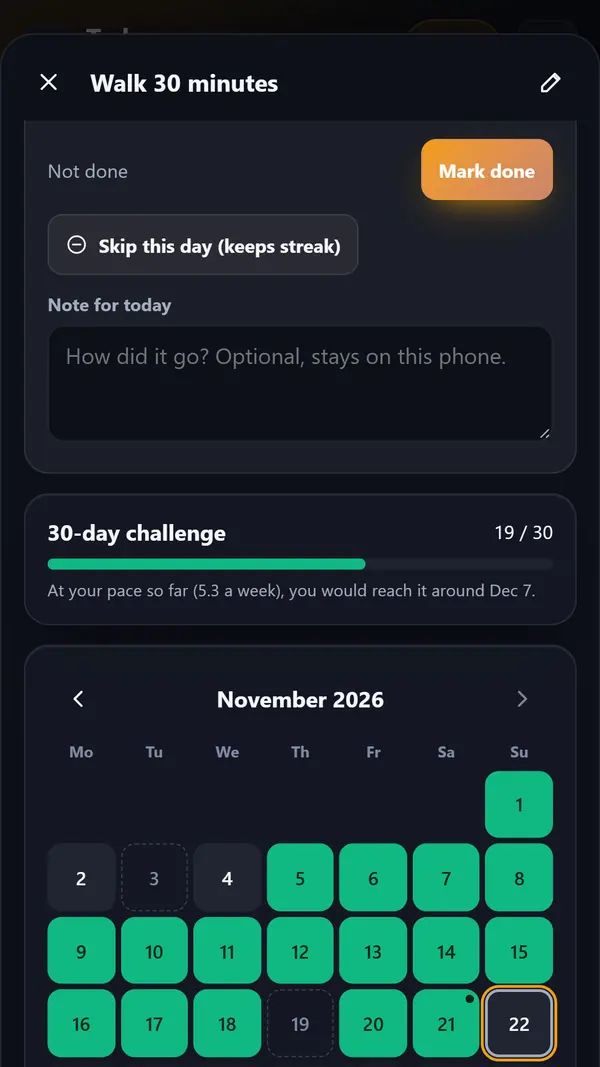
- Set a 21, 30, 66 or 100-day challenge on any habit and see progress and the date you would reach it at your pace.
- Break mode
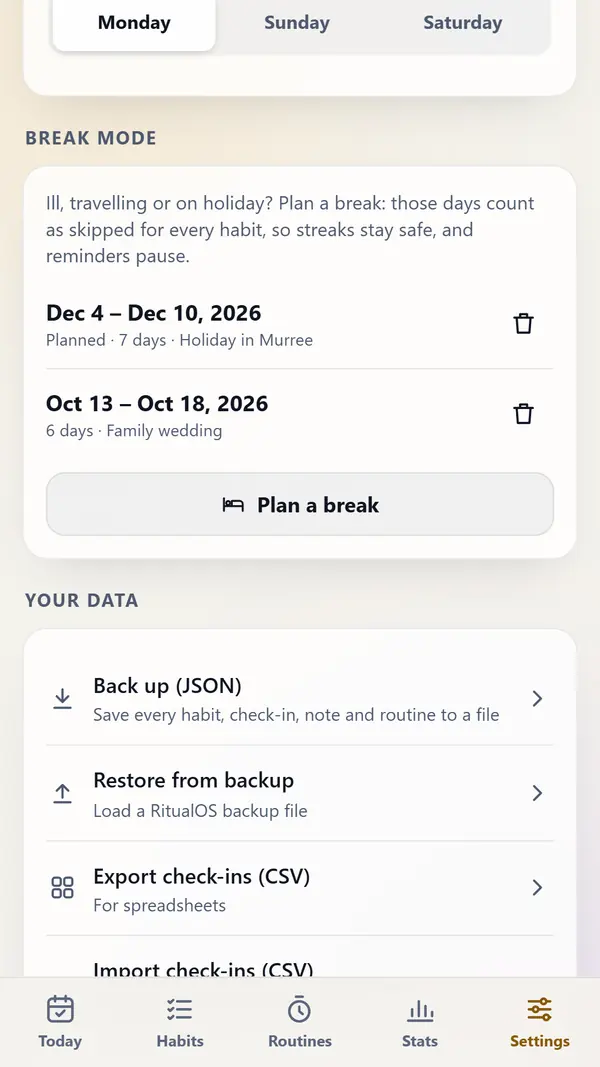
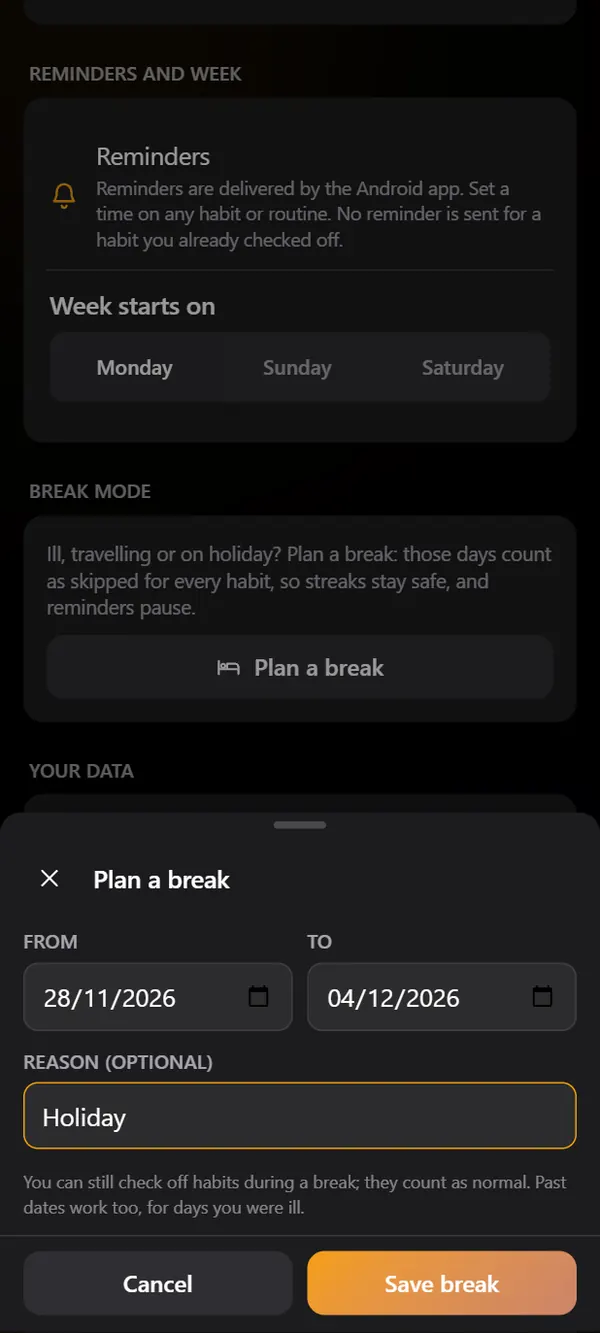
- Plan a holiday or sick days; every habit counts them as skipped, so streaks stay safe and reminders pause.
- Habit stacking
- Attach a new habit to one you already do, or to a cue such as "After I make my coffee".
- Reminders
- Set a reminder on any habit or routine. It is sent only on planned days and not if you already checked it off (Android app).
Stats and reviews
- Streaks and calendars
- Current and best streak for every habit, a month calendar for each habit (last 2 months on the free plan) and a 12-week heatmap of all habits.
- Completion stats
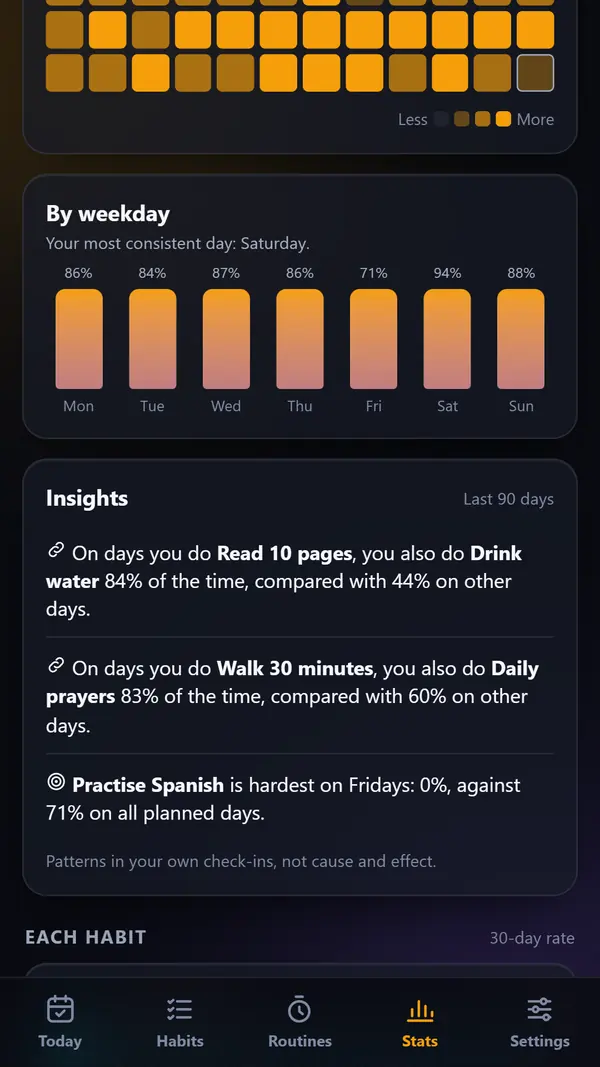
- Completion for 7 and 30 days, perfect days and your most consistent weekday.
- This week vs last week
- Check-ins this week against the same days last week, the biggest changes per habit and streaks to keep today.
- Mood and habits insights
- Your average mood, a 30-day mood chart and how many planned habits you finish on good and low days.
- Milestone badges
- Badges for check-ins, streaks, perfect weeks and months, routines and mood logging, earned from your own data.
- Habit insights Pro
- Strength score, trend chart, and weekly and monthly totals for each habit.
- Insights across habits Pro
- Which habits you tend to do together and your hardest weekday for each.
- Monthly report Pro
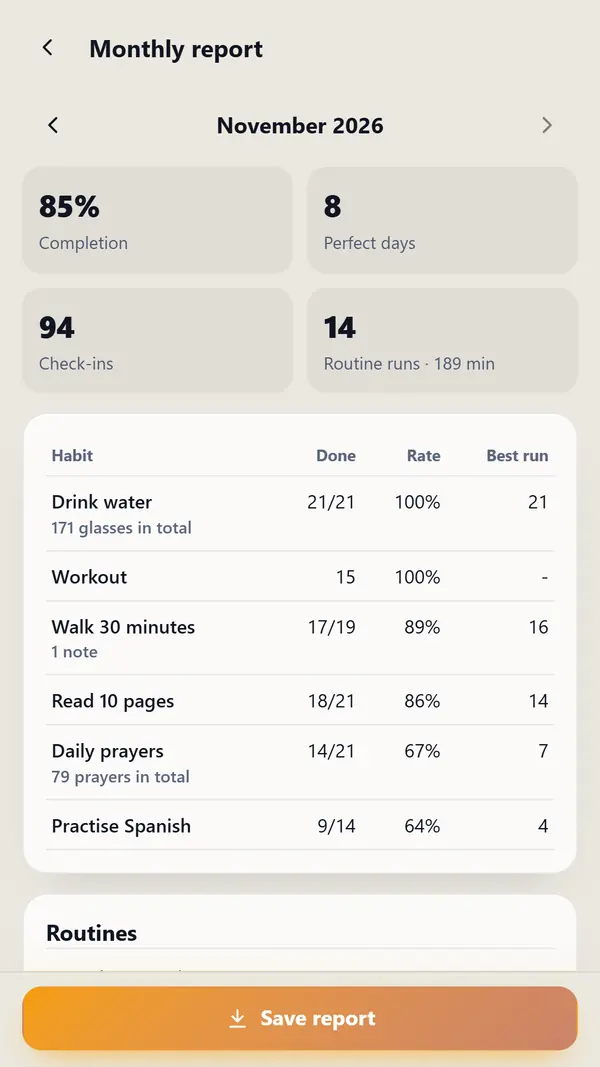
- A report for any month, saved as a printable file.
- 1-year heatmap and full history Pro
- A 1-year heatmap, a month-by-month chart and full calendar history for every habit.
Routines with a timer
- Your own steps or templates
- Build routines or start from morning, evening wind-down, 7-minute workout, desk stretch break or focus session.
- Timer controls
- Pause, go back, skip or add 30 seconds, with a gentle chime and optional voice prompts using your phone's text-to-speech.
- Linked habits
- Link a routine to a habit so finishing it checks the habit off.
Plans, look and data
- Free plan
- Up to 6 active habits and 3 routines, with every schedule type, reminders, the routine timer and 12-week stats.
- Unlimited habits and routines Pro
- No limit on active habits or routines.
- Themes and backup
- System, light and dark themes, accent colours, and JSON backup and restore.
- CSV export and import Pro
- Export check-ins to CSV, and import check-ins from a CSV file with date and habit columns.
- Three extra accent colours Pro
- Cobalt, rose and teal accents.
Full store description
Habits that fit your week
- Every day, chosen weekdays, a number of times a week, or every few days
- Counted goals such as 8 glasses of water or 5 daily prayers
- Morning, afternoon and evening groups, plus areas such as Health or Mind
- Skip a day without losing your streak, fill in missed days later, add a note to any day
- Ready-made ideas: drink water, walk, read, meditate, journal, daily prayers and more
Fast check-ins
- Mark all done: check off a whole morning or evening group in one tap, with undo
- Select several habits to change their area or time of day, archive or delete them together
Challenges and breaks
- Set a 21, 30, 66 or 100-day challenge on any habit and watch your progress and pace
- Break mode: plan a holiday or sick days and every habit counts them as skipped, so streaks stay safe and reminders pause
Streaks, calendar and stats
- Current and best streak for every habit
- Month calendar for each habit and a 12-week heatmap of all habits
- Completion for 7 and 30 days, perfect days and your most consistent weekday
Routines with a timer
- Build your own steps or start from a template: morning, evening wind-down, 7-minute workout, stretch break, focus session
- Pause, go back, skip or add 30 seconds, with a gentle chime and optional voice prompts using your phone's text-to-speech
- Link a routine to a habit so finishing it checks the habit off
Habit stacking and reminders
Attach a new habit to one you already do. Set a reminder on any habit or routine; it is sent only on planned days and not if you already checked it off.
How to use RitualOS.
Step-by-step walkthroughs of the main tasks, with screens from the current version.
1Check off your habitsTick habits, count up goals and catch up on missed days.
- Step 1
Open Today. The ring shows how many of today's habits are done; tap a day in the strip at the top to fill in an earlier day.
- Step 2
Tap the circle next to a habit to check it off. For a counted goal such as Drink water, each tap adds one (5 of 8 glasses). Use Mark all done to finish a whole morning, afternoon or evening group at once, with Undo.
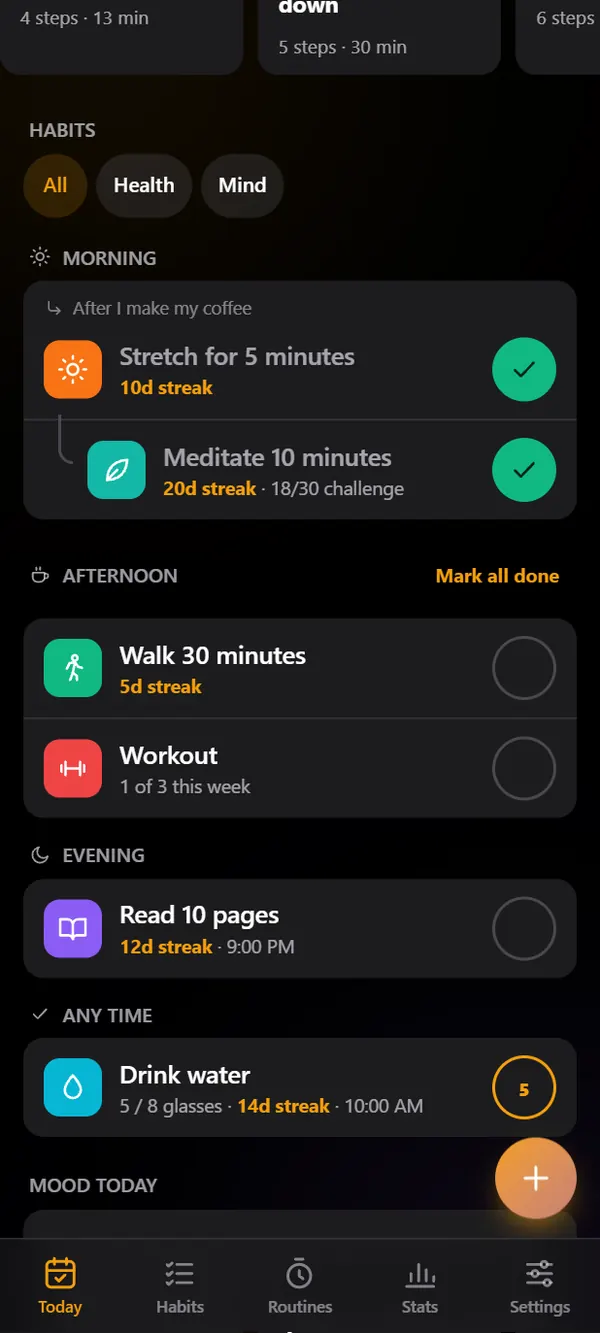
- Step 3
Tap a habit to see its streak, best streak, 30-day rate, challenge progress and calendar. From there you can skip a day without losing the streak or add a note for the day.
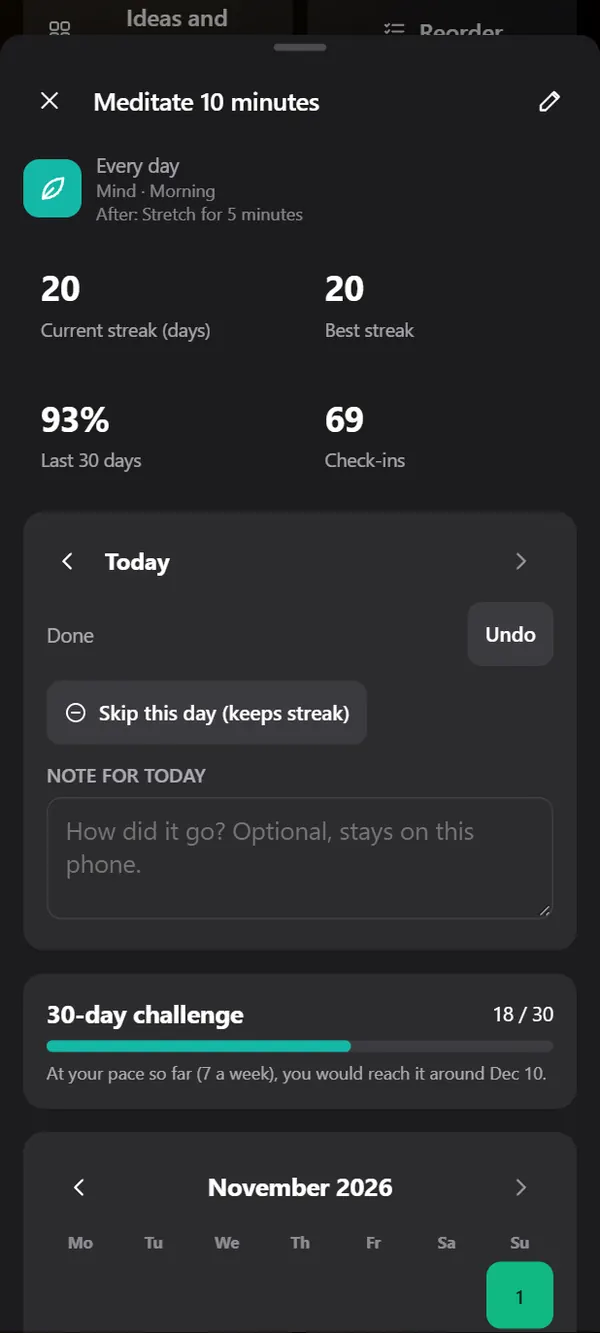
2Log your mood and see how it links to your habitsA one-tap mood check-in each day, compared with your habits in Stats.
- Step 1
At the bottom of Today, under Mood today, tap Rough, Low, Okay, Good or Great. Tap it again to clear.
- Step 2
In Stats, Mood and habits shows your average mood, a 30-day chart and, once there are enough good and low days, how many planned habits you finished on each.
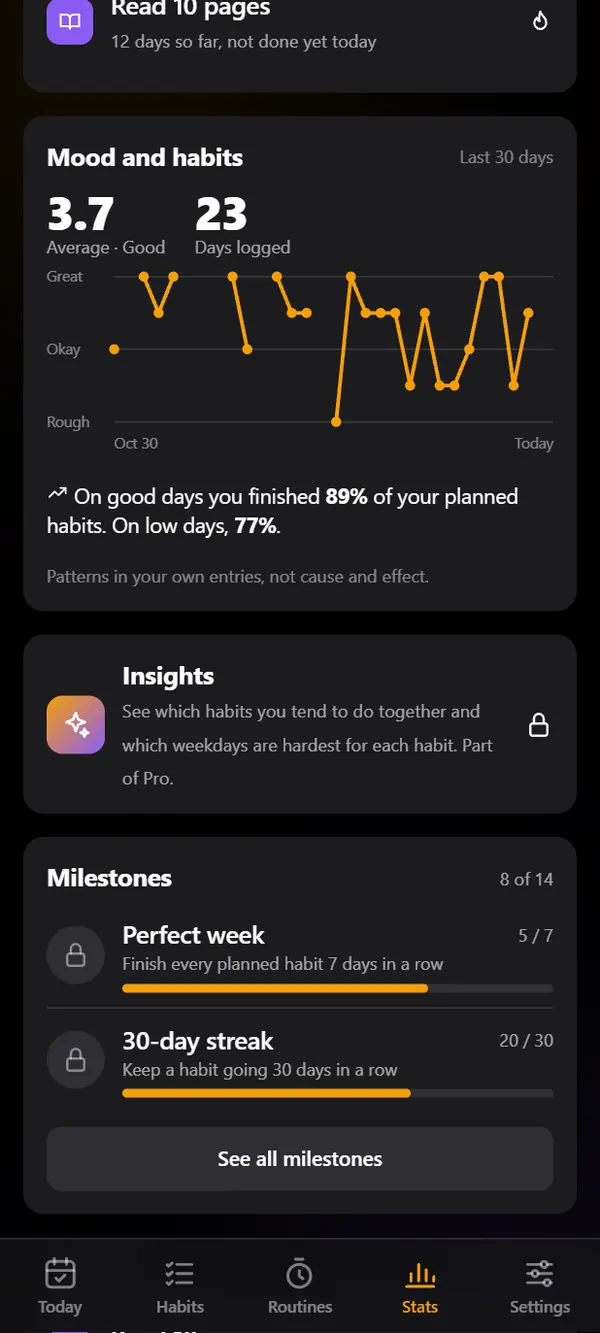
- Step 3
Logging your mood also counts towards the Mood week and Mood month milestones.
3Review your week and milestonesSee how this week compares with last week and which badges you have earned.
- Step 1
Open Stats for today, the last 7 and 30 days, perfect days, routines run and the 12-week heatmap.
- Step 2
Scroll to This week: your check-ins against the same days last week, the habits that changed most, and the streaks to keep today.
- Step 3
Under Milestones, tap See all milestones for every badge, from your first check-in to a perfect month, with progress towards the next ones.
4Find and edit a habitSearch your list and change how a habit is scheduled.
- Step 1
Open Habits to see every habit with its streak and the last 7 days.
- Step 2
Type in Search habits to find a habit by name, area, unit or schedule.
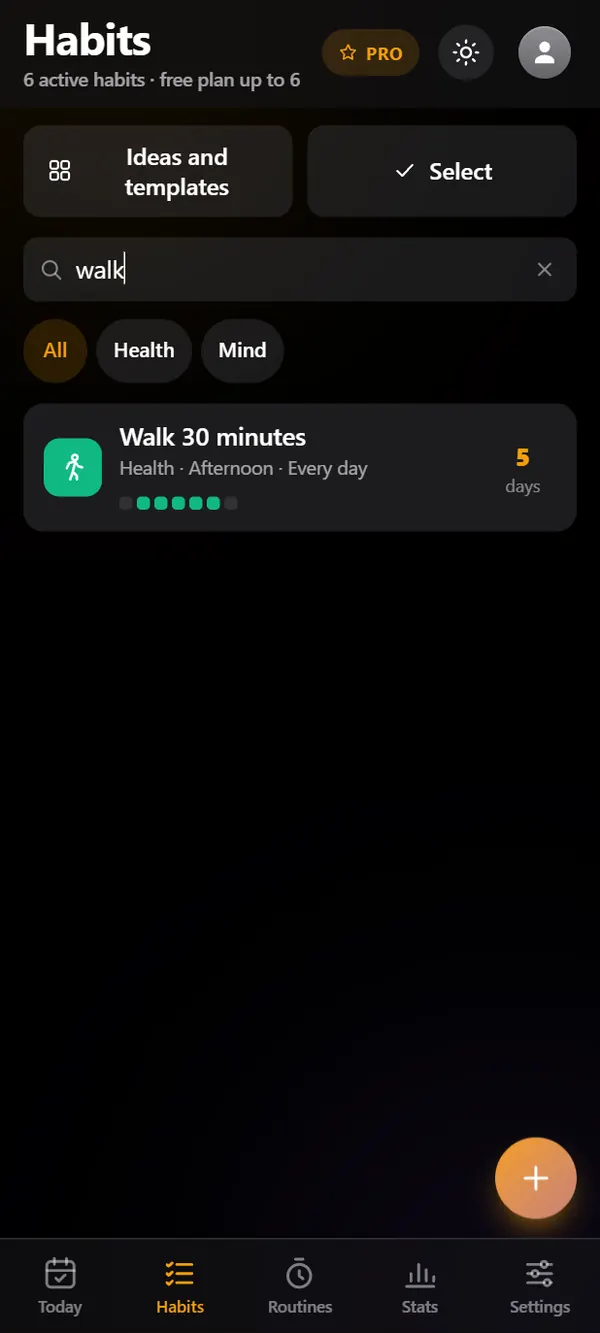
- Step 3
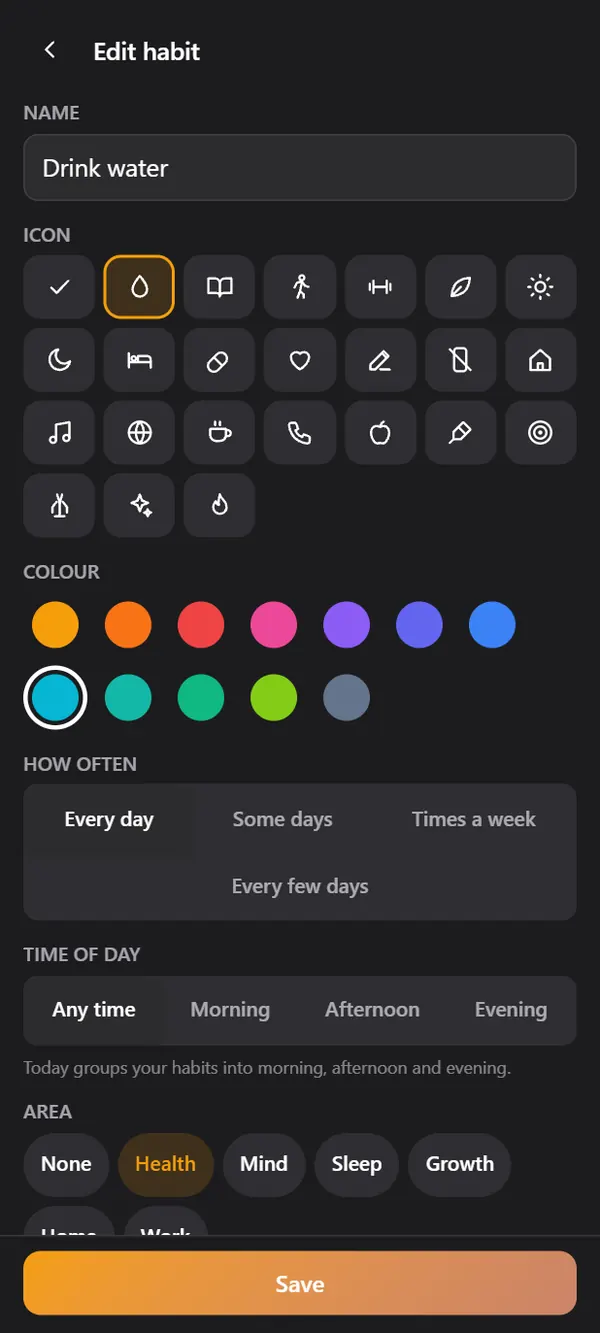
Tap a habit, then the pencil, to change its name, icon, colour, How often, Time of day, area, goal, stacking, challenge and reminder. Tap Save.
- Step 4
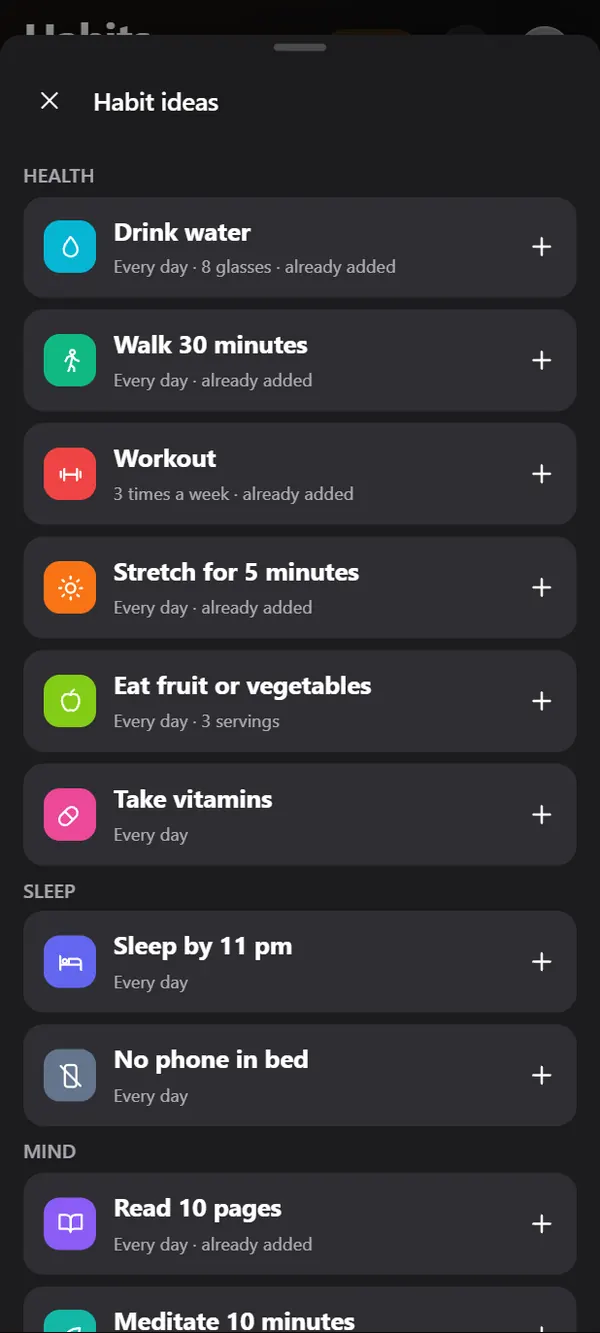
To add a new habit quickly, tap Ideas and templates and pick one such as Drink water or Read 10 pages.
5Run a routine with a timerFollow your morning routine or a quick workout step by step.
- Step 1
Your routines also appear as cards on Today; a finished one shows Done. Tap a card to start it.
- Step 2
Open Routines and tap the play button next to a routine. Routine templates adds ready-made ones like Evening wind-down or the 7-minute workout.
- Step 3
Tap play to start. Each step counts down; go back, skip to the next step or add 30 seconds. A chime and optional voice prompts tell you when to move on. A routine linked to a habit checks it off when you finish.
6Take a break without losing streaksPlan a holiday or sick days so every habit counts them as skipped.
- Step 1
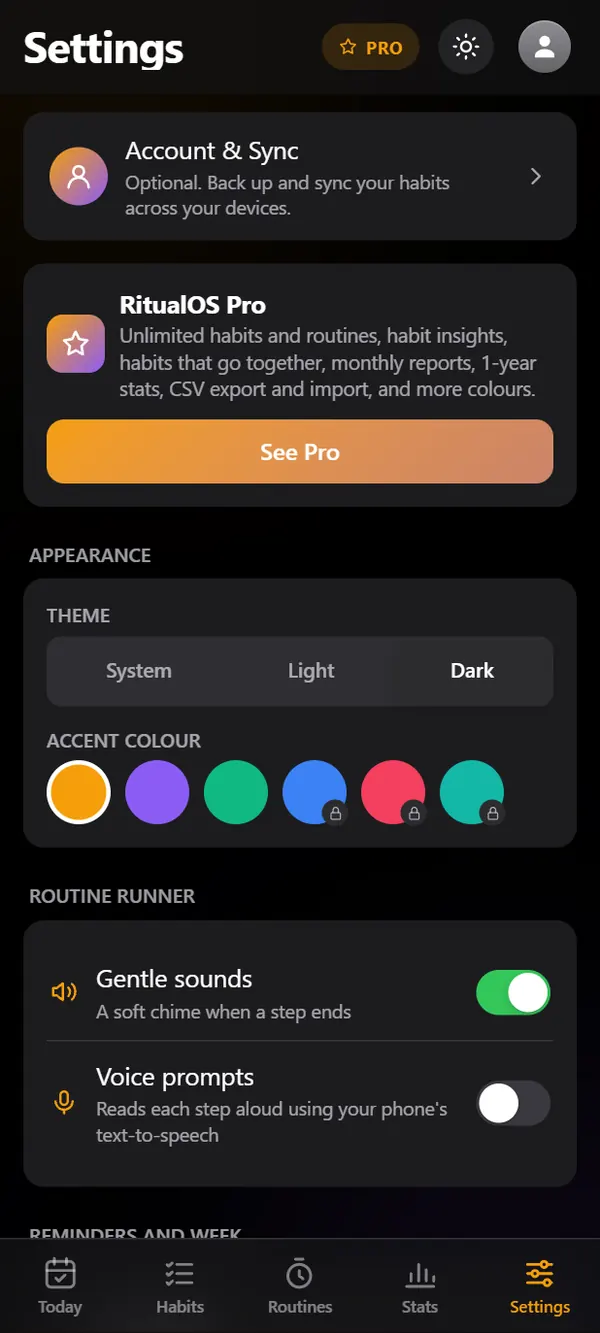
Open Settings from the bottom bar.
- Step 2
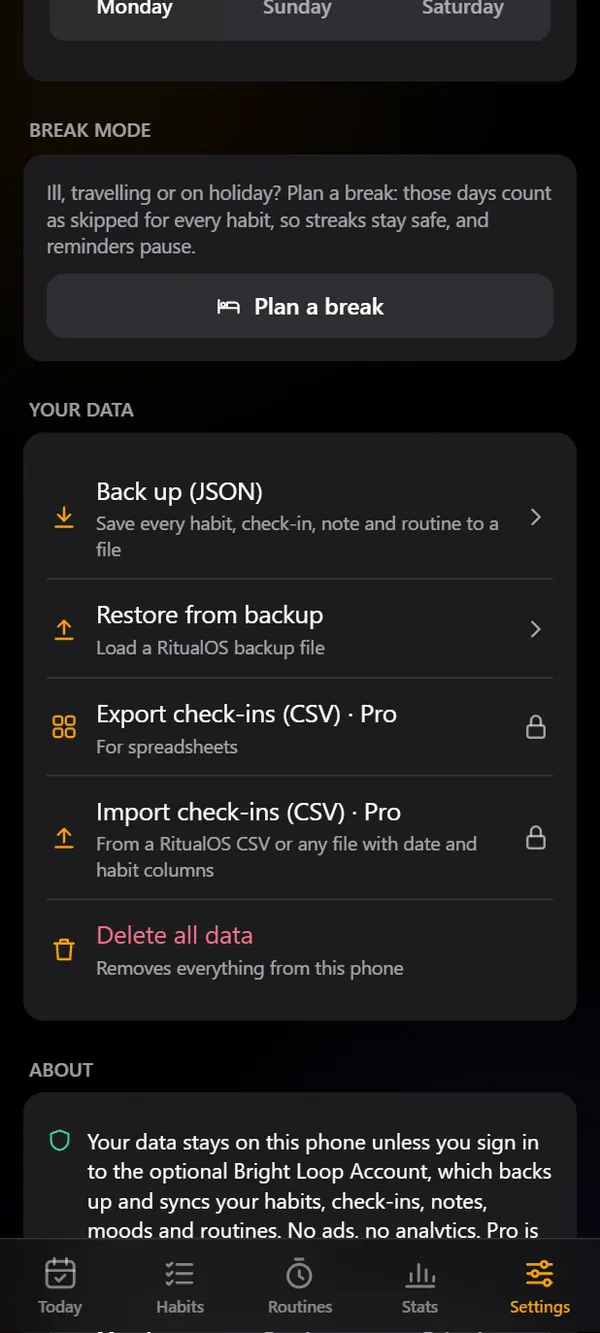
Scroll to Break mode and tap Plan a break.
- Step 3
Pick the first and last day, add a note if you like, and tap Save break. Those days count as skipped for every habit, and reminders pause.
Free, with optional Pro.
Download RitualOS free. Pro is optional and billed by Google Play, which shows the price before you confirm.
Free
- Up to 6 active habits and 3 routines
- All schedule types, counted goals, skips, notes, areas, groups, stacking, challenges, break mode, mark-all and multi-select
- Reminders and the routine timer
- Habit calendars for the last 2 months, 12-week heatmap and stats
- Light and dark themes, JSON backup and restore
RitualOS Pro (optional subscription)
- Unlimited habits and routines
- Habit insights: strength score, trend chart, weekly and monthly totals
- Insights across habits: which habits you tend to do together and your hardest weekday for each
- Monthly report for any month, saved as a printable file
- 1-year heatmap, month-by-month chart and full calendar history
- CSV export, and import of check-ins from a CSV file with date and habit columns
- Three extra accent colours
Pro renews monthly or yearly through Google Play until you cancel; the price and any trial are shown before you subscribe.
Manage or cancel subscriptions in Google Play > Payments & subscriptions. Purchases and Restore purchases
Try it now.
Open RitualOS right here in your browser, or download the Android app file directly.
Open in browser
The full RitualOS app, running in a new tab. Nothing to install.
Some phone-only features, such as purchases, notifications, sharing and camera scanning, work only in the Android app. Anything you do in the browser is saved in that browser only, unless you sign in to the Bright Loop Account.
Download the APK
Install RitualOS on an Android phone without Google Play.
- Version
- 1.3
- Size
- 4.0 MB
- SHA-256
d0420aa55f9271f9c08a003021e76151837d277a7cd4a4c5a0da55a32e84c8b4
An APK installed from this website can't be updated from Google Play later. To switch to Google Play, uninstall it and install from Play. Your data only comes with you if you back it up with the Bright Loop Account first. How to install an APK
Requirements & details.
- Requires
- Android 7.0 or later
- Size
- 4.0 MB
- Version
- 1.3
- Price
- Free, optional Pro subscription
- Internet
- Not required
- Account
- Optional Bright Loop Account
- Ads
- None
- Category
- Productivity, Health & Fitness
- Developer
- Bright Loop (Google Play: Bright Loop Games)
- Availability
- Early access (Google Play closed testing)
- Web version
- Open in browser
How to get RitualOS.
RitualOS is in early access through Google Play closed testing. It takes about two minutes.
- Ask to join the tester listEarly access runs as a Google Play closed test, so your Google account must be on the tester list before the opt-in link works. Send us the Gmail address you use on Google Play and we'll add you.
- Open the opt-in linkOn your Android phone, signed in to the same Google account, open the RitualOS early access link.
- Tap "Become a tester"Google Play confirms that you've joined the test.
- Install from Google PlayTap the "download it on Google Play" link on that page, or open the Google Play page, then tap Install. Updates arrive through Google Play like any other app.
- Tell us what you thinkEarly access means your feedback shapes the next update. Email rehman@mindum.dev any time.
Link not working? See Troubleshooting or the full early access guide.
Account & sync.
Optional. RitualOS works fully without an account. Sign in to the free Bright Loop Account to back up your RitualOS data and keep it in sync across your phones.
What syncs
- Habits, check-ins and streaks
- Routines and settings
What stays on this phone
- Your Pro status (Google Play restores it)
Account & Sync is part of RitualOS 1.3. Look for it at the top of Settings.
Privacy.
RitualOS keeps your data on your phone. No ads and no analytics.
Private and offline
No account needed, no ads, no analytics. Your data is stored only on your phone. RitualOS is a personal tracking tool, not medical advice.
If you sign in
The Bright Loop Account is optional. If you sign in, RitualOS backs up the records listed under Account & sync to your account so you can restore them on another phone. Photos and files are never uploaded, and you can export or delete your cloud data at any time.
Read the full Privacy Policy.
Tips.
- Start with habits you can do in under two minutes; you can raise the goal later.
- Stack a new habit after one you already do, so the first reminds you of the second.
- Missed a day you actually did? Tap that day in the strip on Today and check it off.
- Going away? Plan a break in Settings before you leave so your streaks stay safe.
- Log your mood daily for a couple of weeks; the Mood and habits card needs a few good and low days to compare.
Troubleshooting.
Reminders do not arrive
Allow notifications for RitualOS in Android Settings > Apps > RitualOS > Notifications. Reminders are not sent on days the habit is not planned or when it is already checked off, or during a break.
Voice prompts are silent
Voice prompts use your phone's text-to-speech. Check it is installed and the media volume is up; chimes still play without it.
A habit is missing from Today
It may not be scheduled for this day. Look under Not scheduled today, or check the area filter at the top of the list.
I cannot add another habit
The free plan allows 6 active habits. Open a habit, tap the pencil and choose Archive to make room (its history is kept), or get Pro.
My streak reset after a holiday
Plan breaks in Settings > Break mode ahead of time; you can also open the habit and mark missed days as skipped.
Questions.
Will skipping a day break my streak?
No. Use Skip this day (keeps streak) in the habit's details, or plan a break in Settings; skipped days do not count against your streak.
How do habits I do a few times a week work?
Choose Times a week and a number. The habit stays on Today until you reach that number for the week, and its streak counts weeks.
What does the mood check-in do?
It saves how you felt each day. Stats then shows your average mood, a 30-day chart and how many planned habits you finished on good and low days. These are patterns in your own entries, not cause and effect.
How do I earn milestones?
From your own check-ins, streaks, perfect weeks, routines and mood entries. Open Stats and tap See all milestones for the full list and your progress.
Why does it say I have reached the free limit?
The free plan tracks up to 6 active habits and 3 routines. Archive a habit (open it, tap the pencil, then Archive) to make room, or get Pro for unlimited habits.
Can a routine check off a habit?
Yes. Link a routine to a habit when you edit it; finishing the routine checks that habit off.
Can I see this week against last week?
Yes. Stats shows This week with your check-ins against the same days last week, the habits that changed most and the streaks to keep today.
Is RitualOS free?
Yes. RitualOS is free to download and use. RitualOS Pro is an optional monthly or yearly subscription through Google Play that adds the extras listed under Free and Pro. Google Play shows the price, and any trial, before you confirm.
Why can't I find RitualOS on Google Play?
RitualOS is in early access (a Google Play closed test), so it only appears for people on the tester list. Follow the steps under How to get it. Once it becomes public, anyone can install it from Google Play.
Does RitualOS work offline?
Yes. RitualOS works without an internet connection. You only need a connection for optional things like Bright Loop Account sync and Google Play purchases.
Do I need an account?
No. RitualOS works fully without one. The Bright Loop Account is optional and adds cloud backup and sync across your phones.
How do I move to a new phone?
Sign in to your Bright Loop Account on the new phone and choose "Use Cloud Data", or export a backup file on the old phone and restore it on the new one. Photos and files only move with a backup file. Pro comes back with Restore purchases. See Move to a new phone.
How do I restore a purchase?
Make sure your phone uses the same Google account you bought with, open RitualOS and tap Restore purchases. Google Play checks your purchases and RitualOS unlocks what you own. More about purchases.
Can I use RitualOS in a browser?
Yes. Tap Open in browser to run it in a new tab. Some phone-only features, such as purchases, notifications, sharing and camera scanning, work only in the Android app, and anything you do there is saved in that browser.
Can I install it without Google Play?
Yes, with the APK on this page (version 1.3, 4.0 MB). An APK install can't be updated from Google Play later; see Install an APK on Android.
What do I need to run it?
Android 7.0 or later, or any modern browser for the web version.
Is it available on iPhone?
There's no iPhone app at the moment. RitualOS is made for Android, but you can open the web version in Safari.
Get help with RitualOS
Email rehman@mindum.dev. Include your phone model, Android version and what happened, and we'll take it from there.
Help Centre
Step-by-step guides for early access, sync, backups, purchases and moving phones. Visit the Help Centre
More apps you might like.
SnapMacro
Calorie and macro counter with 600+ world foods, exercise log and fasting timer.
EchoNote
Talk or type your day. Tasks, due dates, ideas and mood are picked out for you.
Unplug
Pomodoro focus timer with offline background sounds, daily goals and a heatmap
IronOS
Log sets fast, supersets, progression hints, rest timer, 1RM and body stats