
NoorPro
Offline prayer times, Qibla, iqamah, reminders, Hijri calendar, fasts and zakat
Google Play pageDownload APK v1.3 · 4.1 MB
Early access on Google Play closed testing. You need to be on the tester list first: see how to join.
A closer look.
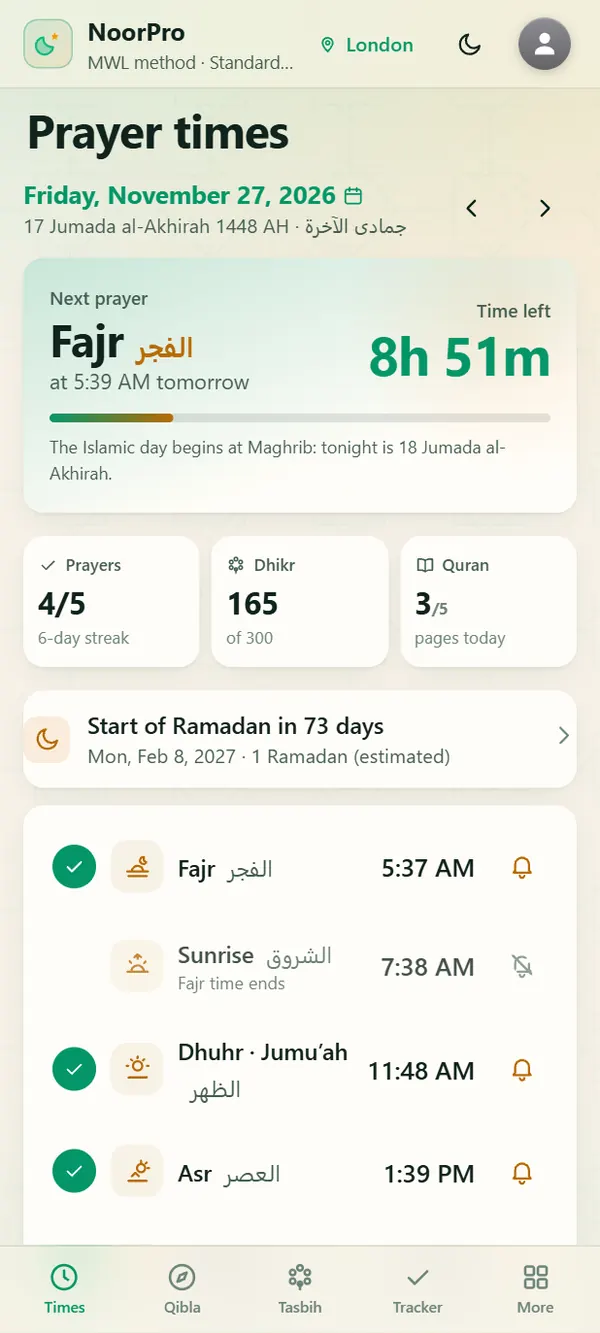
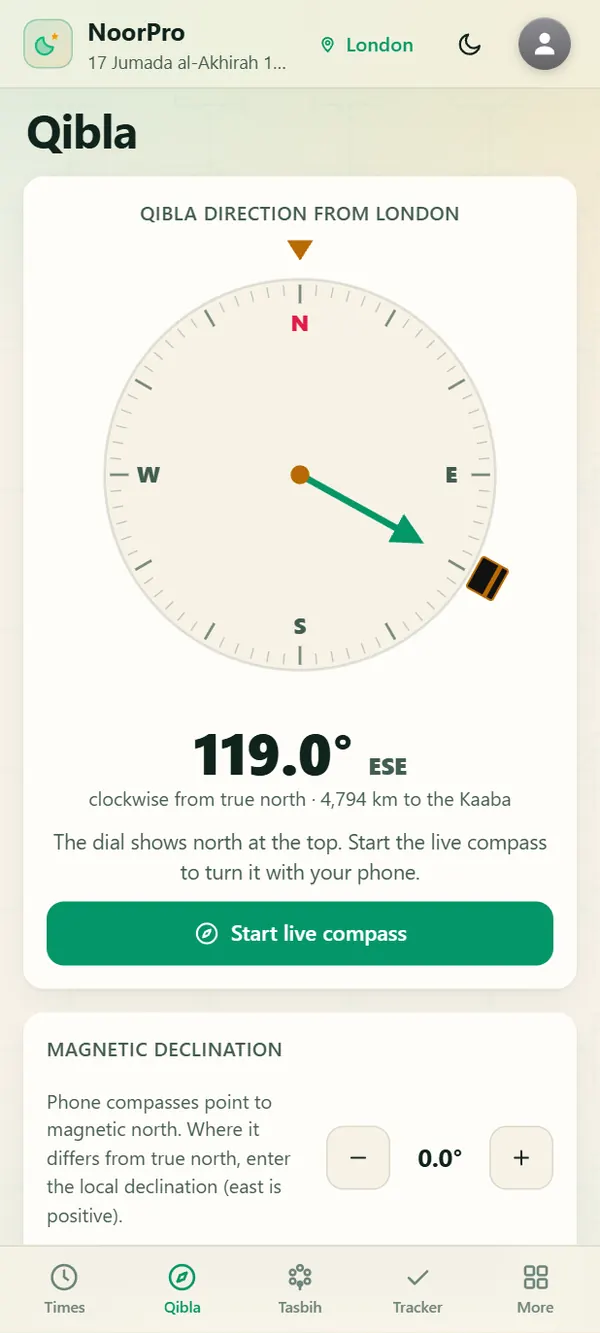
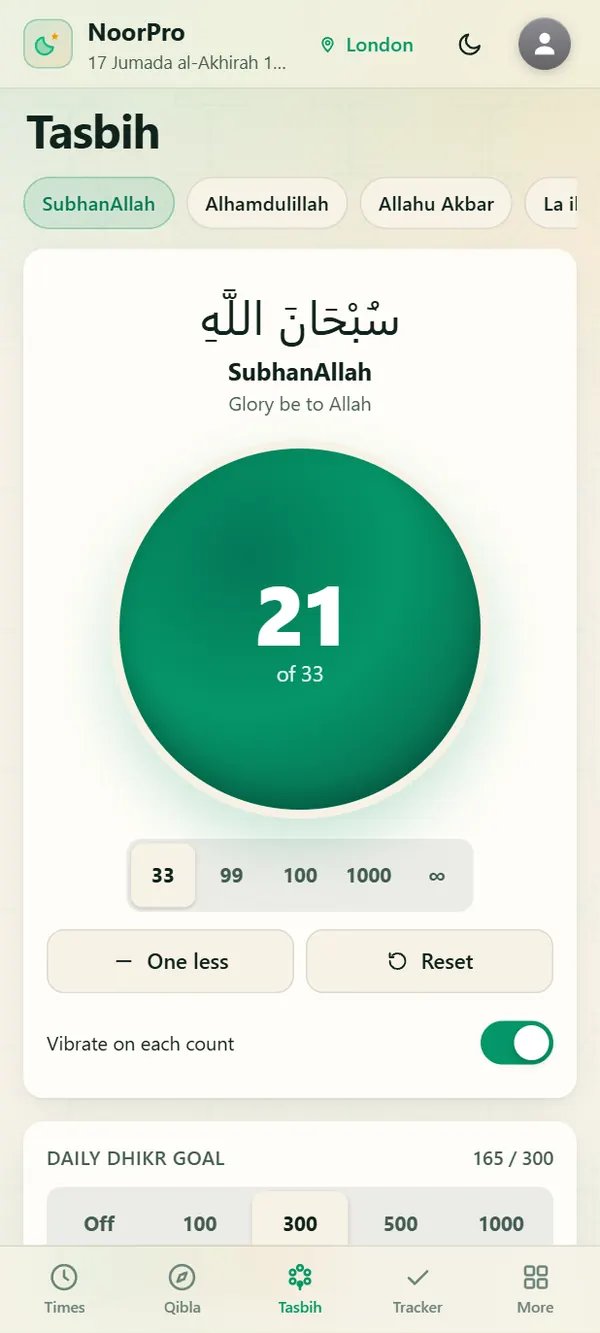
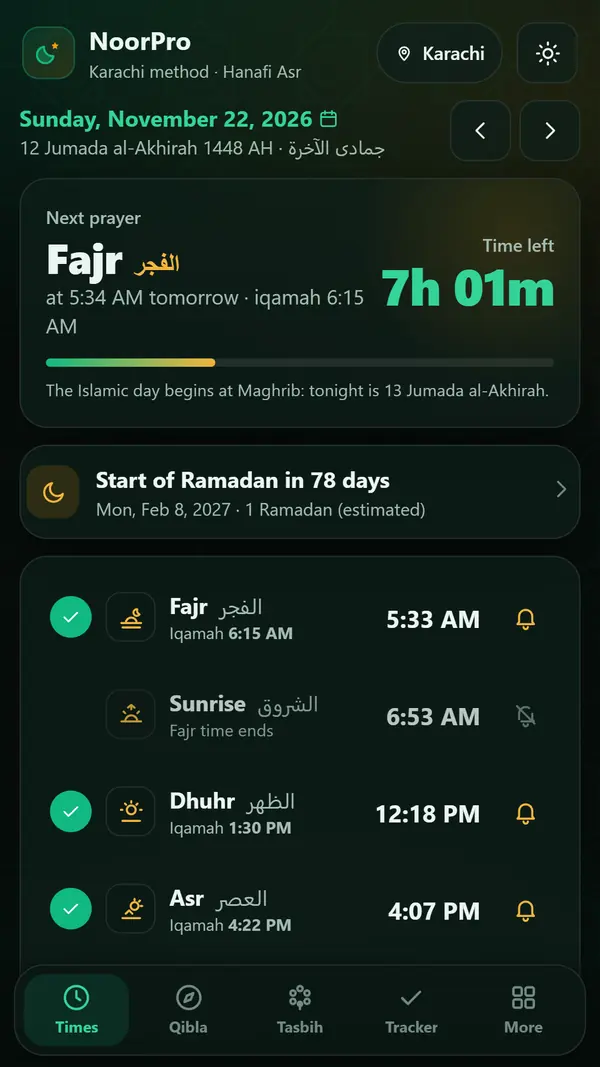
NoorPro is a calm, private Muslim daily companion. It works out prayer times on your phone, shows the Qibla, reminds you when each prayer begins, and keeps a private prayer and fasting log. No account needed, no ads, and nothing you enter leaves your phone.
What's new in version 1.3
New in version 1.3, along with a refreshed design and the optional Bright Loop Account. Early-access testers get it through Google Play.
Quran reading tracker with daily page goal, streak and khatm counter
Today at a glance
Daily dhikr goal
Feature tour.
Every feature in NoorPro, and what it does for you. Items marked Pro are part of the optional subscription.
Prayer times
- Offline prayer times
- Fajr, Sunrise, Dhuhr, Asr, Maghrib and Isha are worked out on your phone from standard astronomical formulas, so no internet is needed.
- Calculation methods
- Muslim World League, Karachi, ISNA, Umm al-Qura, Egypt, Gulf, Dubai, Kuwait, Qatar, Singapore, JAKIM, Kemenag, Diyanet (approximate), Tehran, France and Russia, with Standard or Hanafi Asr and a high-latitude rule.
- Compare methods
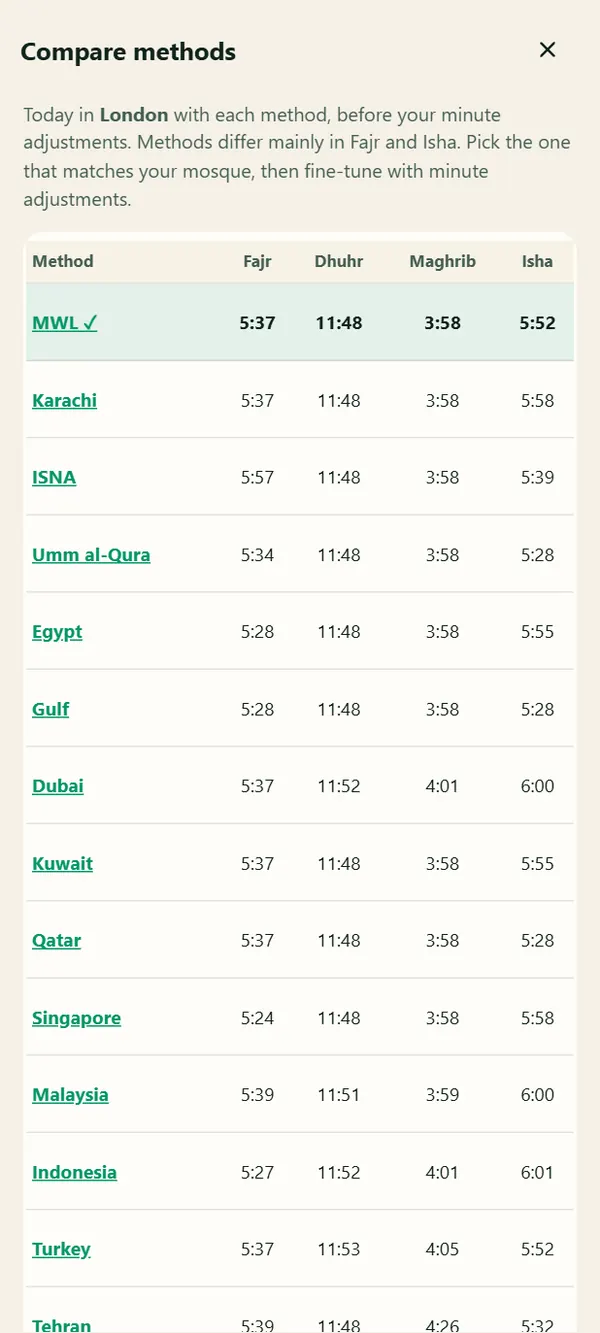
- See today’s times with every method side by side to find the one your mosque uses.
- Minute adjustments
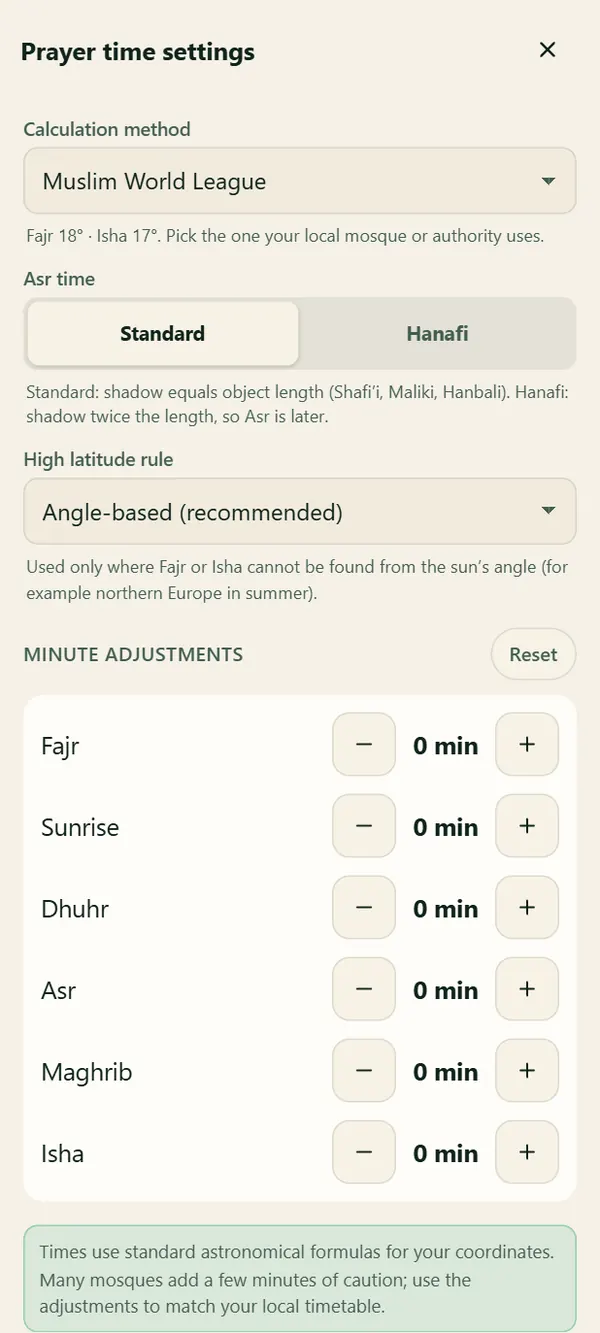
- Move any prayer time by minutes to match your local mosque timetable.
- Countdown and night times
- A next-prayer countdown, plus Imsak, midnight and the start of the last third of the night.
- Next key date
- A countdown on the Times tab to the next key date, such as the start of Ramadan or Eid.
- Location your way
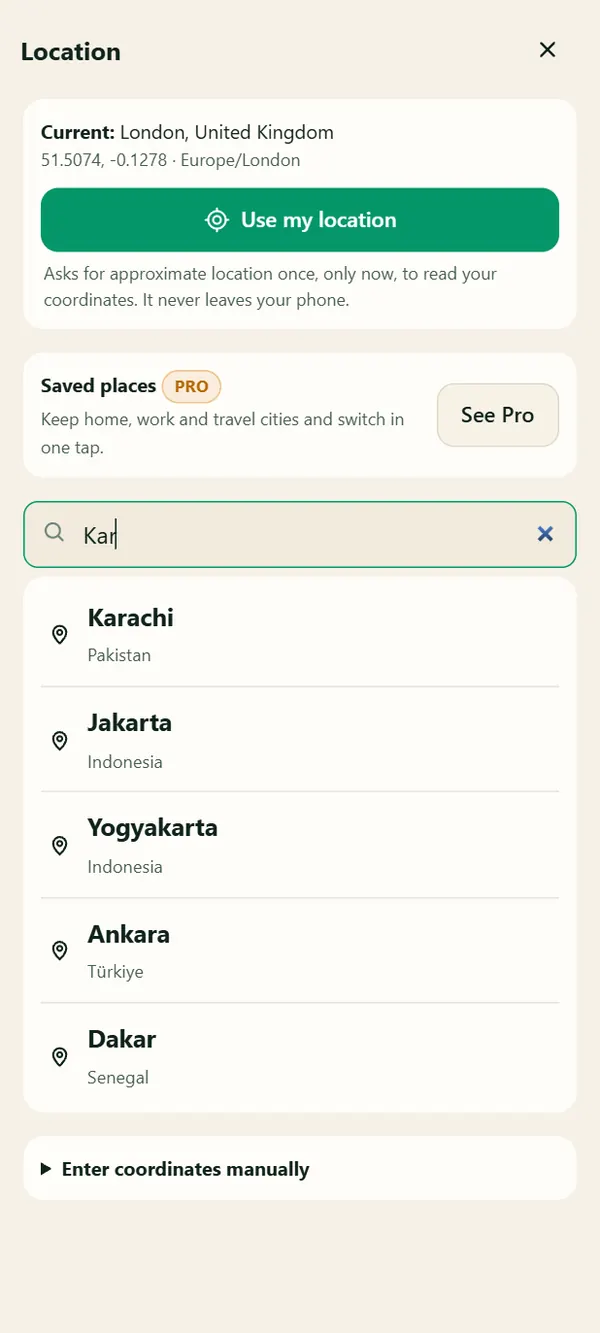
- Use your location, pick from 270+ cities, or enter coordinates. Location is read only when you tap Use my location.
Today and reminders
- Today at a glance
- Three tiles on the Times tab show prayers ticked today with your streak, today’s dhikr against your goal, and Quran pages read today. Tap a tile to jump to it.
- Prayer reminders
- A notification when each prayer begins, chosen per prayer. Reminders work in the Android app.
- Early reminders Pro
- An extra reminder 10, 15 or 30 minutes before each prayer.
- Jumu’ah and suhoor reminders Pro
- A reminder before Jumu’ah on Fridays and before Fajr in Ramadan.
- Voluntary fast reminders Pro
- A reminder the evening before Mondays and Thursdays, the white days, Arafah and Ashura.
- Iqamah times Pro
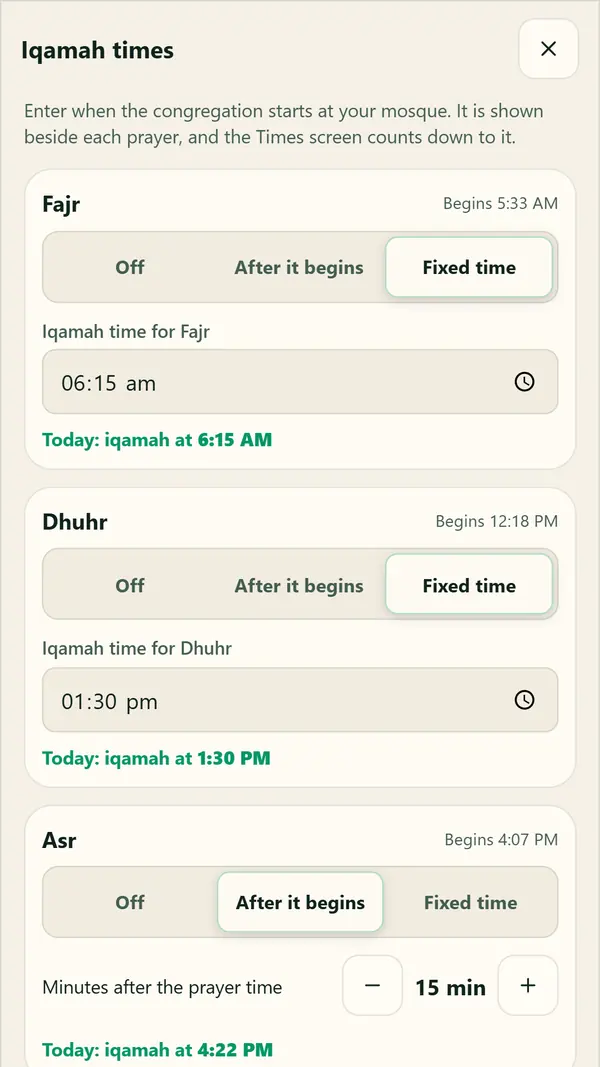
- Your mosque’s iqamah for each prayer, a set number of minutes after the prayer time or at a fixed time, shown beside it with a countdown.
Qibla and calendar
- Qibla direction
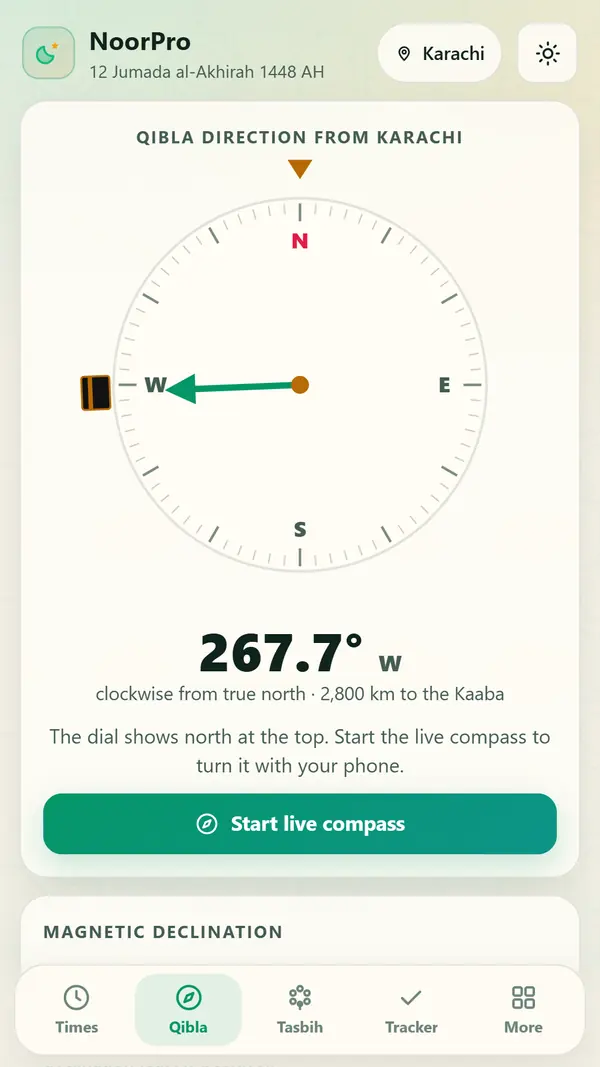
- The great-circle bearing to the Kaaba and the distance from your city, with a magnetic declination setting.
- Live compass
- On phones with a magnetic sensor, Start live compass turns the dial with your phone. Without a sensor, NoorPro tells you clearly.
- Islamic calendar
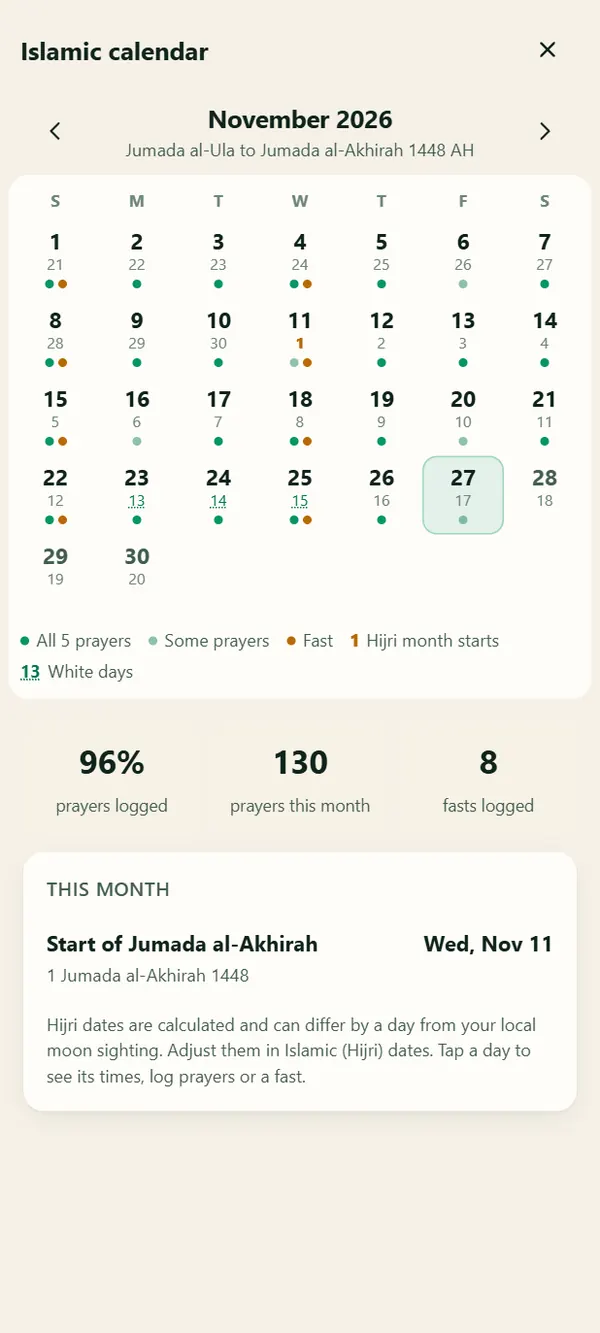
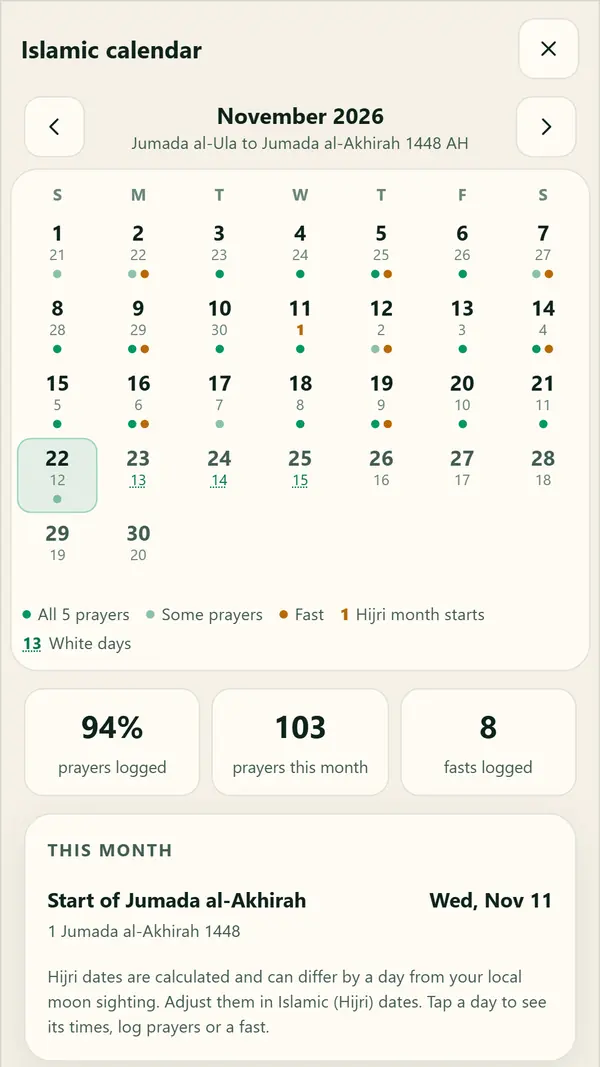
- A month view with Hijri dates, Ramadan, Eid, Arafah, Ashura and the white days. Tap any day to see its times and log prayers or a fast.
- Hijri date converter
- Convert Gregorian to Hijri and Hijri to Gregorian. Hijri dates are calculated and can be adjusted by a day to match your local moon sighting.
- Month timetable Pro
- Every day of the month in one table with Hijri dates, saved or shared as a CSV file.
- Ramadan timetable Pro
- Imsak, suhoor and iftar for every day of Ramadan, with CSV export.
- Places at a glance Pro
- Keep up to 20 cities and see their prayer times side by side, each in its own local time.
Tracker
- Prayer tracker
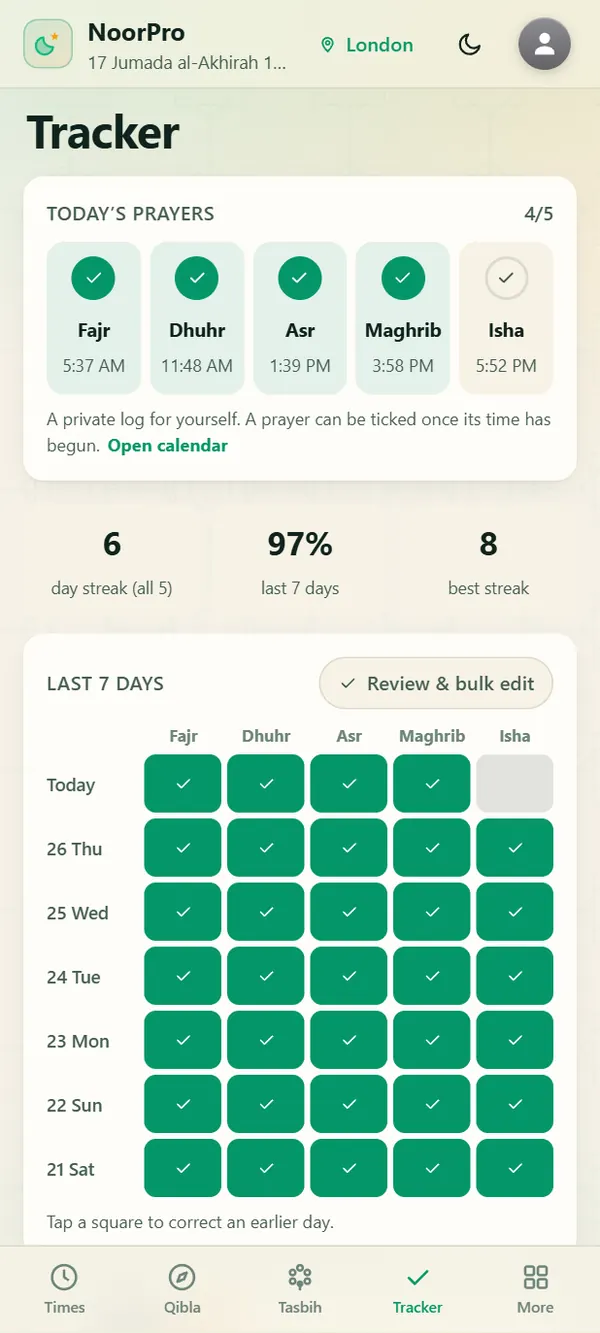
- Tick off each prayer and see your week, day streak, last-7-days percentage and best streak.
- Review and bulk edit
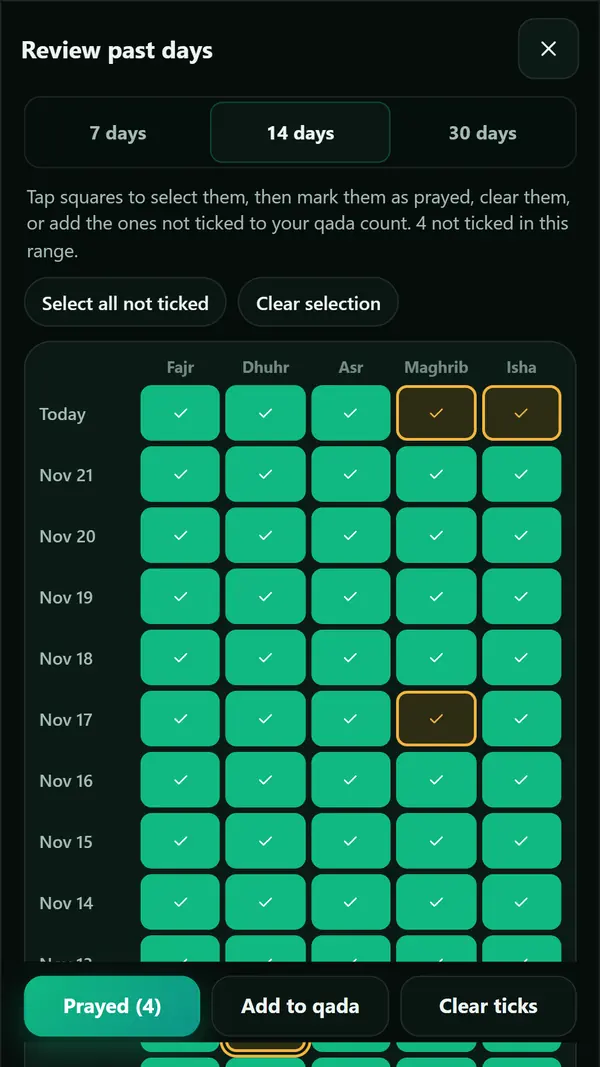
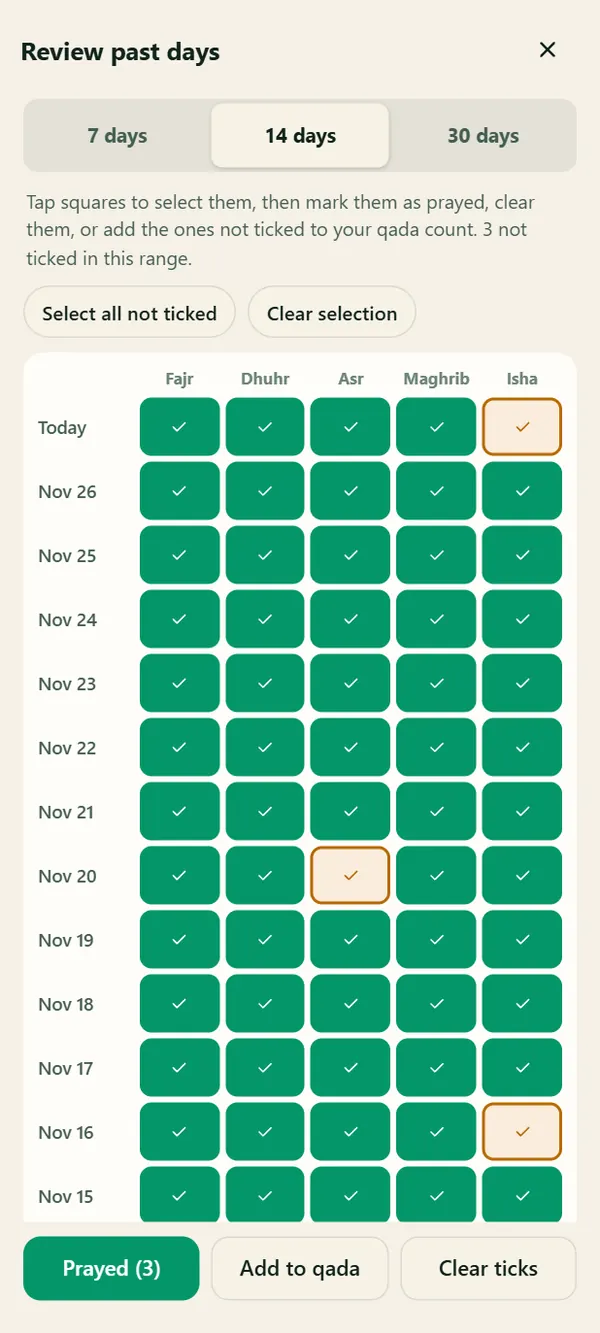
- Review 7, 14 or 30 days at once: select many prayers, mark them as prayed, clear them or add them to qada, with undo.
- Qada counter
- Count the prayers you owe, set a daily make-up goal and see an estimated finish date.
- Fasting log
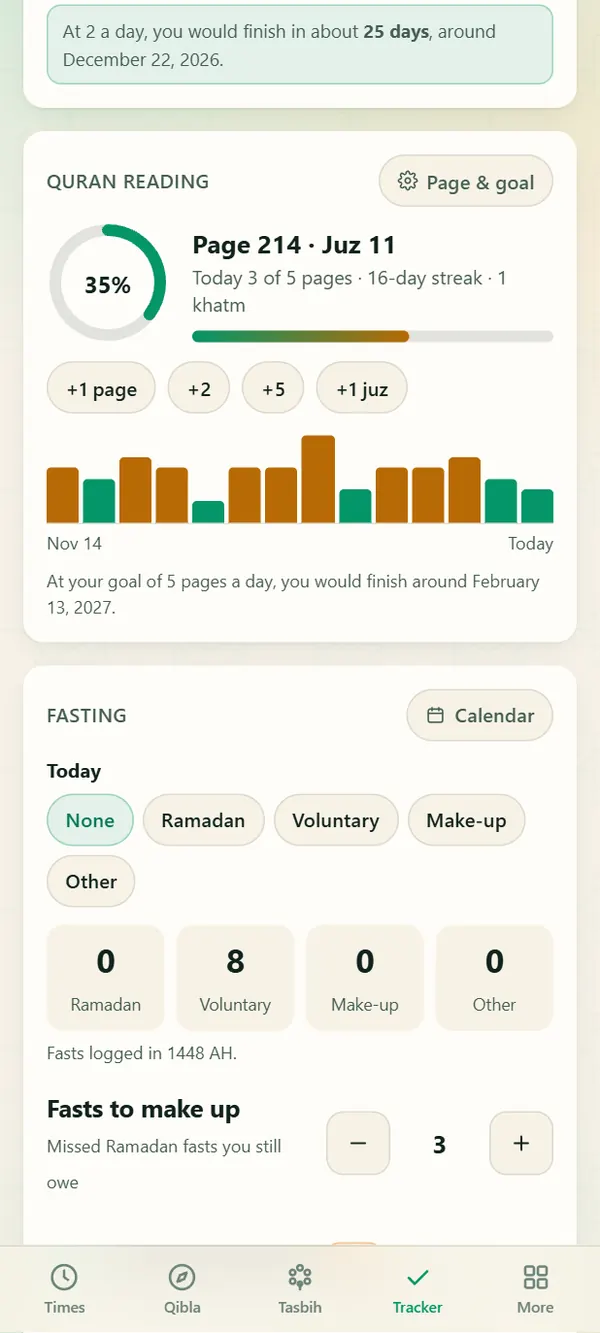
- Log Ramadan, voluntary, make-up and other fasts, see this Hijri year’s count and keep a count of fasts you still owe.
- Tracker insights Pro
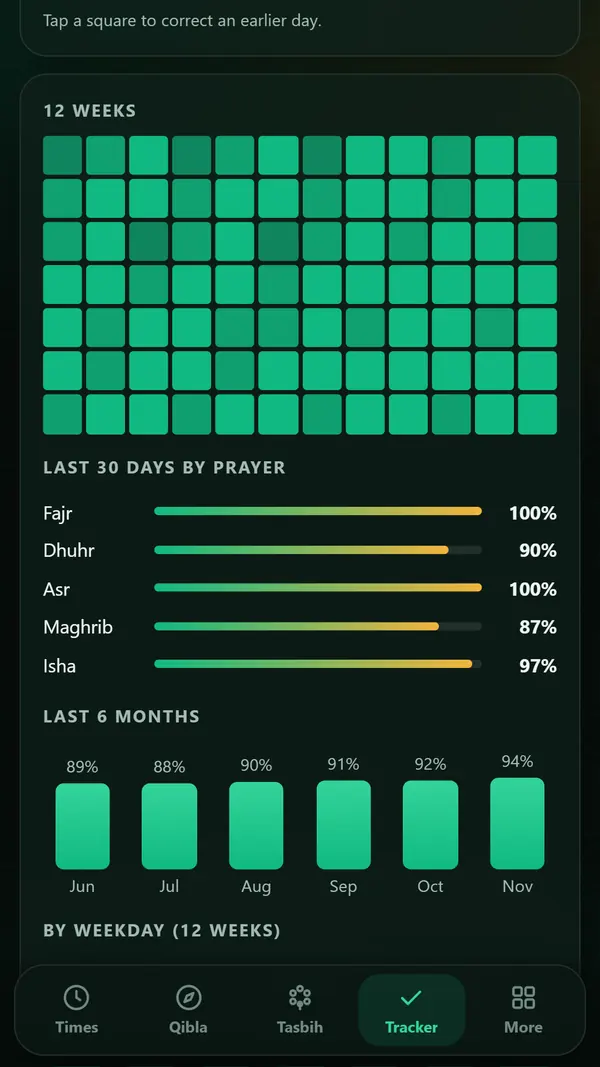
- A 12-week view, the last 30 days by prayer, a 6-month trend, a weekday pattern and CSV export of your prayer log.
Quran and dhikr
- Quran reading tracker
- Log pages with +1 page, +2, +5 or +1 juz. See your page and juz, a daily page goal, your reading streak, the last 14 days, an estimated finish date and a khatm counter.
- Tasbih counter
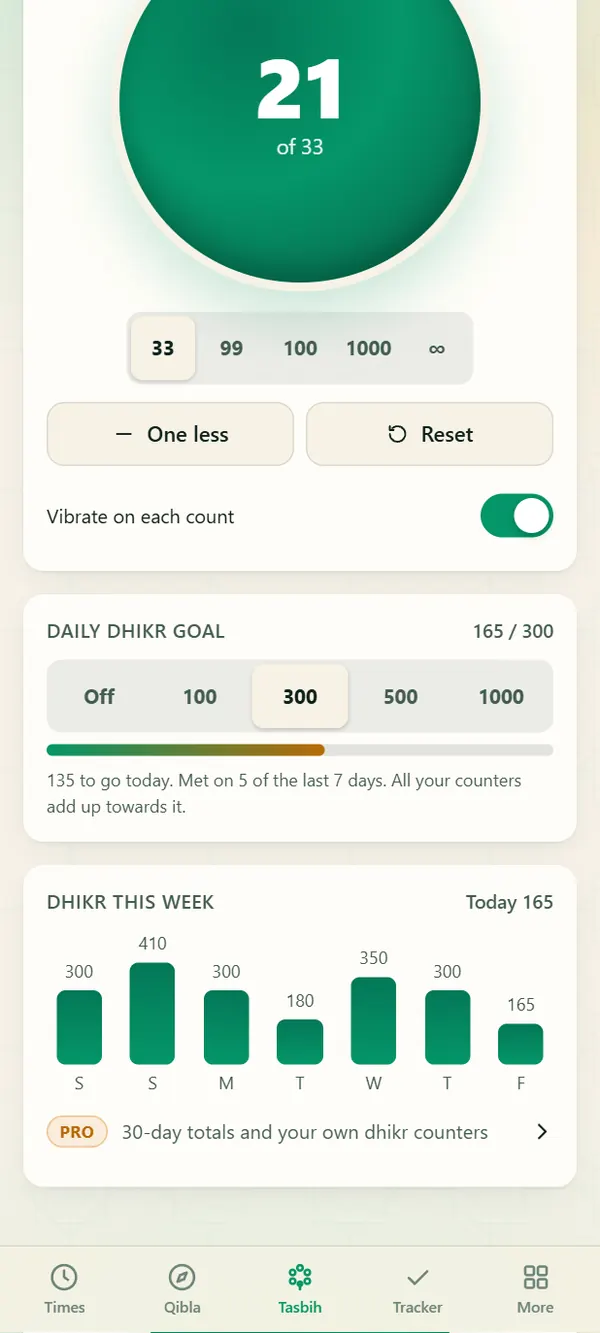
- Common dhikr in Arabic with transliteration and meaning, targets of 33, 99, 100, 1000 or unlimited, and gentle vibration.
- Daily dhikr goal
- Set a daily total of 100, 300, 500 or 1000. All your counters add towards it, and a weekly chart shows how you did.
- Your own dhikr Pro
- Add your own counters with targets, plus 30-day totals.
Zakat, privacy and backup
- Zakat calculator
- Add up cash, bank balances, gold, silver, investments, business stock and money owed to you in your currency, minus debts due now, against a gold or silver nisab using prices you enter. A guide, not a ruling.
- Private by design
- No ads and no analytics. Your location, settings and logs stay on your phone.
- Backup and restore
- Export a backup file (JSON) and import it on another phone, or turn on the optional Bright Loop Account sync under More > Account & Sync.
- Light and dark themes
- Switch with the moon button at the top, or choose the theme and clock format in More > Appearance.
Full store description
Prayer times that work offline
- Fajr, Sunrise, Dhuhr, Asr, Maghrib and Isha from standard astronomical formulas, no internet needed
- Common methods: Muslim World League, Karachi, ISNA, Umm al-Qura, Egypt, Gulf, Dubai, Kuwait, Qatar, Singapore, JAKIM, Kemenag, Diyanet (approximate), Tehran, France and Russia
- Compare all methods side by side for today to find the one your mosque uses
- Standard or Hanafi Asr, high-latitude rules and minute adjustments
- Next-prayer countdown, Imsak, midnight and the last third of the night
- Countdown to the next key date, such as Ramadan or Eid
- Use your location, pick from 270+ cities, or enter coordinates
Qibla
- Great-circle bearing to the Kaaba and the distance from you
- Live compass on phones with a magnetic sensor, with a clear message if there is none
Islamic calendar and fasting
- Month calendar with Hijri dates, Ramadan, Eid, Arafah, Ashura and the white days
- Tap any day to see its prayer times, log prayers or a fast
- Fasting log and a count of fasts you still owe
- Convert dates both ways, Gregorian to Hijri and Hijri to Gregorian
- Hijri dates are calculated and may differ by a day from local moon sighting; adjustable
Tracker, tasbih and zakat
- Tick off each prayer, see your week, streak and best streak
- Review 30 days at once: select many prayers, mark them or add them to qada, with undo
- Qada counter with a daily make-up goal and an estimated finish date
- Tasbih counter with common dhikr, targets and gentle vibration
- Zakat calculator in your currency, with the gold or silver price you enter. A guide, not a ruling
- Reminders when each prayer begins, light and dark themes, backup and restore
How to use NoorPro.
Step-by-step walkthroughs of the main tasks, with screens from the current version.
1Set up prayer times for your cityChoose your location and the calculation method your mosque uses so the times match your local timetable.
- Step 1
Open More and tap Location. Search for your city, tap Use my location, or open Enter coordinates manually.
- Step 2
Back in More, tap Prayer time settings to pick the Calculation method, Standard or Hanafi Asr and the High latitude rule.
- Step 3
Not sure which method your mosque uses? Tap Compare methods in More to see today’s Fajr, Dhuhr, Maghrib and Isha with every method side by side.
- Step 4
If your mosque’s times still differ by a few minutes, use Minute adjustments in Prayer time settings. The Times tab then shows your day with a countdown to the next prayer.
2Log your prayers and keep a streakTick prayers as you pray them and see your week, streak and best streak in the Tracker.
- Step 1
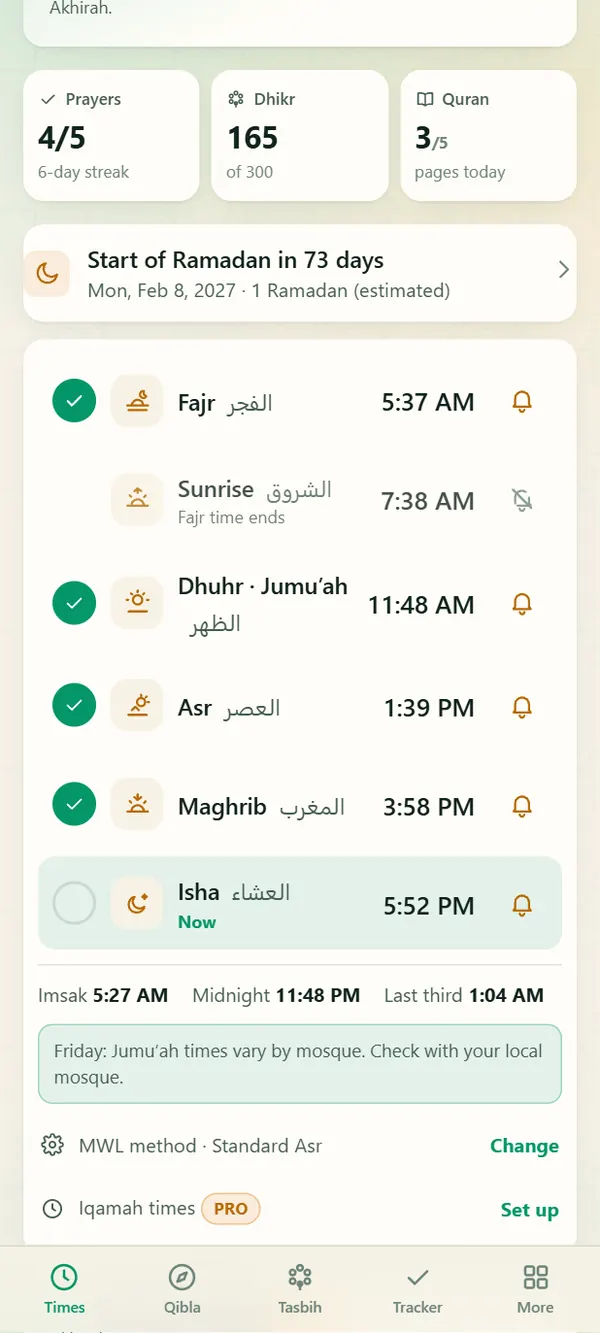
On the Times tab, tap the circle beside a prayer to mark it as prayed. A prayer can be ticked once its time has begun. The bell beside each prayer turns its reminder on or off.
- Step 2
Open Tracker to see Today’s prayers, your day streak, the last 7 days and your best streak. Tap a square in Last 7 days to correct an earlier day.
- Step 3
To fix many days at once, tap Review & bulk edit, choose 7 days, 14 days or 30 days, select squares (or tap Select all not ticked), then tap Prayed, Add to qada or Clear ticks.
3Track your Quran readingLog the pages you read each day and see your position, daily goal, streak and estimated finish date.
- Step 1
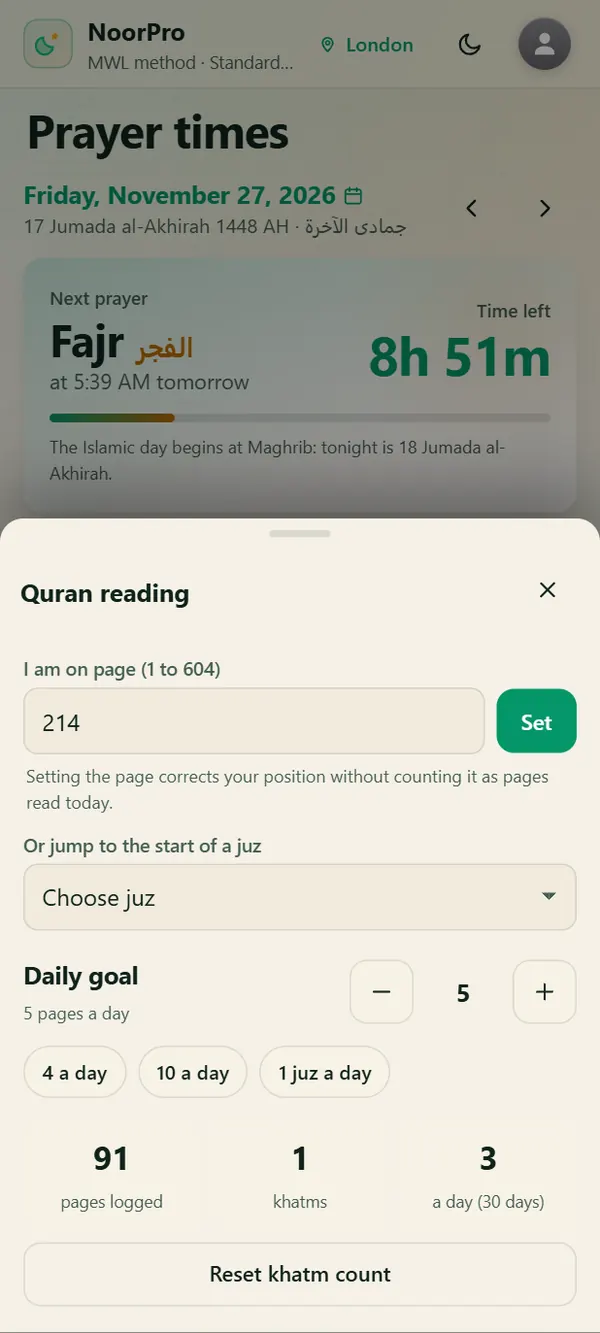
Tap the Quran tile on the Times tab (or Quran reading in More). Type the page you are on and tap Set, or choose a juz to jump to its first page.
- Step 2
Set a Daily goal with the minus and plus buttons, or tap 4 a day, 10 a day or 1 juz a day.
- Step 3
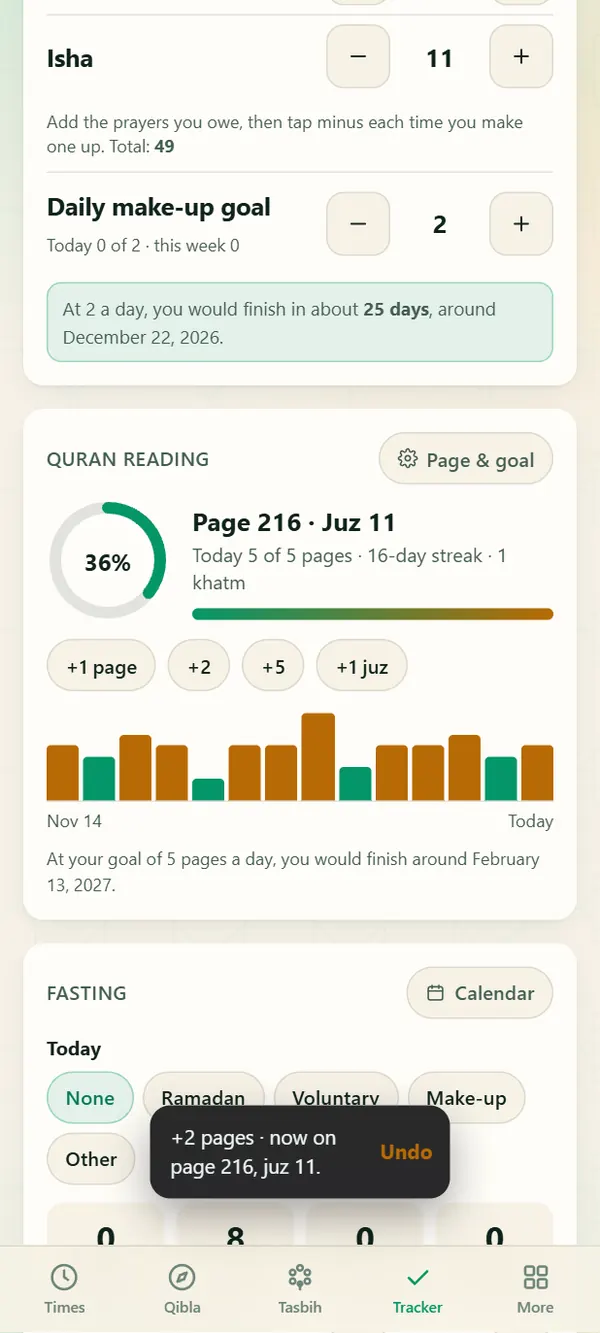
After you read, open Tracker and tap +1 page, +2, +5 or +1 juz in the Quran reading card. A message confirms your new page and offers Undo.
- Step 4
The card shows your page and juz, how much of the mushaf you have read, today against your goal, your streak, khatms, the last 14 days and when you would finish at your goal.
4Count dhikr with a daily goalUse the tasbih counter and set a daily total that all your counters add up towards.
- Step 1
Open Tasbih and choose a dhikr, such as SubhanAllah or Astaghfirullah. Pick a target: 33, 99, 100, 1000 or ∞.
- Step 2
Tap the big circle to count. One less corrects a tap and Reset starts again. Vibrate on each count gives a gentle buzz on phones.
- Step 3
Scroll down to Daily dhikr goal and choose 100, 300, 500 or 1000. Every counter adds to today’s total, and NoorPro shows how many of the last 7 days you met it, with a chart of this week.
5Make up missed prayers (qada)Keep a count of prayers you owe, set a daily make-up goal and see when you would finish.
- Step 1
In Tracker, tap Review & bulk edit, tap Select all not ticked and then Add to qada to add those missed prayers to your count.
- Step 2
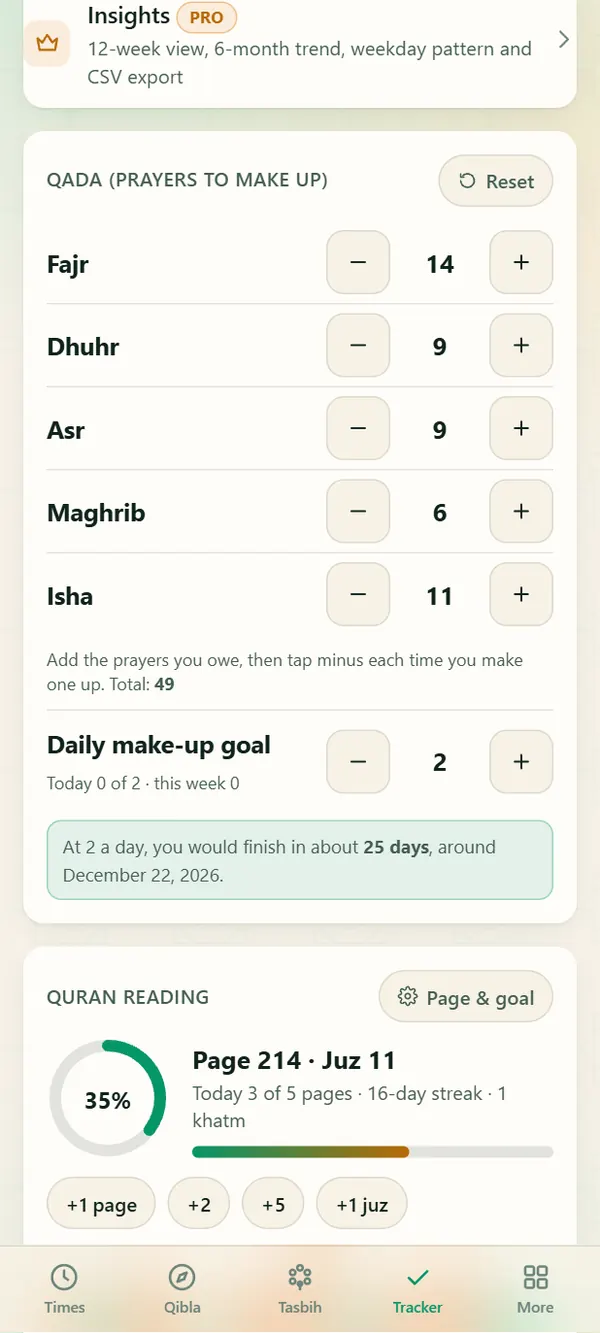
In the Qada (prayers to make up) card, use plus and minus for each prayer. Tap minus each time you make one up.
- Step 3
Set a Daily make-up goal. NoorPro shows how many you have made up today and this week, and the estimated finish date at that pace.
6Use the Islamic calendar and fasting logSee the Hijri month, key dates, your prayers and fasts, and log fasts you keep or owe.
- Step 1
Open More and tap Islamic calendar. Each day shows its Hijri date, with dots for all five prayers, some prayers and fasts, plus marks for the start of a Hijri month and the white days.
- Step 2
Tap a day to see its prayer times and log prayers or a fast. Below the month you see the share of prayers logged, prayers this month and fasts logged.
- Step 3
In Tracker, the Fasting card logs today as Ramadan, Voluntary, Make-up or Other, counts this Hijri year’s fasts and keeps Fasts to make up.
- Step 4
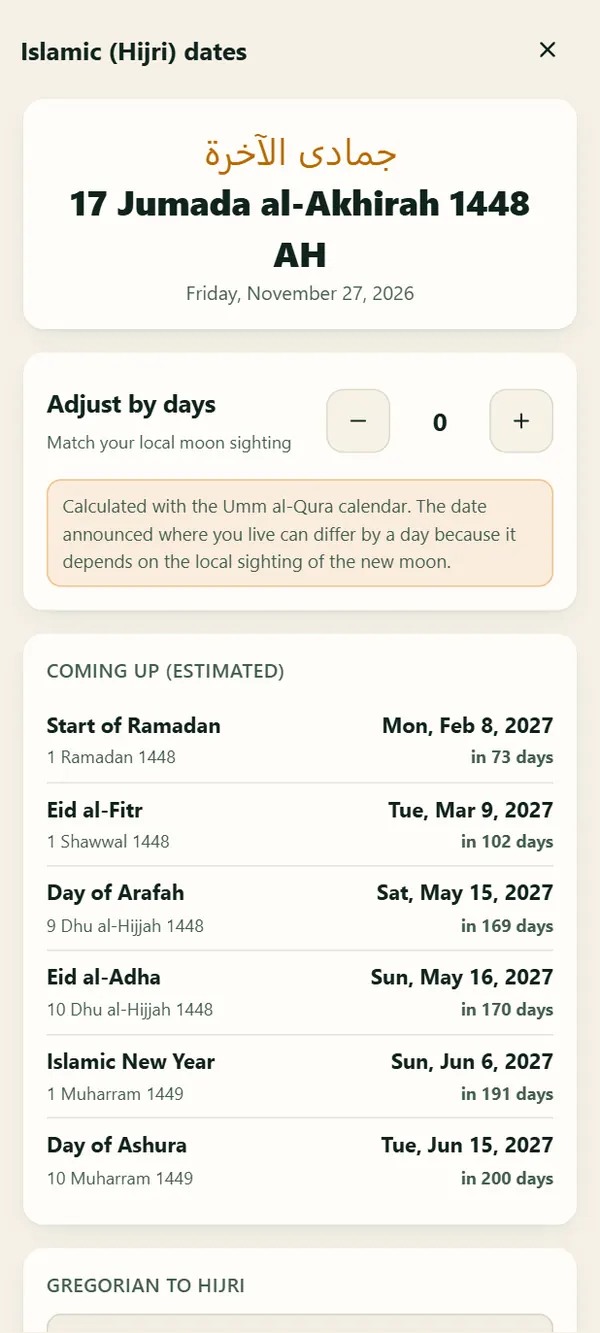
Open Islamic (Hijri) dates in More to shift the Hijri date by a day for your local moon sighting, see upcoming key dates and convert dates both ways.
Free, with optional Pro.
Download NoorPro free. Pro is optional and billed by Google Play, which shows the price before you confirm.
NoorPro Pro (optional subscription)
Everything above is free. Pro adds:
- Month timetable with Hijri dates, saved or shared as a CSV file
- Ramadan timetable: Imsak, suhoor and iftar for every day, with CSV
- Early reminders 10, 15 or 30 minutes before each prayer
- A Jumu'ah reminder on Fridays and a suhoor reminder in Ramadan
- Saved places and their prayer times side by side, in each city's own time
- Tracker insights: 12-week view, 6-month trend, weekday pattern and CSV export
- Your own dhikr counters with targets, plus 30-day totals
- Iqamah times for your mosque, after the prayer time or fixed, with a countdown
- Voluntary fast reminders before Mondays and Thursdays, white days, Arafah and Ashura
Pro is monthly or yearly through Google Play and renews until you cancel it in Google Play.
Manage or cancel subscriptions in Google Play > Payments & subscriptions. Purchases and Restore purchases
Try it now.
Open NoorPro right here in your browser, or download the Android app file directly.
Open in browser
The full NoorPro app, running in a new tab. Nothing to install.
Some phone-only features, such as purchases, notifications, sharing and camera scanning, work only in the Android app. Anything you do in the browser is saved in that browser only, unless you sign in to the Bright Loop Account.
Download the APK
Install NoorPro on an Android phone without Google Play.
- Version
- 1.3
- Size
- 4.1 MB
- SHA-256
43f7618981632e87da11ab1120901ee126491b38250aab5966f48fbbcc9f9cb3
An APK installed from this website can't be updated from Google Play later. To switch to Google Play, uninstall it and install from Play. Your data only comes with you if you back it up with the Bright Loop Account first. How to install an APK
Requirements & details.
- Requires
- Android 7.0 or later
- Size
- 4.1 MB
- Version
- 1.3
- Price
- Free, optional Pro subscription
- Internet
- Not required
- Account
- Optional Bright Loop Account
- Ads
- None
- Category
- Faith
- Developer
- Bright Loop (Google Play: Bright Loop Games)
- Availability
- Early access (Google Play closed testing)
- Web version
- Open in browser
How to get NoorPro.
NoorPro is in early access through Google Play closed testing. It takes about two minutes.
- Ask to join the tester listEarly access runs as a Google Play closed test, so your Google account must be on the tester list before the opt-in link works. Send us the Gmail address you use on Google Play and we'll add you.
- Open the opt-in linkOn your Android phone, signed in to the same Google account, open the NoorPro early access link.
- Tap "Become a tester"Google Play confirms that you've joined the test.
- Install from Google PlayTap the "download it on Google Play" link on that page, or open the Google Play page, then tap Install. Updates arrive through Google Play like any other app.
- Tell us what you thinkEarly access means your feedback shapes the next update. Email rehman@mindum.dev any time.
Link not working? See Troubleshooting or the full early access guide.
Account & sync.
Optional. NoorPro works fully without an account. Sign in to the free Bright Loop Account to back up your NoorPro data and keep it in sync across your phones.
What syncs
- Prayer and fasting logs, Quran reading progress and dhikr
- Locations you saved, iqamah and reminder settings
What stays on this phone
- Your Pro status (Google Play restores it)
Account & Sync is part of NoorPro 1.3. Look for it at the top of Settings.
Privacy.
NoorPro keeps your data on your phone. No ads and no analytics.
Private by design
No account needed, no ads, no analytics. Your location, settings and logs stay on your phone. Location is used only when you tap "Use my location".
Small differences from your mosque's timetable are normal; adjust by minutes to match.
If you sign in
The Bright Loop Account is optional. If you sign in, NoorPro backs up the records listed under Account & sync to your account so you can restore them on another phone. Photos and files are never uploaded, and you can export or delete your cloud data at any time.
Read the full Privacy Policy.
Tips.
- If your mosque’s Fajr or Isha is well off, open Compare methods first. Switching method fixes bigger gaps; keep minute adjustments for the last few minutes.
- Tap the Prayers, Dhikr or Quran tile on the Times tab to jump straight to that tracker.
- Use Set in the Quran reading sheet to correct your page. It does not count as pages read today, so your streak stays honest.
- Your daily dhikr goal counts every counter together, so SubhanAllah, Alhamdulillah and Allahu Akbar all add up.
- In Review & bulk edit, Select all not ticked followed by Add to qada moves a whole range of missed prayers into your qada count at once.
- If your community’s Hijri date differs, adjust it by a day in Islamic (Hijri) dates and the calendar follows.
Troubleshooting.
Prayer reminders do not arrive
Open More > Prayer reminders and check that Remind me at prayer times and each prayer are on. Then allow notifications for NoorPro in Android settings and turn off battery optimisation for it.
The prayer times look wrong
Check the city and time zone in More > Location, then the method and Asr setting in Prayer time settings. Compare methods helps you find the one your mosque uses.
I cannot tick a prayer
A prayer can only be ticked once its time has begun. For earlier days, tap the square in Tracker > Last 7 days or use Review & bulk edit.
The Qibla arrow jumps around
Hold the phone flat, away from metal and magnets, and move it in a figure-eight to calibrate the sensor. You can also set your local magnetic declination on the Qibla tab.
My log is gone on a new phone
On the old phone use More > Backup & restore > Export backup (JSON), then Import backup on the new phone. If you used Account & Sync, sign in on the new phone instead.
Questions.
Which calculation method should I use?
NoorPro suggests the usual method for your country when you set your location. If your mosque uses another, open More > Compare methods to see today’s times with every method, then choose the closest in Prayer time settings.
Why are my times a few minutes different from my mosque?
Small differences are normal: many mosques add a few minutes of caution. Use Minute adjustments in Prayer time settings to match their timetable.
Does NoorPro need the internet?
No. Prayer times, Qibla, the calendar and all trackers work offline. Location is only read when you tap Use my location.
How does the Quran reading tracker count pages?
It follows the 604-page mushaf. Each tap on +1 page, +2, +5 or +1 juz adds to today and moves your page forward. Reaching page 604 adds a khatm and starts again from page 1.
What does the daily dhikr goal count?
The total of all your tasbih counters for the day, whichever dhikr you counted. The card shows how many of the last 7 days you met it.
Is the Zakat result a ruling?
No. It is a guide to help you add things up, using the gold or silver price you enter. For your own situation, ask a qualified scholar.
Why might the Hijri date differ from my local announcement?
NoorPro calculates Hijri dates with the Umm al-Qura calendar, while many places start the month on the local moon sighting. Adjust the date by a day in Islamic (Hijri) dates.
Why does the Qibla compass not turn?
The live compass needs a magnetic sensor in your phone. Without one, NoorPro still shows the bearing from true north and the distance to the Kaaba.
Is NoorPro free?
Yes. NoorPro is free to download and use. NoorPro Pro is an optional monthly or yearly subscription through Google Play that adds the extras listed under Free and Pro. Google Play shows the price, and any trial, before you confirm.
Why can't I find NoorPro on Google Play?
NoorPro is in early access (a Google Play closed test), so it only appears for people on the tester list. Follow the steps under How to get it. Once it becomes public, anyone can install it from Google Play.
Does NoorPro work offline?
Yes. NoorPro works without an internet connection. You only need a connection for optional things like Bright Loop Account sync and Google Play purchases.
Do I need an account?
No. NoorPro works fully without one. The Bright Loop Account is optional and adds cloud backup and sync across your phones.
How do I move to a new phone?
Sign in to your Bright Loop Account on the new phone and choose "Use Cloud Data", or export a backup file on the old phone and restore it on the new one. Photos and files only move with a backup file. Pro comes back with Restore purchases. See Move to a new phone.
How do I restore a purchase?
Make sure your phone uses the same Google account you bought with, open NoorPro and tap Restore purchases. Google Play checks your purchases and NoorPro unlocks what you own. More about purchases.
Can I use NoorPro in a browser?
Yes. Tap Open in browser to run it in a new tab. Some phone-only features, such as purchases, notifications, sharing and camera scanning, work only in the Android app, and anything you do there is saved in that browser.
Can I install it without Google Play?
Yes, with the APK on this page (version 1.3, 4.1 MB). An APK install can't be updated from Google Play later; see Install an APK on Android.
What do I need to run it?
Android 7.0 or later, or any modern browser for the web version.
Is it available on iPhone?
There's no iPhone app at the moment. NoorPro is made for Android, but you can open the web version in Safari.
Get help with NoorPro
Email rehman@mindum.dev. Include your phone model, Android version and what happened, and we'll take it from there.
Help Centre
Step-by-step guides for early access, sync, backups, purchases and moving phones. Visit the Help Centre
More apps you might like.

IronOS
Log sets fast, supersets, progression hints, rest timer, 1RM and body stats
SafeKeep
Passport, ID, insurance & warranty expiry reminders. Private, kept on your phone

OmniCalc
Scientific calculator, unit converter, EMI, hours, GPA and your own formulas.
QRForge
Make QR codes for links, Wi-Fi, contacts and more, print stickers, scan codes.